cancel
Showing results for 
Search instead for 
Did you mean: 

Learn from the best! Meet the four finalists headed to the FINALS of the Power BI Dataviz World Championships! Register now

Reply
davaru
Frequent Visitor

gateways

Hi. Im trying to enable schedule refresh on a dataset generate with power bi desktop on on-premises data, i have installer power bi pro (60 days test) and i receive he message below.

where or how i can get this credentials ????

poewrbi gateway - personal is running  and connected: you are good to go

i appreciate your answer  tnks in advance

dav


Failed to update data source credentials: The credentials you provided for the data source are invalid. Please check the credentials for all the data source.

Activity ID: 35c1de71-5524-5a44-f98b-8e6e5e4649bf

Request ID:3ee4c2a7-9f01-903d-a0dc-8cad06ff0a88

Status code:200


2 ACCEPTED SOLUTIONS
ankitpatira
Community Champion
Community Champion

@davaru In power bi service under setting icon click settings -> Dataset -> Data source credentials and make sure you've signed in there. Also check that you've configured personal gateway not just installed.


1.png

View solution in original post

v-sihou-msft
Microsoft Employee
Microsoft Employee

@davaru


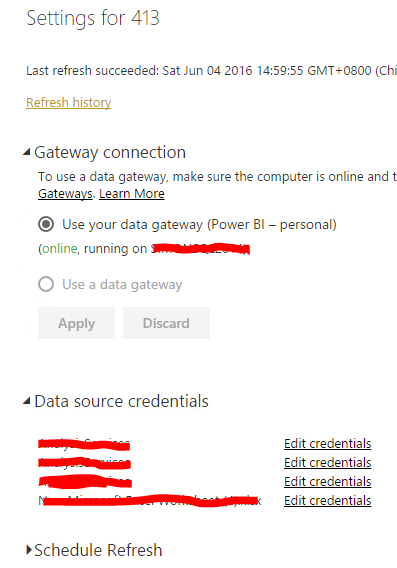
Just adding to @ankitpatira's reply, you need to click the dropdown on "Gatway connection" to make the personal - gateway loaded and connected to current dataset. Then you can edit the "Data source credentials" successfully.


10.PNG

20.PNG

Regards,

View solution in original post

2 REPLIES 2
v-sihou-msft
Microsoft Employee
Microsoft Employee

@davaru


Just adding to @ankitpatira's reply, you need to click the dropdown on "Gatway connection" to make the personal - gateway loaded and connected to current dataset. Then you can edit the "Data source credentials" successfully.


10.PNG

20.PNG

Regards,

ankitpatira
Community Champion
Community Champion

@davaru In power bi service under setting icon click settings -> Dataset -> Data source credentials and make sure you've signed in there. Also check that you've configured personal gateway not just installed.


1.png

Helpful resources

Announcements
Join our Fabric User Panel

Join our Fabric User Panel

Share feedback directly with Fabric product managers, participate in targeted research studies and influence the Fabric roadmap.

March Power BI Update Carousel

Power BI Community Update - March 2026

Check out the March 2026 Power BI update to learn about new features.