Join us at FabCon Atlanta from March 16 - 20, 2026, for the ultimate Fabric, Power BI, AI and SQL community-led event. Save $200 with code FABCOMM.
Register now!The Power BI Data Visualization World Championships is back! It's time to submit your entry. Live now!
Hi. Im trying to enable schedule refresh on a dataset generate with power bi desktop on on-premises data, i have installer power bi pro (60 days test) and i receive he message below.
where or how i can get this credentials ????
poewrbi gateway - personal is running and connected: you are good to go
i appreciate your answer tnks in advance
dav
Failed to update data source credentials: The credentials you provided for the data source are invalid. Please check the credentials for all the data source.
Activity ID: 35c1de71-5524-5a44-f98b-8e6e5e4649bf
Request ID:3ee4c2a7-9f01-903d-a0dc-8cad06ff0a88
Status code:200
Solved! Go to Solution.
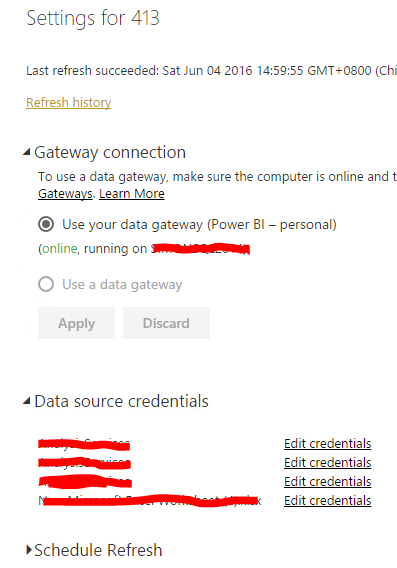
@davaru In power bi service under setting icon click settings -> Dataset -> Data source credentials and make sure you've signed in there. Also check that you've configured personal gateway not just installed.
Just adding to @ankitpatira's reply, you need to click the dropdown on "Gatway connection" to make the personal - gateway loaded and connected to current dataset. Then you can edit the "Data source credentials" successfully.
Regards,
Just adding to @ankitpatira's reply, you need to click the dropdown on "Gatway connection" to make the personal - gateway loaded and connected to current dataset. Then you can edit the "Data source credentials" successfully.
Regards,
@davaru In power bi service under setting icon click settings -> Dataset -> Data source credentials and make sure you've signed in there. Also check that you've configured personal gateway not just installed.
| User | Count |
|---|---|
| 53 | |
| 40 | |
| 35 | |
| 24 | |
| 22 |
| User | Count |
|---|---|
| 134 | |
| 107 | |
| 57 | |
| 43 | |
| 38 |