Join us at FabCon Atlanta from March 16 - 20, 2026, for the ultimate Fabric, Power BI, AI and SQL community-led event. Save $200 with code FABCOMM.
Register now!Get Fabric Certified for FREE during Fabric Data Days. Don't miss your chance! Request now
Hello,
I have a query that brings in phone data consistently as 10 digits, eg: 5558884444 (currently set as text field)
To import this to another program I need it formated as
555-888-4444
Anyone help in how to format appreciated.
Thank you
Sharon
Solved! Go to Solution.
@SharonHMA wrote:
Hello,
I have a query that brings in phone data consistently as 10 digits, eg: 5558884444 (currently set as text field)
To import this to another program I need it formated as
555-888-4444
Anyone help in how to format appreciated.
Thank you
Sharon
Two approaches FYI.
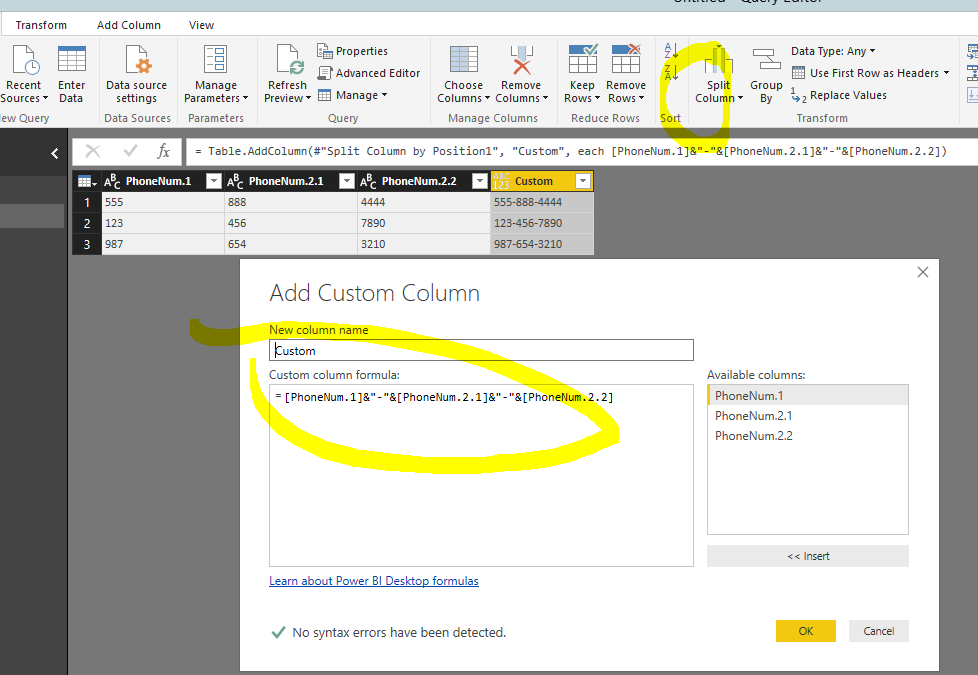
1. In Power Query, split that one column into 3 and add a new custom column
.
2. In DAX. Change that column to decimal type and use FORMAT(TABLE[PHONENO],"###-###-####")
@SharonHMA wrote:
Hello,
I have a query that brings in phone data consistently as 10 digits, eg: 5558884444 (currently set as text field)
To import this to another program I need it formated as
555-888-4444
Anyone help in how to format appreciated.
Thank you
Sharon
Two approaches FYI.
1. In Power Query, split that one column into 3 and add a new custom column
.
2. In DAX. Change that column to decimal type and use FORMAT(TABLE[PHONENO],"###-###-####")
Awesome thank you @Eric_Zhang. I had to use option 1 since some phone fields are empty & I was getting errors.
Sharon
Check out the November 2025 Power BI update to learn about new features.
Advance your Data & AI career with 50 days of live learning, contests, hands-on challenges, study groups & certifications and more!