
cancel
Showing results for 
Search instead for 
Did you mean: 

The Power BI Data Visualization World Championships is back! Get ahead of the game and start preparing now! Learn more

Reply
vinaychinnapp
New Member

filtering using values from multiple column

Hi All,


I have four columns "Managing Region", "Delivery Region", "Managing Country" and "Delivery Country".


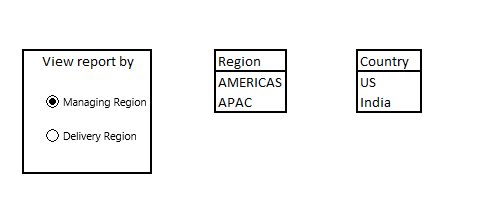
Filter 1 : i want the user to get option to choose the view of the report with either by "managing Region" or "Delivery Region"

Filter 2 : if the user clicks on "Managing Region" in filter 1, then filter 2 should get values populated from "Managing region" Column else the value should be from "Delivery Region"

Filter 3 : If user clicks on "Managin Region" in filter 1, then filter 3 should have countries listed in "Managing country" columns , if the user click on "delivery region" in filter 1 then values in filter 3 should be populated from "Delivery country" column.


can any one help me the steps to achieve this task ?

1 ACCEPTED SOLUTION
Anonymous
Not applicable

@vinaychinnapp,

You would need to implement some steps in query editor to achieve the above requirement: remove duplicates ,duplicate the query, remove different columns in the two tables, unpivot columns in the two tables, append query. For more details, please review this PBIX file.
1.PNG


Thanks,
Lydia

View solution in original post

6 REPLIES 6
Anonymous
Not applicable

@vinaychinnapp,

Could you please share sample data of your table?

Regards,
Lydia Zhang

Hi, thanks for you reply. below is the sample data with four columns. 


Managing RegionManaging CountryDelivery RegionDelivery Country
APACIndiaAPACIndia
AMERICASUSAMERICASCosta Rica
APACIndiaAPACIndia
AMERICASUSAMERICASCosta Rica
APACIndiaAPACIndia
AMERICASUSAMERICASCosta Rica
APACIndiaAPACIndia
APACIndiaAPACIndia
AMERICASUSAMERICASCosta Rica
Anonymous
Not applicable

@vinaychinnapp,

If you only have the four columns in table with above sample data, when you create a table visual in Power BI, Power BI will remove duplicates and will only show you two rows as follows.
1.PNG

What data would you like to show if you select APAC in “Managing Region” column?


Regards,


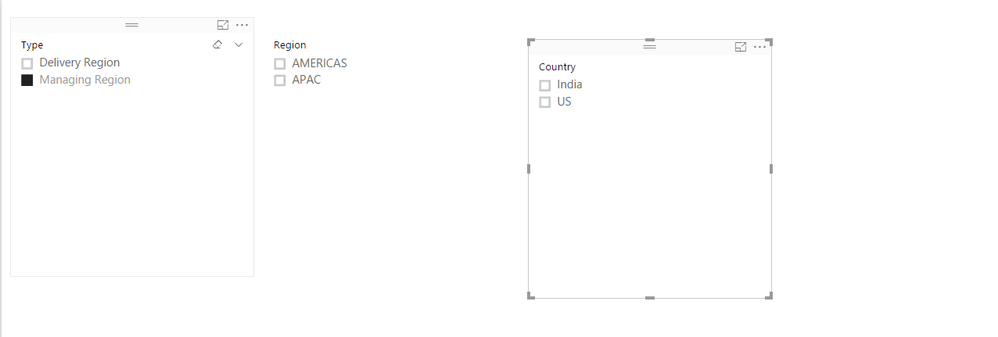
Capture.PNGI want to see the report this way. i want a first slider to have 2 optiions. if user clicks on Managing region then slider Region should get values populated from managing region column else calues shoud get populated from delivery region column.

same way for country.

Anonymous
Not applicable

@vinaychinnapp,

You would need to implement some steps in query editor to achieve the above requirement: remove duplicates ,duplicate the query, remove different columns in the two tables, unpivot columns in the two tables, append query. For more details, please review this PBIX file.
1.PNG


Thanks,
Lydia

opticshrew
Resolver II
Resolver II

Hi there,


I would use the in built slicer visual along with the edit interactions function. This should get what your going for.


Thanks,

J

Helpful resources

Announcements
Power BI DataViz World Championships

Power BI Dataviz World Championships

The Power BI Data Visualization World Championships is back! Get ahead of the game and start preparing now!

December 2025 Power BI Update Carousel

Power BI Monthly Update - December 2025

Check out the December 2025 Power BI Holiday Recap!

FabCon Atlanta 2026 carousel

FabCon Atlanta 2026

Join us at FabCon Atlanta, March 16-20, for the ultimate Fabric, Power BI, AI and SQL community-led event. Save $200 with code FABCOMM.