Join us at FabCon Atlanta from March 16 - 20, 2026, for the ultimate Fabric, Power BI, AI and SQL community-led event. Save $200 with code FABCOMM.
Register now!The Power BI Data Visualization World Championships is back! Get ahead of the game and start preparing now! Learn more
I am splitting a column from sharepoint with different directories, some of these directories are text values and some are only number i.e like year 2018, i am only interested in the numbers, ie year - how can i filter out all text values or only select all the numerical values? is this possible? I know how to do it manually by unticking what i dont want, however this is for future proofing.
Proud to be a Super User!
Solved! Go to Solution.
Hi @vanessafvg
->
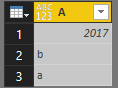
Creates a table with three rows. The first row's data type is number. The second and third rows are both text.
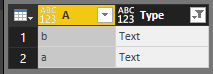
Then creates two new columns showing if each row is a text or number type. The first column checks the data type.
Code in Advanced Editor
let
Source = Table.FromRecords({[A=2017],[A="b"],[A="a"]}),
#"Added Custom" = Table.AddColumn(Source, "Type", each
let
TypeLookup = (inputType as type) as text =>
Table.FromRecords(
{
[Type=type text, Value="Text"],
[Type=type number, Value="Number"]
}
){[Type=inputType]}[Value]
in
TypeLookup(Value.Type([A]))
),
textvalue=Table.SelectRows(#"Added Custom",each[Type]="Text")
in
textvalue
Best Regards
Maggie
Hi @vanessafvg
let
CharsToRemove = List.Transform({33..45,47,58..126}, each Character.FromNumber(_)),
Source = Excel.Workbook(File.Contents("C:\Users\maggiel\Desktop\PR4.0\4.26\test out.xlsx"), null, true),
Table1_Table = Source{[Item="Table1",Kind="Table"]}[Data],
#"Changed Type" = Table.TransformColumnTypes(Table1_Table,{{"Column1", type text}}),
#"Added Custom" = Table.AddColumn(#"Changed Type", "Result", each Text.Remove([Column1],CharsToRemove))
in
#"Added Custom" Text.Remove(text as nullable text,removeChars as any)
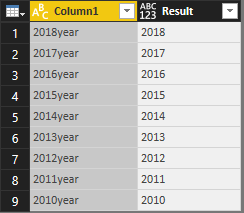
CharsToRemove = List.Transform({33..45,47,58..126}, each Character.FromNumber(_))@v-juanli-msft thanks so much for that but what i meant was filtering out the rows that have text value as opposed to remove text values from columns if you know what i mean?
Proud to be a Super User!
Hi @vanessafvg
->
Creates a table with three rows. The first row's data type is number. The second and third rows are both text.
Then creates two new columns showing if each row is a text or number type. The first column checks the data type.
Code in Advanced Editor
let
Source = Table.FromRecords({[A=2017],[A="b"],[A="a"]}),
#"Added Custom" = Table.AddColumn(Source, "Type", each
let
TypeLookup = (inputType as type) as text =>
Table.FromRecords(
{
[Type=type text, Value="Text"],
[Type=type number, Value="Number"]
}
){[Type=inputType]}[Value]
in
TypeLookup(Value.Type([A]))
),
textvalue=Table.SelectRows(#"Added Custom",each[Type]="Text")
in
textvalue
Best Regards
Maggie
The Power BI Data Visualization World Championships is back! Get ahead of the game and start preparing now!
Check out the November 2025 Power BI update to learn about new features.
| User | Count |
|---|---|
| 66 | |
| 47 | |
| 43 | |
| 26 | |
| 19 |
| User | Count |
|---|---|
| 196 | |
| 127 | |
| 102 | |
| 67 | |
| 49 |