cancel
Showing results for 
Search instead for 
Did you mean: 

The Power BI Data Visualization World Championships is back! Get ahead of the game and start preparing now! Learn more

Reply
Anonymous
Not applicable

filtering matrix by columns

Hi, 


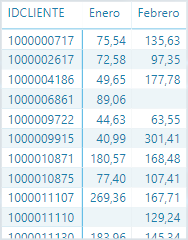
I have a matrix like this (column month row client id and value sales) and I want to filter only the rows which has non blank in each column (1000006861 and 1000011110 would be filtered)

Sin título3.png

Thanks a lot,


Marcos Pérez

1 ACCEPTED SOLUTION
AlB
Community Champion
Community Champion

@Anonymous 

Try placing this measure in a card visual:


BoughtInEneroAndFebrero =
VAR _BoughtInEnero =
    CALCULATETABLE ( DISTINCT ( Table1[IDCLIENTE] ), Table1[MES] = "Enero" )
VAR _BoughtInFebrero =
    CALCULATETABLE ( DISTINCT ( Table1[IDCLIENTE] ), Table1[MES] = "Febrero" )
RETURN
    COUNTROWS ( INTERSECT ( _BoughtInEnero, _BoughtInFebrero ) )


I'm assuming that an IDCLIENTE will only come up in the table for a specific month if there have been sales (i.e. it cannot be the case that you have a blank in IMPORTE 

View solution in original post

4 REPLIES 4
AlB
Community Champion
Community Champion

Hi @Anonymous 

This would probably be easier and more convenient if you unpivoted the month columns.

In any case, with this structure, you could create a new calculates table as follows, where Table1 is the table that you show. Add more months if necessary, following the same pattern.


NewTable =
FILTER (
    Table1,
    Table1[Enero] <> BLANK () && Table1[Febrero] <> BLANK ()
)
Anonymous
Not applicable

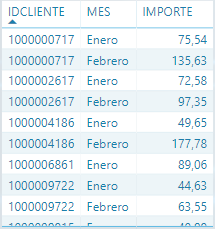
Hi @AlB, In fact I have already the data unpivotted like this. What I want is to know the number of clients who have bought in both months. Thanks! 

Sin título4.png


AlB
Community Champion
Community Champion

@Anonymous 

Try placing this measure in a card visual:


BoughtInEneroAndFebrero =
VAR _BoughtInEnero =
    CALCULATETABLE ( DISTINCT ( Table1[IDCLIENTE] ), Table1[MES] = "Enero" )
VAR _BoughtInFebrero =
    CALCULATETABLE ( DISTINCT ( Table1[IDCLIENTE] ), Table1[MES] = "Febrero" )
RETURN
    COUNTROWS ( INTERSECT ( _BoughtInEnero, _BoughtInFebrero ) )


I'm assuming that an IDCLIENTE will only come up in the table for a specific month if there have been sales (i.e. it cannot be the case that you have a blank in IMPORTE 

Anonymous
Not applicable

@AlB Thanks! It works.  Finally do you know how can I add a month slicer in the same scenario to make it dinamically? Because that measure has "Enero" and "Febrero" hardcoded. Would it be possible to do it with a slicer?


Thank you! You helped me a lot

Helpful resources

Announcements
November Power BI Update Carousel

Power BI Monthly Update - November 2025

Check out the November 2025 Power BI update to learn about new features.

Fabric Data Days Carousel

Fabric Data Days

Advance your Data & AI career with 50 days of live learning, contests, hands-on challenges, study groups & certifications and more!

FabCon Atlanta 2026 carousel

FabCon Atlanta 2026

Join us at FabCon Atlanta, March 16-20, for the ultimate Fabric, Power BI, AI and SQL community-led event. Save $200 with code FABCOMM.