Join us at FabCon Atlanta from March 16 - 20, 2026, for the ultimate Fabric, Power BI, AI and SQL community-led event. Save $200 with code FABCOMM.
Register now!The Power BI Data Visualization World Championships is back! Get ahead of the game and start preparing now! Learn more
Hi,
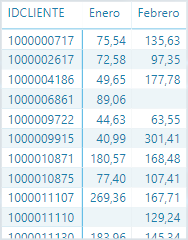
I have a matrix like this (column month row client id and value sales) and I want to filter only the rows which has non blank in each column (1000006861 and 1000011110 would be filtered)
Thanks a lot,
Marcos Pérez
Solved! Go to Solution.
@Anonymous
Try placing this measure in a card visual:
BoughtInEneroAndFebrero =
VAR _BoughtInEnero =
CALCULATETABLE ( DISTINCT ( Table1[IDCLIENTE] ), Table1[MES] = "Enero" )
VAR _BoughtInFebrero =
CALCULATETABLE ( DISTINCT ( Table1[IDCLIENTE] ), Table1[MES] = "Febrero" )
RETURN
COUNTROWS ( INTERSECT ( _BoughtInEnero, _BoughtInFebrero ) )
I'm assuming that an IDCLIENTE will only come up in the table for a specific month if there have been sales (i.e. it cannot be the case that you have a blank in IMPORTE
Hi @Anonymous
This would probably be easier and more convenient if you unpivoted the month columns.
In any case, with this structure, you could create a new calculates table as follows, where Table1 is the table that you show. Add more months if necessary, following the same pattern.
NewTable =
FILTER (
Table1,
Table1[Enero] <> BLANK () && Table1[Febrero] <> BLANK ()
)
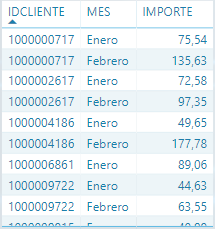
Hi @AlB, In fact I have already the data unpivotted like this. What I want is to know the number of clients who have bought in both months. Thanks!
@Anonymous
Try placing this measure in a card visual:
BoughtInEneroAndFebrero =
VAR _BoughtInEnero =
CALCULATETABLE ( DISTINCT ( Table1[IDCLIENTE] ), Table1[MES] = "Enero" )
VAR _BoughtInFebrero =
CALCULATETABLE ( DISTINCT ( Table1[IDCLIENTE] ), Table1[MES] = "Febrero" )
RETURN
COUNTROWS ( INTERSECT ( _BoughtInEnero, _BoughtInFebrero ) )
I'm assuming that an IDCLIENTE will only come up in the table for a specific month if there have been sales (i.e. it cannot be the case that you have a blank in IMPORTE
@AlB Thanks! It works. Finally do you know how can I add a month slicer in the same scenario to make it dinamically? Because that measure has "Enero" and "Febrero" hardcoded. Would it be possible to do it with a slicer?
Thank you! You helped me a lot
The Power BI Data Visualization World Championships is back! Get ahead of the game and start preparing now!
Check out the November 2025 Power BI update to learn about new features.
| User | Count |
|---|---|
| 65 | |
| 46 | |
| 44 | |
| 28 | |
| 19 |
| User | Count |
|---|---|
| 198 | |
| 125 | |
| 102 | |
| 69 | |
| 53 |