Share feedback directly with Fabric product managers, participate in targeted research studies and influence the Fabric roadmap.
Sign up nowGet Fabric certified for FREE! Don't miss your chance! Learn more
I need help to filter rows.
It needs to be made in edit query, NOT in DAX:
i need to filter a row if "gbl" is included in a string
like the SQL LIKE %gbl%
example if the row is like
x-scope/house-bill-of-lading-copy-pdf-custom;gon_aaagblse; customFormOID=77d3a26a-ce9c-4b95-9780-b0a36fb4059a
need to be keepd and filter since inclute gbl -> aagblse
all post I found was in DAX
Hi @Anonymous
Please follow the steps in the video below.
You can create a new custom column with Text.Contains([Column], "gbl") and filter this column in the next step, so it only shows TRUE values.
https://docs.microsoft.com/de-de/powerquery-m/text-contains
Just thought about, you can do it even easier in Edit Query. Click on the Filter Arrow next to the column name, select Text Filters -> Contains.
@Anonymous
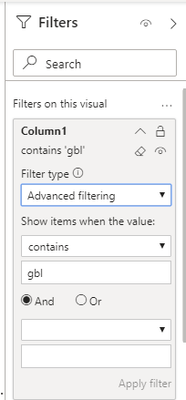
you can use advanced filtering in visual settings
this is not in edit query, I'm wrong?
If you love stickers, then you will definitely want to check out our Community Sticker Challenge!
Check out the January 2026 Power BI update to learn about new features.
| User | Count |
|---|---|
| 62 | |
| 59 | |
| 45 | |
| 21 | |
| 18 |
| User | Count |
|---|---|
| 121 | |
| 116 | |
| 37 | |
| 34 | |
| 30 |