cancel
Showing results for 
Search instead for 
Did you mean: 

Get Fabric Certified for FREE during Fabric Data Days. Don't miss your chance! Request now

Reply
stauffermi
New Member

filter on two columns (or condition)

Hi, i have two tables looking like this:


Locations:


IDLocation Name
1Location 1
2

Location 2

3

Location 3


Requests:

IDnameLocation 1Location 2
1Jon13
2Mike21
3Bob12
4Bill3 


Now I want to display a Filter in the Report, where the users can select a location. After selection, the Request table should be filtered and show only data where the selected location is in column "location 1" or in column "location 2".


Any ideas how to do this, because I can only create one active relationship? i struggle with this. thanks for your help!


1 ACCEPTED SOLUTION
amitchandak
Super User
Super User

@stauffermi , do not join two tables or create one more independent table


Then try measure like

measure =

var _tab = summarize(allselected(Table1), Table1[Location ID])

return

Calculate(Count(Table2[ID]), filter(Table2, Table[Location 1] in _tab  || Table[Location 2] in _tab  ) )


or


measure =

var _tab = summarize(allselected(Table1), Table1[Location ID])

return

Calculate(Count(Table2[ID]), filter(Table2, Table[Location 1] in _tab  || Table[Location 2] in _tab  ), values(Table2[ID]) )

Share with Power BI Enthusiasts: Full Power BI Video (20 Hours) YouTube
Microsoft Fabric Series 60+ Videos YouTube
Microsoft Fabric Hindi End to End YouTube

View solution in original post

3 REPLIES 3
stauffermi
New Member

Thank you very much for your help! I was able to solve it with the measure.

ddpl
Solution Sage
Solution Sage

@stauffermi 

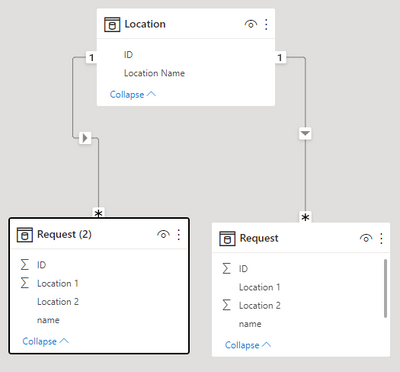
First you need to create duplicate request table and then create join table as per below


ddpl_0-1656589071524.png


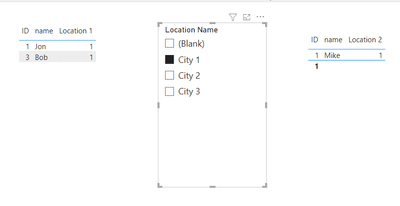
then use single filter for both the table as per below


ddpl_1-1656589131310.png


amitchandak
Super User
Super User

@stauffermi , do not join two tables or create one more independent table


Then try measure like

measure =

var _tab = summarize(allselected(Table1), Table1[Location ID])

return

Calculate(Count(Table2[ID]), filter(Table2, Table[Location 1] in _tab  || Table[Location 2] in _tab  ) )


or


measure =

var _tab = summarize(allselected(Table1), Table1[Location ID])

return

Calculate(Count(Table2[ID]), filter(Table2, Table[Location 1] in _tab  || Table[Location 2] in _tab  ), values(Table2[ID]) )

Share with Power BI Enthusiasts: Full Power BI Video (20 Hours) YouTube
Microsoft Fabric Series 60+ Videos YouTube
Microsoft Fabric Hindi End to End YouTube

Helpful resources

Announcements
November Power BI Update Carousel

Power BI Monthly Update - November 2025

Check out the November 2025 Power BI update to learn about new features.

Fabric Data Days Carousel

Fabric Data Days

Advance your Data & AI career with 50 days of live learning, contests, hands-on challenges, study groups & certifications and more!

FabCon Atlanta 2026 carousel

FabCon Atlanta 2026

Join us at FabCon Atlanta, March 16-20, for the ultimate Fabric, Power BI, AI and SQL community-led event. Save $200 with code FABCOMM.

Top Solution Authors
Top Kudoed Authors