This time we’re going bigger than ever. Fabric, Power BI, SQL, AI and more. We're covering it all. You won't want to miss it.
Learn moreLevel up your Power BI skills this month - build one visual each week and tell better stories with data! Get started
Maybe it is an very obvious question, but I'm not sure how to search for it (in english) so I'll give it a try here.
I have a table with invoices with sales for a file (every file has an amount of sales).
File invoiceid Sales Pax
1 1 1000 2
1 2 500 2
2 3 500 2
3 4 500 1
3 5 1000 1
4 6 1500 2
4 7 1000 2
What I want is an count of files grouped by the total sales amount:
Sales #Files
0-1000 1
1000-2000 2
>2000 1
What is the best way to achieve this?
Hi @Jordi
You can do this with the help of a small PARAMETER table
Please check this post..
http://community.powerbi.com/t5/Desktop/Company-Durations/m-p/365503#M165285
Thanks for the hint @Zubair_Muhammad
Added the Parameter table, and added a calculated column with this formula: (I want to count the Files within the parameters)
Category =
VAR Sales =
SUM('Sales'[sales])
RETURN
CALCULATE (
DISTINCTCOUNT('Sales'[File] );
FILTER (
Parameters;
Sales >= Parameters[Start]
&& Sales < Parameters[End]
)
)
But that return the value "1"
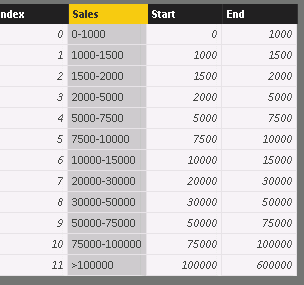
Table "Parameters"
(Column "Index" is added for ordering purposes)
Check out the April 2026 Power BI update to learn about new features.
Sign up to receive a private message when registration opens and key events begin.
If you have recently started exploring Fabric, we'd love to hear how it's going. Your feedback can help with product improvements.
| User | Count |
|---|---|
| 36 | |
| 33 | |
| 31 | |
| 24 | |
| 18 |
| User | Count |
|---|---|
| 70 | |
| 50 | |
| 33 | |
| 24 | |
| 24 |