Join us at FabCon Atlanta from March 16 - 20, 2026, for the ultimate Fabric, Power BI, AI and SQL community-led event. Save $200 with code FABCOMM.
Register now!Vote for your favorite vizzies from the Power BI Dataviz World Championship submissions. Vote now!
I would like to show only the data related to the viewer email, from what I read around it should be feasable in Power BI,
however I can't find a way.
I have already all the data in my data set, with 2 kind of users, employees and DMs, I would like to show different data (even in different pages)
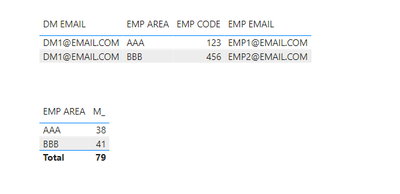
| EMP CODE | EMP AREA | EMP EMAIL | DM EMAIL |
| 123 | AAA | EMP1@EMAIL.COM | DM1@EMAIL.COM |
| 456 | BBB | EMP2@EMAIL.COM | DM1@EMAIL.COM |
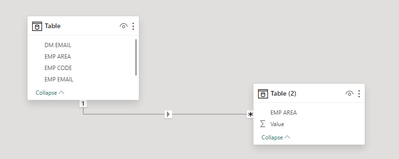
EMP AREA connects this table to all my other data (1:many relationships)
Anyone could help?
Thanks in advance
Solved! Go to Solution.
Hi @Anonymous ,
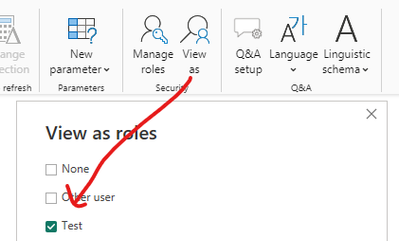
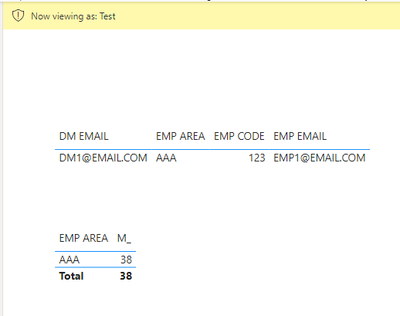
As @Greg_Deckler said, to verify that your configured rls is in effect, just select view as. The reference is below:
Best Regards,
Adamk Kong
If this post helps, then please consider Accept it as the solution to help the other members find it more quickly.
Hi @Anonymous ,
As @Greg_Deckler said, to verify that your configured rls is in effect, just select view as. The reference is below:
Best Regards,
Adamk Kong
If this post helps, then please consider Accept it as the solution to help the other members find it more quickly.
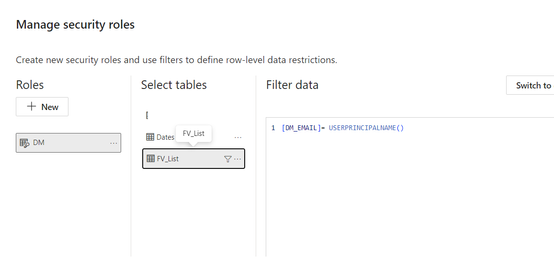
@Anonymous Yes, this is done by creating an RLS rule on the table and using USERPRINCIPALNAME such as:
[EMAIL] = USERPRINCIPALNAME()
Many thanks!
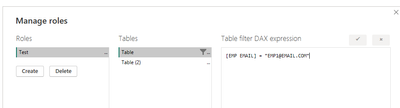
I've done the following and seems to work
But is there any way to test this?
I've tried "View as" but whatever I select the data doesn't seem to be filtered
@Anonymous So when viewing as, you need to select the role and then "Other user" and type in the email address of the other user who you want to impersonate.
Vote for your favorite vizzies from the Power BI World Championship submissions!
If you love stickers, then you will definitely want to check out our Community Sticker Challenge!
Check out the January 2026 Power BI update to learn about new features.
| User | Count |
|---|---|
| 57 | |
| 54 | |
| 42 | |
| 16 | |
| 16 |
| User | Count |
|---|---|
| 112 | |
| 106 | |
| 39 | |
| 36 | |
| 27 |