FabCon is coming to Atlanta
Join us at FabCon Atlanta from March 16 - 20, 2026, for the ultimate Fabric, Power BI, AI and SQL community-led event. Save $200 with code FABCOMM.
Register now!- Power BI forums
- Get Help with Power BI
- Desktop
- Service
- Report Server
- Power Query
- Mobile Apps
- Developer
- DAX Commands and Tips
- Custom Visuals Development Discussion
- Health and Life Sciences
- Power BI Spanish forums
- Translated Spanish Desktop
- Training and Consulting
- Instructor Led Training
- Dashboard in a Day for Women, by Women
- Galleries
- Data Stories Gallery
- Themes Gallery
- Contests Gallery
- QuickViz Gallery
- Quick Measures Gallery
- Visual Calculations Gallery
- Notebook Gallery
- Translytical Task Flow Gallery
- TMDL Gallery
- R Script Showcase
- Webinars and Video Gallery
- Ideas
- Custom Visuals Ideas (read-only)
- Issues
- Issues
- Events
- Upcoming Events
The Power BI Data Visualization World Championships is back! Get ahead of the game and start preparing now! Learn more
- Power BI forums
- Forums
- Get Help with Power BI
- Desktop
- Re: filter a path with two parents
- Subscribe to RSS Feed
- Mark Topic as New
- Mark Topic as Read
- Float this Topic for Current User
- Bookmark
- Subscribe
- Printer Friendly Page


- Mark as New
- Bookmark
- Subscribe
- Mute
- Subscribe to RSS Feed
- Permalink
- Report Inappropriate Content
filter a path with two parents
Hello
I have a table with Parent_Id, Child_ID, I want to add a third column, when for a particular Child_id, it will show if the rows belong to the path or not.
the dax function Path works well, but only if 1 child has 1 parent, which is not my case.
cheers
Mi

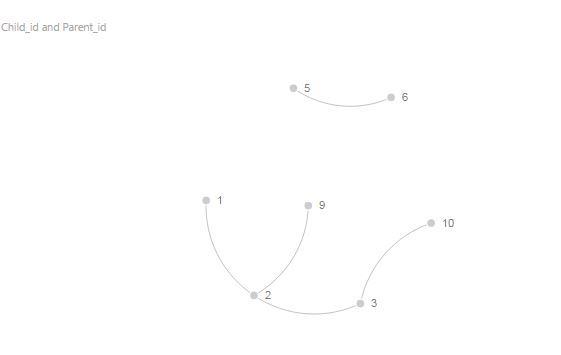
Solved! Go to Solution.


- Mark as New
- Bookmark
- Subscribe
- Mute
- Subscribe to RSS Feed
- Permalink
- Report Inappropriate Content
Hi mim,
this is a variation of my pattern to dynamically flatten parent-child-hierarchies. I've twitched it a bit to cover multiple parents as well. Cannot see any flaws at the moment, but you'd do me a favour to test it thoroughly. Would like to write a post for this forum here, if it works successfully, as I think that this would be useful for others as well 🙂
(TableName, ParentColumnName as text, ChildColumnName as text) =>

let

// Prepare input data
    ParChTable = TableName,
    #"Renamed Columns1" = Table.RenameColumns(ParChTable,{{ChildColumnName, "NodeKey"}, {ParentColumnName, "ParentKey"}}),
    Custom1 = List.Difference(List.Distinct(#"Renamed Columns1"[ParentKey]), List.Distinct(#"Renamed Columns1"[NodeKey])),
    #"Converted to Table" = Table.FromList(Custom1, Splitter.SplitByNothing(), null, null, ExtraValues.Error),
    #"Renamed Columns" = Table.RenameColumns(#"Converted to Table",{{"Column1", "NodeKey"}}),
    #"Appended Query" = Table.Combine({#"Renamed Columns", #"Renamed Columns1"}),
    Name = Table.AddColumn(#"Appended Query", "Name", each "Item" & Text.From([NodeKey])),
    InputTable = Table.AddIndexColumn(Name, "Index", 0, 1),
    ChildKey = "NodeKey",
    ParentKey = "ParentKey",
    LevelColumnName = "Name",

// Retrieve all parents per row
    fnAllParents = Table.AddColumn(InputTable, "AllParents", each List.Generate(()=>
    [Parent=Record.Field(_, ParentKey)],
    each [Parent] <> null and [Parent] <> "",
    each [ Parent = Table.Column(Table.SelectRows(InputTable, (ParChTable) => Record.Field(ParChTable, ChildKey) = [Parent] ), ParentKey){0} ],
    each [Parent])),
// Calculate Max Browse Depth as parameter
    MaxBrowseDepth = List.Max(List.Transform(fnAllParents[AllParents], each List.Count(_)))+1,
// Collect and sort all items for PathItems
    PathItems = Table.AddColumn(fnAllParents, "PathItems", each List.Union({List.Sort([AllParents]), {Record.Field(_, ChildKey)}})),
// Hierarchy Depth of current row
    HierarchyDepth = Table.AddColumn(PathItems, "HierarchyDepth", each List.Count([AllParents])+1),
// Check if is leaf
    Leaf = Table.AddColumn(HierarchyDepth, "IsLeaf", each if [HierarchyDepth]=MaxBrowseDepth then true else false),
// Create String Hiearchy Path (PathItems equivalent)
    HierarchyPath = Table.AddColumn(Leaf, "HierarchyPath", each Text.Combine(List.Transform([PathItems], each Text.From(_)), "|")),
// Create table for pivoting levels
    PivotTable = Table.AddColumn(HierarchyPath, "PivotTable", each Table.AddIndexColumn(Table.FromColumns({List.Union({[PathItems], List.Repeat({List.Last([PathItems])}, MaxBrowseDepth-[HierarchyDepth]+1)})}), "Level",1,1)),
// Expand pivot-level table
    #"Expanded PivotTable" = Table.ExpandTableColumn(PivotTable, "PivotTable", {"Column1", "Level"}, {"Column1", "Level"}),
// Lookup values from the name column for the level-pivots
    MergeForAccountName = Table.NestedJoin(#"Expanded PivotTable",{"Column1"},InputTable,{ChildKey},"NewColumn",JoinKind.LeftOuter),
// Expand name column
    ExpandAccountname = Table.ExpandTableColumn(MergeForAccountName, "NewColumn", {LevelColumnName}, {"LevelColumnName"}),
// Cleanup
    #"Removed Columns" = Table.RemoveColumns(ExpandAccountname,{"Column1", "AllParents", "PathItems"}),
// Create helper column for pivot column names
    AddLevel = Table.AddColumn(#"Removed Columns", "Merge", each "Level "),
    // Merge for pivot column names
    MergeLevel = Table.CombineColumns(Table.TransformColumnTypes(AddLevel, {{"Level", type text}}, "de-DE"),{"Merge", "Level"},Combiner.CombineTextByDelimiter("", QuoteStyle.None),"Level" as text),
// New step: Remove dups
    #"Removed Duplicates" = Table.Distinct(MergeLevel, {"NodeKey", "ParentKey", "HierarchyPath", "Level"}),
// Create dynamic number of level-columns by pivoting
    #"Pivoted Column1" = Table.Pivot(#"Removed Duplicates", List.Distinct(#"Removed Duplicates"[Level]), "Level", "LevelColumnName")
in
    #"Pivoted Column1"
Link to file: https://www.dropbox.com/s/pqaxcy4e35t6oe5/DynamicPCHierarchy.pbix?dl=0
Imke Feldmann (The BIccountant)
If you liked my solution, please give it a thumbs up. And if I did answer your question, please mark this post as a solution. Thanks!
How to integrate M-code into your solution -- How to get your questions answered quickly -- How to provide sample data -- Check out more PBI- learning resources here -- Performance Tipps for M-queries
- Mark as New
- Bookmark
- Subscribe
- Mute
- Subscribe to RSS Feed
- Permalink
- Report Inappropriate Content
Hi @akhilduvvuru ,
this could happen if you have a circular dependency in your data. Adding a counter to the iteration with a max of 20 would stop the iteration after this round and hopefully return the problematic rows at the bottom of the table:
(TableName, ParentColumnName as text, ChildColumnName as text) =>

let

// Prepare input data
    ParChTable = TableName,
    #"Renamed Columns1" = Table.RenameColumns(ParChTable,{{ChildColumnName, "NodeKey"}, {ParentColumnName, "ParentKey"}}),
    Custom1 = List.Difference(List.Distinct(#"Renamed Columns1"[ParentKey]), List.Distinct(#"Renamed Columns1"[NodeKey])),
    #"Converted to Table" = Table.FromList(Custom1, Splitter.SplitByNothing(), null, null, ExtraValues.Error),
    #"Renamed Columns" = Table.RenameColumns(#"Converted to Table",{{"Column1", "NodeKey"}}, MissingField.Ignore),
    #"Appended Query" = Table.Combine({#"Renamed Columns", #"Renamed Columns1"}),
    Name = Table.AddColumn(#"Appended Query", "Name", each "Item" & Text.From([NodeKey])),
    InputTable = Table.Buffer(Table.AddIndexColumn(Name, "Index", 0, 1)),
    ChildKey = "NodeKey",
    ParentKey = "ParentKey",
    LevelColumnName = "Name",

// Retrieve all parents per row
    fnAllParents = Table.AddColumn(InputTable, "AllParents", each List.Generate(()=>
    [Parent=Record.Field(_, ParentKey), Counter = 0],
    each [Parent] <> null and [Parent] <> "" and [Counter] < 20,,
    each [ Parent = Table.Column(Table.SelectRows(InputTable, (ParChTable) => Record.Field(ParChTable, ChildKey) = [Parent] ), ParentKey){0},
Counter = [Counter] + 1 ],
    each [Parent])),
// Calculate Max Browse Depth as parameter
    MaxBrowseDepth = List.Max(List.Transform(fnAllParents[AllParents], each List.Count(_)))+1,
// Collect and sort all items for PathItems
    PathItems = Table.AddColumn(fnAllParents, "PathItems", each List.Union({List.Sort([AllParents]), {Record.Field(_, ChildKey)}})),
// Hierarchy Depth of current row
    HierarchyDepth = Table.AddColumn(PathItems, "HierarchyDepth", each List.Count([AllParents])+1),
// Check if is leaf
    Leaf = Table.AddColumn(HierarchyDepth, "IsLeaf", each if [HierarchyDepth]=MaxBrowseDepth then true else false),
// Create String Hiearchy Path (PathItems equivalent)
    HierarchyPath = Table.AddColumn(Leaf, "HierarchyPath", each Text.Combine(List.Transform([PathItems], each Text.From(_)), "|")),
// Create table for pivoting levels
    PivotTable = Table.AddColumn(HierarchyPath, "PivotTable", each Table.AddIndexColumn(Table.FromColumns({List.Union({[PathItems], List.Repeat({List.Last([PathItems])}, MaxBrowseDepth-[HierarchyDepth]+1)})}), "Level",1,1)),
// Expand pivot-level table
    #"Expanded PivotTable" = Table.ExpandTableColumn(PivotTable, "PivotTable", {"Column1", "Level"}, {"Column1", "Level"}),
// Lookup values from the name column for the level-pivots
    MergeForAccountName = Table.NestedJoin(#"Expanded PivotTable",{"Column1"},InputTable,{ChildKey},"NewColumn",JoinKind.LeftOuter),
// Expand name column
    ExpandAccountname = Table.ExpandTableColumn(MergeForAccountName, "NewColumn", {LevelColumnName}, {"LevelColumnName"}),
// Cleanup
    #"Removed Columns" = Table.RemoveColumns(ExpandAccountname,{"Column1", "AllParents", "PathItems"}),
// Create helper column for pivot column names
    AddLevel = Table.AddColumn(#"Removed Columns", "Merge", each "Level "),
    // Merge for pivot column names
    MergeLevel = Table.CombineColumns(Table.TransformColumnTypes(AddLevel, {{"Level", type text}}, "de-DE"),{"Merge", "Level"},Combiner.CombineTextByDelimiter("", QuoteStyle.None),"Level" as text),
// New step: Remove dups
    #"Removed Duplicates" = Table.Distinct(MergeLevel, {"NodeKey", "ParentKey", "HierarchyPath", "Level"}),
// Create dynamic number of level-columns by pivoting
    #"Pivoted Column1" = Table.Pivot(#"Removed Duplicates", List.Distinct(#"Removed Duplicates"[Level]), "Level", "LevelColumnName")
in
    #"Pivoted Column1"
Imke Feldmann (The BIccountant)
If you liked my solution, please give it a thumbs up. And if I did answer your question, please mark this post as a solution. Thanks!
How to integrate M-code into your solution -- How to get your questions answered quickly -- How to provide sample data -- Check out more PBI- learning resources here -- Performance Tipps for M-queries


- Mark as New
- Bookmark
- Subscribe
- Mute
- Subscribe to RSS Feed
- Permalink
- Report Inappropriate Content
@ImkeF - I have tried changing the counter < 2, still it is taking very long time to load. Not sure why. Any idea what could have gone wrong? Thanks!
- Mark as New
- Bookmark
- Subscribe
- Mute
- Subscribe to RSS Feed
- Permalink
- Report Inappropriate Content
Hi @akhilduvvuru ,
I have change the code in the thread above. Please try again.
Imke Feldmann (The BIccountant)
If you liked my solution, please give it a thumbs up. And if I did answer your question, please mark this post as a solution. Thanks!
How to integrate M-code into your solution -- How to get your questions answered quickly -- How to provide sample data -- Check out more PBI- learning resources here -- Performance Tipps for M-queries
- Mark as New
- Bookmark
- Subscribe
- Mute
- Subscribe to RSS Feed
- Permalink
- Report Inappropriate Content
@ImkeF - Thanks for your quick response. There are multiple codes available here. May I know which one you corrected?
I used this one and it is loading for ages. Thanks!
(TableName, ParentColumnName as text, ChildColumnName as text) =>

let

// Prepare input data
    ParChTable = TableName,
    #"Renamed Columns1" = Table.RenameColumns(ParChTable,{{ChildColumnName, "NodeKey"}, {ParentColumnName, "ParentKey"}}),
    Custom1 = List.Difference(List.Distinct(#"Renamed Columns1"[ParentKey]), List.Distinct(#"Renamed Columns1"[NodeKey])),
    #"Converted to Table" = Table.FromList(Custom1, Splitter.SplitByNothing(), null, null, ExtraValues.Error),
    #"Renamed Columns" = Table.RenameColumns(#"Converted to Table",{{"Column1", "NodeKey"}}, MissingField.Ignore),
    #"Appended Query" = Table.Combine({#"Renamed Columns", #"Renamed Columns1"}),
    Name = Table.AddColumn(#"Appended Query", "Name", each "Item" & Text.From([NodeKey])),
    InputTable = Table.Buffer(Table.AddIndexColumn(Name, "Index", 0, 1)),
    ChildKey = "NodeKey",
    ParentKey = "ParentKey",
    LevelColumnName = "Name",

// Retrieve all parents per row
    fnAllParents = Table.AddColumn(InputTable, "AllParents", each List.Generate(()=>
    [Parent=Record.Field(_, ParentKey)],
    each [Parent] <> null and [Parent] <> "",
    each [ Parent = Table.Column(Table.SelectRows(InputTable, (ParChTable) => Record.Field(ParChTable, ChildKey) = [Parent] ), ParentKey){0} ],
    each [Parent])),
// Calculate Max Browse Depth as parameter
    MaxBrowseDepth = List.Max(List.Transform(fnAllParents[AllParents], each List.Count(_)))+1,
// Collect and sort all items for PathItems
    PathItems = Table.AddColumn(fnAllParents, "PathItems", each List.Union({List.Sort([AllParents]), {Record.Field(_, ChildKey)}})),
// Hierarchy Depth of current row
    HierarchyDepth = Table.AddColumn(PathItems, "HierarchyDepth", each List.Count([AllParents])+1),
// Check if is leaf
    Leaf = Table.AddColumn(HierarchyDepth, "IsLeaf", each if [HierarchyDepth]=MaxBrowseDepth then true else false),
// Create String Hiearchy Path (PathItems equivalent)
    HierarchyPath = Table.AddColumn(Leaf, "HierarchyPath", each Text.Combine(List.Transform([PathItems], each Text.From(_)), "|")),
// Create table for pivoting levels
    PivotTable = Table.AddColumn(HierarchyPath, "PivotTable", each Table.AddIndexColumn(Table.FromColumns({List.Union({[PathItems], List.Repeat({List.Last([PathItems])}, MaxBrowseDepth-[HierarchyDepth]+1)})}), "Level",1,1)),
// Expand pivot-level table
    #"Expanded PivotTable" = Table.ExpandTableColumn(PivotTable, "PivotTable", {"Column1", "Level"}, {"Column1", "Level"}),
// Lookup values from the name column for the level-pivots
    MergeForAccountName = Table.NestedJoin(#"Expanded PivotTable",{"Column1"},InputTable,{ChildKey},"NewColumn",JoinKind.LeftOuter),
// Expand name column
    ExpandAccountname = Table.ExpandTableColumn(MergeForAccountName, "NewColumn", {LevelColumnName}, {"LevelColumnName"}),
// Cleanup
    #"Removed Columns" = Table.RemoveColumns(ExpandAccountname,{"Column1", "AllParents", "PathItems"}),
// Create helper column for pivot column names
    AddLevel = Table.AddColumn(#"Removed Columns", "Merge", each "Level "),
    // Merge for pivot column names
    MergeLevel = Table.CombineColumns(Table.TransformColumnTypes(AddLevel, {{"Level", type text}}, "de-DE"),{"Merge", "Level"},Combiner.CombineTextByDelimiter("", QuoteStyle.None),"Level" as text),
// New step: Remove dups
    #"Removed Duplicates" = Table.Distinct(MergeLevel, {"NodeKey", "ParentKey", "HierarchyPath", "Level"}),
// Create dynamic number of level-columns by pivoting
    #"Pivoted Column1" = Table.Pivot(#"Removed Duplicates", List.Distinct(#"Removed Duplicates"[Level]), "Level", "LevelColumnName")
in
    #"Pivoted Column1"
- Mark as New
- Bookmark
- Subscribe
- Mute
- Subscribe to RSS Feed
- Permalink
- Report Inappropriate Content
@ImkeF
Hi, I have a similar requirement where I have multiple parents for the same child. I followed your process explained above.
However, I'm getting the below error. Can you please help me with the same? Thanks!!
An error occurred in the '' query. Expression.Error: The column 'Column1' of the table wasn't found.Details:
    Column1
- Mark as New
- Bookmark
- Subscribe
- Mute
- Subscribe to RSS Feed
- Permalink
- Report Inappropriate Content
Hi mim,
could you please give an example 🙂
Imke Feldmann (The BIccountant)
If you liked my solution, please give it a thumbs up. And if I did answer your question, please mark this post as a solution. Thanks!
How to integrate M-code into your solution -- How to get your questions answered quickly -- How to provide sample data -- Check out more PBI- learning resources here -- Performance Tipps for M-queries
- Mark as New
- Bookmark
- Subscribe
- Mute
- Subscribe to RSS Feed
- Permalink
- Report Inappropriate Content
i choose 1 as an example, the formula will check if 1 belong to the path
- Mark as New
- Bookmark
- Subscribe
- Mute
- Subscribe to RSS Feed
- Permalink
- Report Inappropriate Content
Hi mim,
this is a variation of my pattern to dynamically flatten parent-child-hierarchies. I've twitched it a bit to cover multiple parents as well. Cannot see any flaws at the moment, but you'd do me a favour to test it thoroughly. Would like to write a post for this forum here, if it works successfully, as I think that this would be useful for others as well 🙂
(TableName, ParentColumnName as text, ChildColumnName as text) =>

let

// Prepare input data
    ParChTable = TableName,
    #"Renamed Columns1" = Table.RenameColumns(ParChTable,{{ChildColumnName, "NodeKey"}, {ParentColumnName, "ParentKey"}}),
    Custom1 = List.Difference(List.Distinct(#"Renamed Columns1"[ParentKey]), List.Distinct(#"Renamed Columns1"[NodeKey])),
    #"Converted to Table" = Table.FromList(Custom1, Splitter.SplitByNothing(), null, null, ExtraValues.Error),
    #"Renamed Columns" = Table.RenameColumns(#"Converted to Table",{{"Column1", "NodeKey"}}),
    #"Appended Query" = Table.Combine({#"Renamed Columns", #"Renamed Columns1"}),
    Name = Table.AddColumn(#"Appended Query", "Name", each "Item" & Text.From([NodeKey])),
    InputTable = Table.AddIndexColumn(Name, "Index", 0, 1),
    ChildKey = "NodeKey",
    ParentKey = "ParentKey",
    LevelColumnName = "Name",

// Retrieve all parents per row
    fnAllParents = Table.AddColumn(InputTable, "AllParents", each List.Generate(()=>
    [Parent=Record.Field(_, ParentKey)],
    each [Parent] <> null and [Parent] <> "",
    each [ Parent = Table.Column(Table.SelectRows(InputTable, (ParChTable) => Record.Field(ParChTable, ChildKey) = [Parent] ), ParentKey){0} ],
    each [Parent])),
// Calculate Max Browse Depth as parameter
    MaxBrowseDepth = List.Max(List.Transform(fnAllParents[AllParents], each List.Count(_)))+1,
// Collect and sort all items for PathItems
    PathItems = Table.AddColumn(fnAllParents, "PathItems", each List.Union({List.Sort([AllParents]), {Record.Field(_, ChildKey)}})),
// Hierarchy Depth of current row
    HierarchyDepth = Table.AddColumn(PathItems, "HierarchyDepth", each List.Count([AllParents])+1),
// Check if is leaf
    Leaf = Table.AddColumn(HierarchyDepth, "IsLeaf", each if [HierarchyDepth]=MaxBrowseDepth then true else false),
// Create String Hiearchy Path (PathItems equivalent)
    HierarchyPath = Table.AddColumn(Leaf, "HierarchyPath", each Text.Combine(List.Transform([PathItems], each Text.From(_)), "|")),
// Create table for pivoting levels
    PivotTable = Table.AddColumn(HierarchyPath, "PivotTable", each Table.AddIndexColumn(Table.FromColumns({List.Union({[PathItems], List.Repeat({List.Last([PathItems])}, MaxBrowseDepth-[HierarchyDepth]+1)})}), "Level",1,1)),
// Expand pivot-level table
    #"Expanded PivotTable" = Table.ExpandTableColumn(PivotTable, "PivotTable", {"Column1", "Level"}, {"Column1", "Level"}),
// Lookup values from the name column for the level-pivots
    MergeForAccountName = Table.NestedJoin(#"Expanded PivotTable",{"Column1"},InputTable,{ChildKey},"NewColumn",JoinKind.LeftOuter),
// Expand name column
    ExpandAccountname = Table.ExpandTableColumn(MergeForAccountName, "NewColumn", {LevelColumnName}, {"LevelColumnName"}),
// Cleanup
    #"Removed Columns" = Table.RemoveColumns(ExpandAccountname,{"Column1", "AllParents", "PathItems"}),
// Create helper column for pivot column names
    AddLevel = Table.AddColumn(#"Removed Columns", "Merge", each "Level "),
    // Merge for pivot column names
    MergeLevel = Table.CombineColumns(Table.TransformColumnTypes(AddLevel, {{"Level", type text}}, "de-DE"),{"Merge", "Level"},Combiner.CombineTextByDelimiter("", QuoteStyle.None),"Level" as text),
// New step: Remove dups
    #"Removed Duplicates" = Table.Distinct(MergeLevel, {"NodeKey", "ParentKey", "HierarchyPath", "Level"}),
// Create dynamic number of level-columns by pivoting
    #"Pivoted Column1" = Table.Pivot(#"Removed Duplicates", List.Distinct(#"Removed Duplicates"[Level]), "Level", "LevelColumnName")
in
    #"Pivoted Column1"
Link to file: https://www.dropbox.com/s/pqaxcy4e35t6oe5/DynamicPCHierarchy.pbix?dl=0
Imke Feldmann (The BIccountant)
If you liked my solution, please give it a thumbs up. And if I did answer your question, please mark this post as a solution. Thanks!
How to integrate M-code into your solution -- How to get your questions answered quickly -- How to provide sample data -- Check out more PBI- learning resources here -- Performance Tipps for M-queries
- Mark as New
- Bookmark
- Subscribe
- Mute
- Subscribe to RSS Feed
- Permalink
- Report Inappropriate Content
Imke
it works beautifully, but for a big datasets, the runtime increase very quickly. thanks again for your insight as usual.
- Mark as New
- Bookmark
- Subscribe
- Mute
- Subscribe to RSS Feed
- Permalink
- Report Inappropriate Content
That's no surprise, because I forgot the buffer. Pls check with large data again:
(TableName, ParentColumnName as text, ChildColumnName as text) =>

let

// Prepare input data
    ParChTable = TableName,
    #"Renamed Columns1" = Table.RenameColumns(ParChTable,{{ChildColumnName, "NodeKey"}, {ParentColumnName, "ParentKey"}}),
    Custom1 = List.Difference(List.Distinct(#"Renamed Columns1"[ParentKey]), List.Distinct(#"Renamed Columns1"[NodeKey])),
    #"Converted to Table" = Table.FromList(Custom1, Splitter.SplitByNothing(), null, null, ExtraValues.Error),
    #"Renamed Columns" = Table.RenameColumns(#"Converted to Table",{{"Column1", "NodeKey"}}, MissingField.Ignore),
    #"Appended Query" = Table.Combine({#"Renamed Columns", #"Renamed Columns1"}),
    Name = Table.AddColumn(#"Appended Query", "Name", each "Item" & Text.From([NodeKey])),
    InputTable = Table.Buffer(Table.AddIndexColumn(Name, "Index", 0, 1)),
    ChildKey = "NodeKey",
    ParentKey = "ParentKey",
    LevelColumnName = "Name",

// Retrieve all parents per row
    fnAllParents = Table.AddColumn(InputTable, "AllParents", each List.Generate(()=>
    [Parent=Record.Field(_, ParentKey)],
    each [Parent] <> null and [Parent] <> "",
    each [ Parent = Table.Column(Table.SelectRows(InputTable, (ParChTable) => Record.Field(ParChTable, ChildKey) = [Parent] ), ParentKey){0} ],
    each [Parent])),
// Calculate Max Browse Depth as parameter
    MaxBrowseDepth = List.Max(List.Transform(fnAllParents[AllParents], each List.Count(_)))+1,
// Collect and sort all items for PathItems
    PathItems = Table.AddColumn(fnAllParents, "PathItems", each List.Union({List.Sort([AllParents]), {Record.Field(_, ChildKey)}})),
// Hierarchy Depth of current row
    HierarchyDepth = Table.AddColumn(PathItems, "HierarchyDepth", each List.Count([AllParents])+1),
// Check if is leaf
    Leaf = Table.AddColumn(HierarchyDepth, "IsLeaf", each if [HierarchyDepth]=MaxBrowseDepth then true else false),
// Create String Hiearchy Path (PathItems equivalent)
    HierarchyPath = Table.AddColumn(Leaf, "HierarchyPath", each Text.Combine(List.Transform([PathItems], each Text.From(_)), "|")),
// Create table for pivoting levels
    PivotTable = Table.AddColumn(HierarchyPath, "PivotTable", each Table.AddIndexColumn(Table.FromColumns({List.Union({[PathItems], List.Repeat({List.Last([PathItems])}, MaxBrowseDepth-[HierarchyDepth]+1)})}), "Level",1,1)),
// Expand pivot-level table
    #"Expanded PivotTable" = Table.ExpandTableColumn(PivotTable, "PivotTable", {"Column1", "Level"}, {"Column1", "Level"}),
// Lookup values from the name column for the level-pivots
    MergeForAccountName = Table.NestedJoin(#"Expanded PivotTable",{"Column1"},InputTable,{ChildKey},"NewColumn",JoinKind.LeftOuter),
// Expand name column
    ExpandAccountname = Table.ExpandTableColumn(MergeForAccountName, "NewColumn", {LevelColumnName}, {"LevelColumnName"}),
// Cleanup
    #"Removed Columns" = Table.RemoveColumns(ExpandAccountname,{"Column1", "AllParents", "PathItems"}),
// Create helper column for pivot column names
    AddLevel = Table.AddColumn(#"Removed Columns", "Merge", each "Level "),
    // Merge for pivot column names
    MergeLevel = Table.CombineColumns(Table.TransformColumnTypes(AddLevel, {{"Level", type text}}, "de-DE"),{"Merge", "Level"},Combiner.CombineTextByDelimiter("", QuoteStyle.None),"Level" as text),
// New step: Remove dups
    #"Removed Duplicates" = Table.Distinct(MergeLevel, {"NodeKey", "ParentKey", "HierarchyPath", "Level"}),
// Create dynamic number of level-columns by pivoting
    #"Pivoted Column1" = Table.Pivot(#"Removed Duplicates", List.Distinct(#"Removed Duplicates"[Level]), "Level", "LevelColumnName")
in
    #"Pivoted Column1"
Imke Feldmann (The BIccountant)
If you liked my solution, please give it a thumbs up. And if I did answer your question, please mark this post as a solution. Thanks!
How to integrate M-code into your solution -- How to get your questions answered quickly -- How to provide sample data -- Check out more PBI- learning resources here -- Performance Tipps for M-queries


- Mark as New
- Bookmark
- Subscribe
- Mute
- Subscribe to RSS Feed
- Permalink
- Report Inappropriate Content
Hi @ImkeF, thanks for sharing. Just tested your query and it shows shows some inconsistenies for some rows. Where parent is a child.
Cheers.

- Mark as New
- Bookmark
- Subscribe
- Mute
- Subscribe to RSS Feed
- Permalink
- Report Inappropriate Content
all I can say is you know your stuff, thanks

Helpful resources

Power BI Dataviz World Championships
The Power BI Data Visualization World Championships is back! Get ahead of the game and start preparing now!

Power BI Monthly Update - November 2025
Check out the November 2025 Power BI update to learn about new features.

FabCon Atlanta 2026
Join us at FabCon Atlanta, March 16-20, for the ultimate Fabric, Power BI, AI and SQL community-led event. Save $200 with code FABCOMM.

| User | Count |
|---|---|
| 59 | |
| 46 | |
| 42 | |
| 23 | |
| 17 |


| User | Count |
|---|---|
| 190 | |
| 122 | |
| 96 | |
| 66 | |
| 47 |


