This time we’re going bigger than ever. Fabric, Power BI, SQL, AI and more. We're covering it all. You won't want to miss it.
Learn moreLevel up your Power BI skills this month - build one visual each week and tell better stories with data! Get started
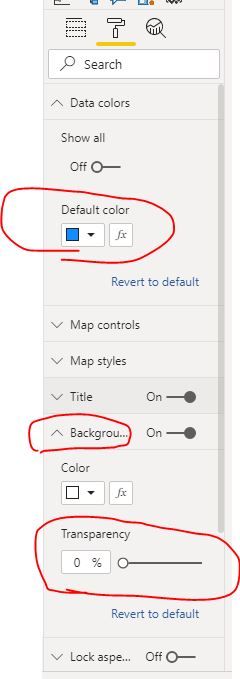
Last week filled maps were automatically transparent, today I try it and there is no transparency with no option to add. Is this a bug?
hi @jwjwjwjwjw
It should be conditional format or background transparency.
Regards,
Lin
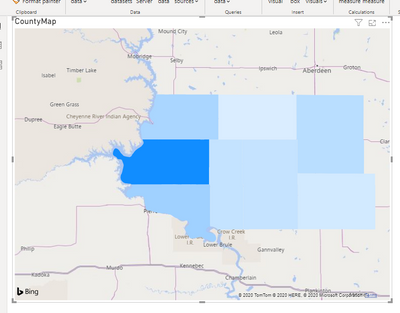
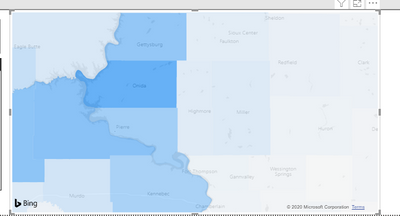
These two maps have the same (conditional on both) formatting. Different pbix files but open at the same time. Are you seriously trying to tell me that the top one is functioning as intended - that we can have conditional formatting OR transparency, but not both? What would be the purpose of that, with basemap place names visible everywhere but inside the area in question where they would actually be relevant?!? Would you actually attempt to use such a map in any sort of professional setting?
What am I missing here?
this is still a bug, any solution out there or does nobody make maps in powerbi anymore?
Check out the April 2026 Power BI update to learn about new features.
Sign up to receive a private message when registration opens and key events begin.
If you have recently started exploring Fabric, we'd love to hear how it's going. Your feedback can help with product improvements.
| User | Count |
|---|---|
| 36 | |
| 33 | |
| 31 | |
| 24 | |
| 18 |
| User | Count |
|---|---|
| 70 | |
| 50 | |
| 33 | |
| 24 | |
| 24 |