cancel
Showing results for 
Search instead for 
Did you mean: 

Get Fabric Certified for FREE during Fabric Data Days. Don't miss your chance! Request now

Reply
luizzed
Frequent Visitor

fact table filtering dimension table (one to many), Star Schema modeling error?

Hi!
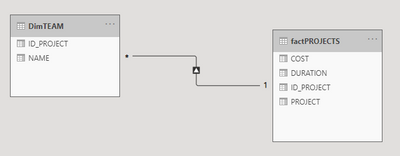
I'm having trouble modeling my data. The way I'm doing it results in the fact table filtering the dimension table with the cardinality one (for the fact table) to many (for the dimension table). I believe that conceptually this is incorrect. How could I model the following scenario:
I have a fact table that records information about projects. factPROJECTS:

img1.png

And a dimension table with the team for each project. dimTEAM:

img2.png

The relationship between the tables is thus, cardinality from one to many, starting from the fact table.

luizzed_0-1615996287407.png

How could I better model this using Star or SnowFlakes Schema?


1 ACCEPTED SOLUTION
Icey
Community Support
Community Support

Hi @luizzed ,


A dimension table contains a key column (or columns) that acts as a unique identifier, and descriptive columns. Your table "factPROJECTES" meets this definition, doesn't it?


And, there's no table property that modelers set to configure the table type as dimension or fact. It's in fact determined by the model relationships. A model relationship establishes a filter propagation path between two tables, and it's the Cardinality property of the relationship that determines the table type. A common relationship cardinality is one-to-many or its inverse many-to-one. The "one" side is always a dimension-type table while the "many" side is always a fact-type table.


Therefore, your table "factPROJECTES" is a dimension-type table and "dimTEAM" is a fact-type table.


If your model is relatively simple, you can consider changing the direction to Both. Or, just merge the two tables.


Reference: Understand star schema and the importance for Power BI - Power BI | Microsoft Docs


Best Regards,

Icey


If this post helps, then please consider Accept it as the solution to help the other members find it more quickly.

View solution in original post

1 REPLY 1
Icey
Community Support
Community Support

Hi @luizzed ,


A dimension table contains a key column (or columns) that acts as a unique identifier, and descriptive columns. Your table "factPROJECTES" meets this definition, doesn't it?


And, there's no table property that modelers set to configure the table type as dimension or fact. It's in fact determined by the model relationships. A model relationship establishes a filter propagation path between two tables, and it's the Cardinality property of the relationship that determines the table type. A common relationship cardinality is one-to-many or its inverse many-to-one. The "one" side is always a dimension-type table while the "many" side is always a fact-type table.


Therefore, your table "factPROJECTES" is a dimension-type table and "dimTEAM" is a fact-type table.


If your model is relatively simple, you can consider changing the direction to Both. Or, just merge the two tables.


Reference: Understand star schema and the importance for Power BI - Power BI | Microsoft Docs


Best Regards,

Icey


If this post helps, then please consider Accept it as the solution to help the other members find it more quickly.

Helpful resources

Announcements
November Power BI Update Carousel

Power BI Monthly Update - November 2025

Check out the November 2025 Power BI update to learn about new features.

Fabric Data Days Carousel

Fabric Data Days

Advance your Data & AI career with 50 days of live learning, contests, hands-on challenges, study groups & certifications and more!

FabCon Atlanta 2026 carousel

FabCon Atlanta 2026

Join us at FabCon Atlanta, March 16-20, for the ultimate Fabric, Power BI, AI and SQL community-led event. Save $200 with code FABCOMM.

Top Solution Authors
Top Kudoed Authors