

cancel
Showing results for 
Search instead for 
Did you mean: 

The Power BI Data Visualization World Championships is back! It's time to submit your entry. Live now!

Reply
dianaelena85
Frequent Visitor

extracting string

Hi!

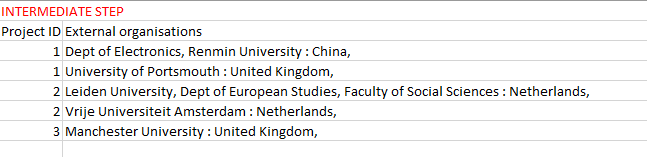
I have an issue extracting parts of a string in a more complicated situation where I cannot split by delimiter.

The initial table as well as the final desired output are shown below. Please note that before the ":" delimiter between the name of the organisation and the corresponding country there may be several commas. Also, the name of the country may include a comma e.g. "Korea, Republic of". This is really giving me headaches... Thanks in advance for any tips.


initialinitial

2.PNG

3.PNG

2 REPLIES 2
parry2k
Super User
Super User

@dianaelena85 can you share sample data in excel so that I can get you the solution.


Subscribe to the @PowerBIHowTo YT channel for an upcoming video on List and Record functions in Power Query!!

Learn Power BI and Fabric - subscribe to our YT channel - Click here: @PowerBIHowTo

If my solution proved useful, I'd be delighted to receive Kudos. When you put effort into asking a question, it's equally thoughtful to acknowledge and give Kudos to the individual who helped you solve the problem. It's a small gesture that shows appreciation and encouragement! ❤


Did I answer your question? Mark my post as a solution. Proud to be a Super User! Appreciate your Kudos 🙂
Feel free to email me with any of your BI needs.

Hi! 

Thanks in advance for any help @parry2k ! Here's a sample xlsx file: https://drive.google.com/file/d/1GBtxsl_FEnB4rZ01hIBWVoDt8EVkSwaV/view?usp=sharing


Cheers,
Diana

Helpful resources

Announcements
FabCon Atlanta 2026 carousel

FabCon Atlanta 2026

Join us at FabCon Atlanta, March 16-20, for the ultimate Fabric, Power BI, AI and SQL community-led event. Save $200 with code FABCOMM.