Don't miss your chance to take the Fabric Data Engineer (DP-600) exam for FREE! Find out how by watching the DP-600 session on-demand now through April 28th.
Learn moreJoin the FabCon + SQLCon recap series. Up next: Power BI, Real-Time Intelligence, IQ and AI, and Data Factory take center stage. All sessions are available on-demand after the live show. Register now
buenas noches.
agradezco su ayuda, es posible que cuando un informe esta publicado y este informe hay una tabla, se podra exportar a un archivo de excel.
Solved! Go to Solution.
If you have permissions to the data, you can see and export the data that Power BI uses to create a visualization.
To export the data from a visual, you need to have Build permission for the underlying dataset.
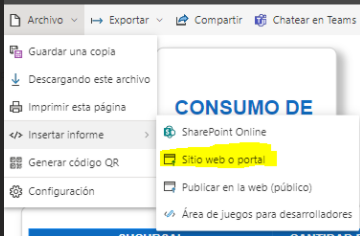
Para que deje exportar datos, puedes probar publicandolo en sitio web o portal web, en vez de publicarlo en web público que es donde se presenta la limitación.
If you have permissions to the data, you can see and export the data that Power BI uses to create a visualization.
To export the data from a visual, you need to have Build permission for the underlying dataset.
@OscarAngulo , You can export table data to excel.
refer: https://docs.microsoft.com/en-us/power-bi/visuals/power-bi-visualization-export-data
Or automated export : https://community.powerbi.com/t5/Community-Blog/Schedule-Automated-Data-Exports-from-Power-BI-using-...
Check out the April 2026 Power BI update to learn about new features.
If you have recently started exploring Fabric, we'd love to hear how it's going. Your feedback can help with product improvements.
A new Power BI DataViz World Championship is coming this June! Don't miss out on submitting your entry.
| User | Count |
|---|---|
| 43 | |
| 37 | |
| 34 | |
| 21 | |
| 16 |
| User | Count |
|---|---|
| 65 | |
| 64 | |
| 31 | |
| 26 | |
| 25 |