Get Fabric or SQL Certified for Free.
Get certified for free when you join Fabric Data Days 2026 and dive into Fabric, Power BI, SQL, AI, and other essential data skills.
Join now- Power BI forums
- Get Help with Power BI
- Desktop
- Service
- Report Server
- Power Query
- Mobile Apps
- Developer
- DAX Commands and Tips
- Custom Visuals Development Discussion
- Health and Life Sciences
- Power BI Spanish forums
- Translated Spanish Desktop
- Training and Consulting
- Instructor Led Training
- Dashboard in a Day for Women, by Women
- Galleries
- Data Stories Gallery
- Themes Gallery
- Contests Gallery
- QuickViz Gallery
- Quick Measures Gallery
- Visual Calculations Gallery
- Notebook Gallery
- Translytical Task Flow Gallery
- TMDL Gallery
- R Script Showcase
- Webinars and Video Gallery
- Ideas
- Custom Visuals Ideas (read-only)
- Issues
- Issues
- Events
- Upcoming Events
July 7 - July 17 | Round 2 of the Power BI Dataviz World Championships. Don't miss your chance! Learn more
- Power BI forums
- Forums
- Get Help with Power BI
- Desktop
- Re: excel Load button grey
- Subscribe to RSS Feed
- Mark Topic as New
- Mark Topic as Read
- Float this Topic for Current User
- Bookmark
- Subscribe
- Printer Friendly Page

- Mark as New
- Bookmark
- Subscribe
- Mute
- Subscribe to RSS Feed
- Permalink
- Report Inappropriate Content
excel Load button grey
When I select an Excel file to load it shows me the preview but the button to load the data remains greyed out so I cannot load the file. Only the Cancel button is available. I can load CSV files. Yes I'm a newbe.

- Mark as New
- Bookmark
- Subscribe
- Mute
- Subscribe to RSS Feed
- Permalink
- Report Inappropriate Content
Instead of clicking on the excel file, select/check it instead

- Mark as New
- Bookmark
- Subscribe
- Mute
- Subscribe to RSS Feed
- Permalink
- Report Inappropriate Content

- Mark as New
- Bookmark
- Subscribe
- Mute
- Subscribe to RSS Feed
- Permalink
- Report Inappropriate Content
Hi,
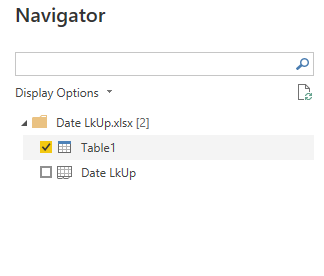
On the pop up that shows you all the available tables to upload, you need to click the checkbox
See below, the little black tick in yellow box.

- Mark as New
- Bookmark
- Subscribe
- Mute
- Subscribe to RSS Feed
- Permalink
- Report Inappropriate Content
I also have the same problem. Can someone please help me with this? I have already reinstalled the desktop app to no avail, same issue occured.

- Mark as New
- Bookmark
- Subscribe
- Mute
- Subscribe to RSS Feed
- Permalink
- Report Inappropriate Content
Only way i was able to get the Load button to appear, not grayed out, in Navigation, was to save my file as a .csv. Simply saving it as an Excel Workbook, not macro enabled, did not do the trick.
However, now when i load the .csv worksheet, the columns and headers appear in Data View, but no data at all.
Im using Excel 2013 and a brand new download of Power BI Desktop

- Mark as New
- Bookmark
- Subscribe
- Mute
- Subscribe to RSS Feed
- Permalink
- Report Inappropriate Content
I'm having the same problem after using the Power BI for a couple of weeks.
I'm attempting to load a very simple Excel table with no luck.
I have performed a clean reinstall to see if this corrects problem to no avail.
| 1 | a |
| 2 | b |
| 3 | c |
| 4 | d |
| 5 | e |
| 6 | f |
| 7 | g |
| 8 | h |
| 9 | i |
- Mark as New
- Bookmark
- Subscribe
- Mute
- Subscribe to RSS Feed
- Permalink
- Report Inappropriate Content
When you open an excel file you are greeted with a tree of the file and a list of all of the tabs. Are you using the checkbox to select which tabs to import? Even if the file has only a single tab, you need to place a check mark in the box.
- Mark as New
- Bookmark
- Subscribe
- Mute
- Subscribe to RSS Feed
- Permalink
- Report Inappropriate Content
I appreciate your response.
It is exactly what I forgot to do.
Gary

- Mark as New
- Bookmark
- Subscribe
- Mute
- Subscribe to RSS Feed
- Permalink
- Report Inappropriate Content
Hi @lporterusc,
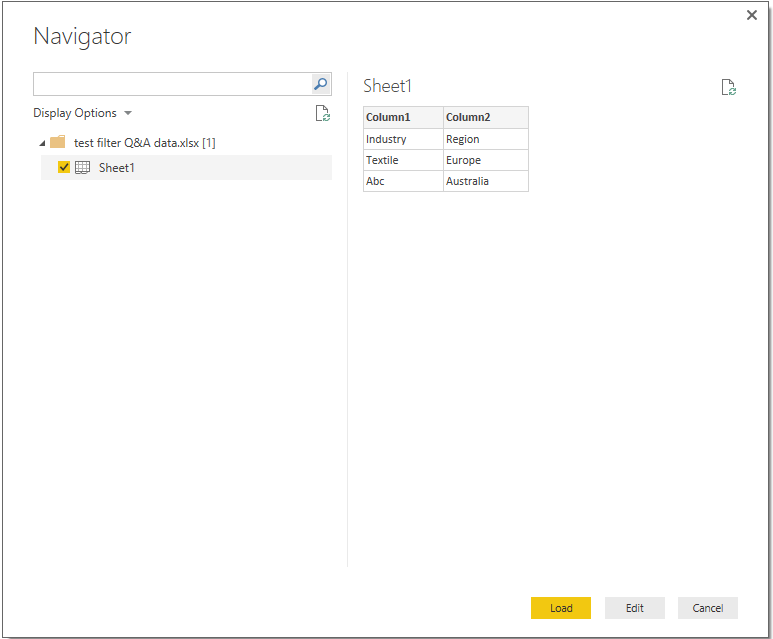
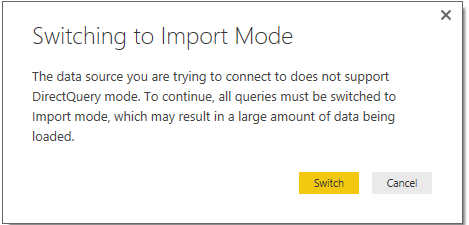
I test to load excel file on Power BI desktop version: 2.38.4491.642 64-bit (August 2016) and it works well. I also test “direct query” and “live connection mode” then use get data to add a new excel file but failed(get an error but not appear the button grey issue).
Below are the screenshots of testing:
Normal load excel file.
Live connection(get data function has been disabled):

Direct query + get data from excel:
Can you share some detail information to reproduce your issue?
For example:
The version of your power bi desktop, which type of excel file you try to load, the items you stored in excel file(e.g. map, table, image, chart,…)
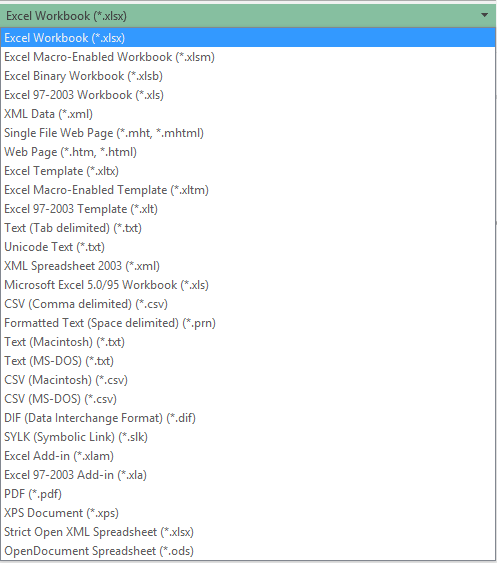
In addition, when I try to load a broken excel file, I get an error:
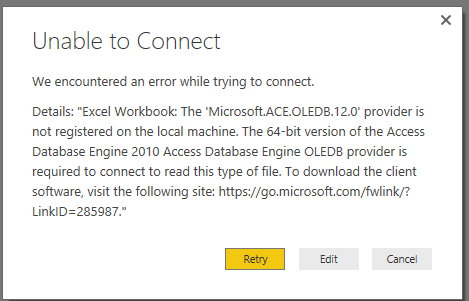
Regards,
Xiaoxin Sheng


- Mark as New
- Bookmark
- Subscribe
- Mute
- Subscribe to RSS Feed
- Permalink
- Report Inappropriate Content
@lporterusc Is your file saved as Excel workbook. If no then save it as Excel workbook and then there shouldn't be an issue loading it.
Helpful resources

FabCon & SQLCon – Barcelona 2026
Join us in Barcelona for FabCon and SQLCon, the Fabric, Power BI, SQL, and AI community event. Save €200 with code FABCMTY200.

Data Days 2026
Join Data Days 2026: 60 days of free live/on-demand sessions, challenges, study groups, and certification opportunities.

Power BI DataViz World Championships - June 2026
A new Power BI DataViz World Championship is coming this June! Don't miss out on submitting your entry.

| User | Count |
|---|---|
| 29 | |
| 27 | |
| 26 | |
| 24 | |
| 16 |


| User | Count |
|---|---|
| 53 | |
| 47 | |
| 38 | |
| 30 | |
| 21 |


