Forum Discussion
dynamic dimension by select all or single value
Hi Experts,
Suppose we have region and city and a user selected filter by region.
If user chose one single region, there is a monthly trend line chart by city.( cities for each line by selected single region)
If user chose all or multiple region, there is a monthly trend line chart by region.(regions for each line)
Anyone can help?
Best Regards
Bruce Chen
Hi Anonymous ,
We can create a calculated table to work on it. One sample for your reference. Please check the following steps as below.
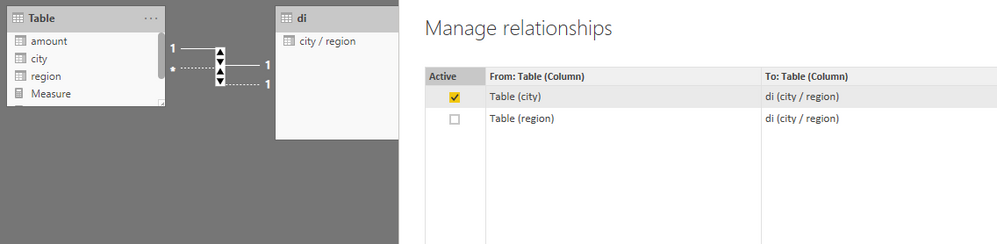
1. Create a calculated table and make it related to the fact table.
di = UNION(VALUES('Table'[city]),VALUES('Table'[region]))2. Then we can create a measure as below to get the excepted result as we need.
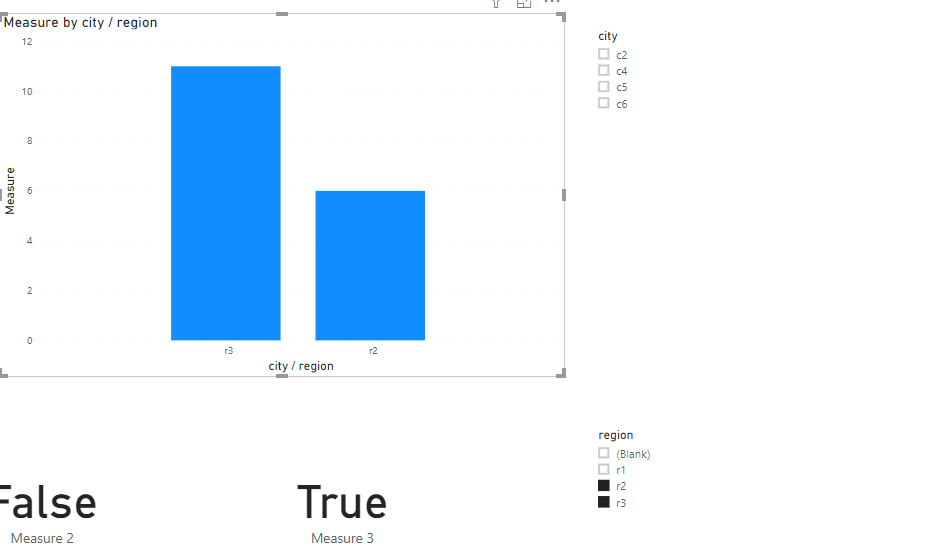
Measure = IF ( ISFILTERED ( 'Table'[city] ), SUM ( 'Table'[amount] ), IF ( ISFILTERED ( 'Table'[region] ), CALCULATE ( SUM ( 'Table'[amount] ), USERELATIONSHIP ( di[city / region], 'Table'[region] ) ) ) )BTW, pbix as attached.
2 Replies
- v-frfei-msft
Community Support
Hi Anonymous ,
We can create a calculated table to work on it. One sample for your reference. Please check the following steps as below.
1. Create a calculated table and make it related to the fact table.
di = UNION(VALUES('Table'[city]),VALUES('Table'[region]))2. Then we can create a measure as below to get the excepted result as we need.
Measure = IF ( ISFILTERED ( 'Table'[city] ), SUM ( 'Table'[amount] ), IF ( ISFILTERED ( 'Table'[region] ), CALCULATE ( SUM ( 'Table'[amount] ), USERELATIONSHIP ( di[city / region], 'Table'[region] ) ) ) )BTW, pbix as attached.
- Mariusz
Community Champion
Hi Anonymous
Unfortunately, there is no way to switch dynamically between columns or use measures in the Legend field of visuals, however, it would be a very powerful future.
Best Regards,
Mariusz
If this post helps, then please consider Accepting it as the solution.
Please feel free to connect with me.