FabCon is coming to Atlanta
Join us at FabCon Atlanta from March 16 - 20, 2026, for the ultimate Fabric, Power BI, AI and SQL community-led event. Save $200 with code FABCOMM.
Register now!- Power BI forums
- Get Help with Power BI
- Desktop
- Service
- Report Server
- Power Query
- Mobile Apps
- Developer
- DAX Commands and Tips
- Custom Visuals Development Discussion
- Health and Life Sciences
- Power BI Spanish forums
- Translated Spanish Desktop
- Training and Consulting
- Instructor Led Training
- Dashboard in a Day for Women, by Women
- Galleries
- Data Stories Gallery
- Themes Gallery
- Contests Gallery
- QuickViz Gallery
- Quick Measures Gallery
- Visual Calculations Gallery
- Notebook Gallery
- Translytical Task Flow Gallery
- TMDL Gallery
- R Script Showcase
- Webinars and Video Gallery
- Ideas
- Custom Visuals Ideas (read-only)
- Issues
- Issues
- Events
- Upcoming Events
The Power BI Data Visualization World Championships is back! Get ahead of the game and start preparing now! Learn more
- Power BI forums
- Forums
- Get Help with Power BI
- Desktop
- duplicating rows in matrix/ grid -when selecting "...
- Subscribe to RSS Feed
- Mark Topic as New
- Mark Topic as Read
- Float this Topic for Current User
- Bookmark
- Subscribe
- Printer Friendly Page


- Mark as New
- Bookmark
- Subscribe
- Mute
- Subscribe to RSS Feed
- Permalink
- Report Inappropriate Content
duplicating rows in matrix/ grid -when selecting "don't summarize"
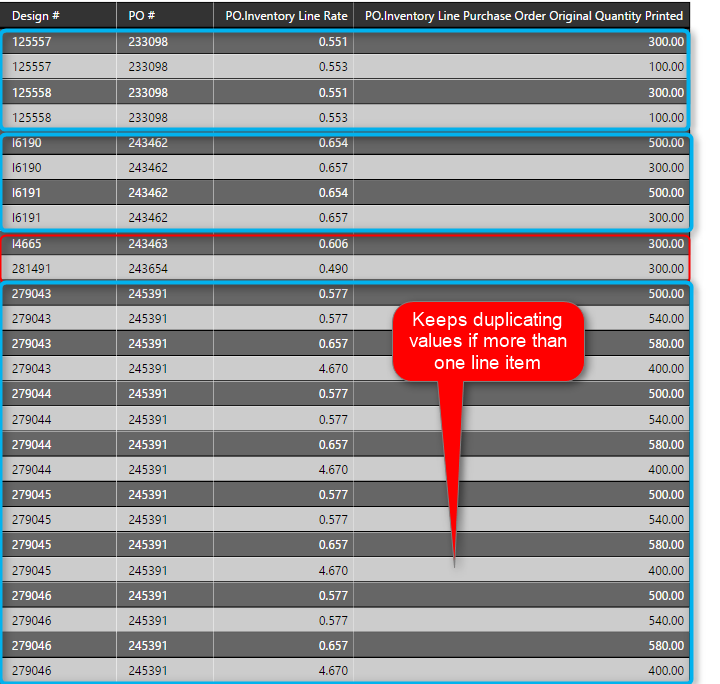
I am trying to create a simple grid that looks at line items from a PO.
When I select a "Don't Summarize" to the Line Rate (or any field for that matter), it starts duplicating rows.
If I don't do that - it summarizes the data - which I don't want.
What should occur is for each PO - there a Design # (can be multiple) and for each design # - there will be a line rate and a quantity. But I don't know what's causing it to duplicate over and over again.
For instance - the first blue outlined section in the grid (at the top) - should ONLY display one row for each design number (125557 and 125558). Those two design numbers should not show twice.
I'm wondering if part of the reason is because the design number field is a text data type. Occasionally there will be letters in the design #.
Any pointers in the right direction would be exceptionally helpful. 🙂
Solved! Go to Solution.


- Mark as New
- Bookmark
- Subscribe
- Mute
- Subscribe to RSS Feed
- Permalink
- Report Inappropriate Content
@heathernicole the issue is defintely your relationships, if you could post your pbix that woudl be most ideal, if not can you post a picture of your relationship view identifying the problem data
If I took the time to answer your question and I came up with a solution, please mark my post as a solution and /or give kudos freely for the effort 🙂 Thank you!
Proud to be a Super User!
- Mark as New
- Bookmark
- Subscribe
- Mute
- Subscribe to RSS Feed
- Permalink
- Report Inappropriate Content
hi heather unless i am missing something, its going to duplicate becase line rate and quantity printed is different? youve told it not to aggregate so each line item will be present,.
If I took the time to answer your question and I came up with a solution, please mark my post as a solution and /or give kudos freely for the effort 🙂 Thank you!
Proud to be a Super User!
- Mark as New
- Bookmark
- Subscribe
- Mute
- Subscribe to RSS Feed
- Permalink
- Report Inappropriate Content
@heathernicole is this all in the same table, or do you have them linked in a relationship?
If I took the time to answer your question and I came up with a solution, please mark my post as a solution and /or give kudos freely for the effort 🙂 Thank you!
Proud to be a Super User!
- Mark as New
- Bookmark
- Subscribe
- Mute
- Subscribe to RSS Feed
- Permalink
- Report Inappropriate Content
not the same table. The entire dataset probably has about 4-6 tables total - off the top of my head.
- Mark as New
- Bookmark
- Subscribe
- Mute
- Subscribe to RSS Feed
- Permalink
- Report Inappropriate Content
@vanessafvg - hey! 🙂
Well, that's what I can't seem to figure out. On the PO -it's correct. There's no duplicate information.
If I allow it to summarize - adds up the line rates and duplicates that for each design number and the same for the quantity.
So for instance - I have the following in reality:
Design # QTY Line Rate
12345 100 .50
12346 100 .75
12347 100 .50
When I pull it into Power BI it's doing this: (If I let it summarize)
Design # QTY Line Rate
12345 300 1.75
12346 300 1.75
12347 300 1.75
If I don't let it summarize:
Design # QTY Line Rate
12345 100 .50
12346 100 .75
12347 100 .50
12345 100 .50
12346 100 .75
12347 100 .50
12345 100 .50
12346 100 .75
12347 100 .50
Neither of those is right. However the first instance (of what's actually on the PO) is what I'm wanting. If those three lines were on the same PO - the PO# would be the same for all - and that's ok.


- Mark as New
- Bookmark
- Subscribe
- Mute
- Subscribe to RSS Feed
- Permalink
- Report Inappropriate Content
I agree with the comment above. You could also consider using DAX to add the result table.
If this post helps, then please consider Accept it as the solution to help the other members find it more quickly.
- Mark as New
- Bookmark
- Subscribe
- Mute
- Subscribe to RSS Feed
- Permalink
- Report Inappropriate Content
@v-chuncz-msft - I've been digging through on how I would use DAX to solve this one - I haven't had an "aha" moment yet. 🙂
- Mark as New
- Bookmark
- Subscribe
- Mute
- Subscribe to RSS Feed
- Permalink
- Report Inappropriate Content
@heathernicole the issue is defintely your relationships, if you could post your pbix that woudl be most ideal, if not can you post a picture of your relationship view identifying the problem data
If I took the time to answer your question and I came up with a solution, please mark my post as a solution and /or give kudos freely for the effort 🙂 Thank you!
Proud to be a Super User!
- Mark as New
- Bookmark
- Subscribe
- Mute
- Subscribe to RSS Feed
- Permalink
- Report Inappropriate Content
@vanessafvg - Hello! 🙂
You're most definitely right! I had that hunch yesterday morning - but not sure WHICH relationships that would cause it.
I switched to a different base report I thought might have the proper relationships (that I would need) and got it to work. I just hadn't had a chance to post. I'm going to try and investigate a little further - so I can give a clear answer.
But thank you! You were right! 🙂
- Mark as New
- Bookmark
- Subscribe
- Mute
- Subscribe to RSS Feed
- Permalink
- Report Inappropriate Content
@heathernicole did you ever find a solution to this problem?
i'm currently working through the exact same issue, though i'm only working with a single SQL query. any posts, dax code or methods you used to get the outcome you desired would be helpful!
thanks,

Helpful resources

Power BI Dataviz World Championships
The Power BI Data Visualization World Championships is back! Get ahead of the game and start preparing now!

Power BI Monthly Update - December 2025
Check out the December 2025 Power BI Holiday Recap!

FabCon Atlanta 2026
Join us at FabCon Atlanta, March 16-20, for the ultimate Fabric, Power BI, AI and SQL community-led event. Save $200 with code FABCOMM.

| User | Count |
|---|---|
| 64 | |
| 47 | |
| 41 | |
| 36 | |
| 23 |


| User | Count |
|---|---|
| 185 | |
| 123 | |
| 106 | |
| 78 | |
| 52 |


