Join us at FabCon Atlanta from March 16 - 20, 2026, for the ultimate Fabric, Power BI, AI and SQL community-led event. Save $200 with code FABCOMM.
Register now!Vote for your favorite vizzies from the Power BI Dataviz World Championship submissions. Vote now!
Hello Team ,
I want count based on business line for category 1,Please help me to write a dax column .
Please find below tabel for example.
I want output based on category 1 and business Line column .
| Category 1 | Category 2 | Business Line |
| A | AB | Export |
| A | AC | Import |
| B | AA | Export |
| C | AM | Export |
| D | AA | Export |
| D | BB | Import |
| D | CC | Export |
Please find below expecated output .
| Category 1 | Ctegory 2 | Business Line | Calculated column |
| A | AB | Export | 2 |
| A | AC | Import | 2 |
| B | AA | Export | 1 |
| C | AM | Export | 1 |
| D | AA | Export | 3 |
| D | BB | Import | 3 |
| D | CC | Export | 3 |
In above output categort 1 - is "A" so A is come 2 times under business line -Import and export so my count is "2".
same for Cetegory 1 - "C" come 1 time under business line is only "Export" so my count is "1" .
Please help me to write a dax calulted column .
Thank you in advance .
Solved! Go to Solution.
Hi, @SAPpowerbi
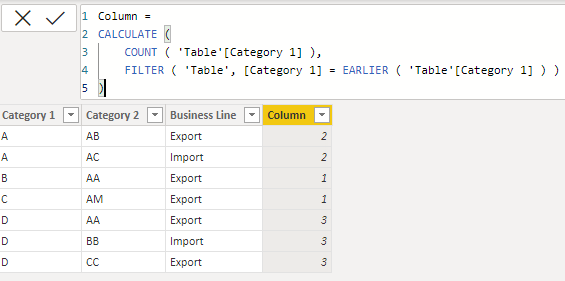
You can try the following methods.
Column =
CALCULATE (
COUNT ( 'Table'[Category 1] ),
FILTER ( 'Table', [Category 1] = EARLIER ( 'Table'[Category 1] ) )
)
Is this the result you expect?
Best Regards,
Community Support Team _Charlotte
If this post helps, then please consider Accept it as the solution to help the other members find it more quickly.
Hi, @SAPpowerbi
You can try the following methods.
Column =
CALCULATE (
COUNT ( 'Table'[Category 1] ),
FILTER ( 'Table', [Category 1] = EARLIER ( 'Table'[Category 1] ) )
)
Is this the result you expect?
Best Regards,
Community Support Team _Charlotte
If this post helps, then please consider Accept it as the solution to help the other members find it more quickly.
Hey there,
Try this :
Try
Calc column =
CALCULATE (
COUNTROWS ( 'Table' ),
ALLEXCEPT ( 'Table', 'Table'[Category 1], 'Table'[Business Line] )
)
Hi thank you for quik responce .
Need small help on the same dax = like category1 A two times and business line is Export and Import so my expected count is 2 , as per your dax its counting 1
Your dax output is like below =
| Category 1 | Business Line | calculated column |
| A | Export | 1 |
| A | Import | 1 |
I need below output
| Category 1 | Category 2 | Business Line | calculated column |
| A | AB | Export | 2 |
| A | Ac | Import | 2 |
*** Note - I want Category1 with multiple business line so it will give me count .
I want output like above kindly help , Thnk you .
Try changing it to
Calc column =
CALCULATE (
COUNTROWS ( 'Table' ),
ALLEXCEPT ( 'Table', 'Table'[Category 1] )
)
Vote for your favorite vizzies from the Power BI World Championship submissions!
If you love stickers, then you will definitely want to check out our Community Sticker Challenge!
Check out the January 2026 Power BI update to learn about new features.
| User | Count |
|---|---|
| 64 | |
| 51 | |
| 46 | |
| 23 | |
| 19 |
| User | Count |
|---|---|
| 138 | |
| 111 | |
| 50 | |
| 33 | |
| 29 |