FabCon is coming to Atlanta
Join us at FabCon Atlanta from March 16 - 20, 2026, for the ultimate Fabric, Power BI, AI and SQL community-led event. Save $200 with code FABCOMM.
Register now!- Power BI forums
- Get Help with Power BI
- Desktop
- Service
- Report Server
- Power Query
- Mobile Apps
- Developer
- DAX Commands and Tips
- Custom Visuals Development Discussion
- Health and Life Sciences
- Power BI Spanish forums
- Translated Spanish Desktop
- Training and Consulting
- Instructor Led Training
- Dashboard in a Day for Women, by Women
- Galleries
- Data Stories Gallery
- Themes Gallery
- Contests Gallery
- QuickViz Gallery
- Quick Measures Gallery
- Visual Calculations Gallery
- Notebook Gallery
- Translytical Task Flow Gallery
- TMDL Gallery
- R Script Showcase
- Webinars and Video Gallery
- Ideas
- Custom Visuals Ideas (read-only)
- Issues
- Issues
- Events
- Upcoming Events
The Power BI Data Visualization World Championships is back! Get ahead of the game and start preparing now! Learn more
- Power BI forums
- Forums
- Get Help with Power BI
- Desktop
- Re: due date passed and status is not done
- Subscribe to RSS Feed
- Mark Topic as New
- Mark Topic as Read
- Float this Topic for Current User
- Bookmark
- Subscribe
- Printer Friendly Page

- Mark as New
- Bookmark
- Subscribe
- Mute
- Subscribe to RSS Feed
- Permalink
- Report Inappropriate Content
due date passed and status is not done
Hi All,
I'm trying to create a column that will show the due date, if the status is not done.
so the data I have is similar to this:
| Due_date | Status |
| 12/03/2022 | New |
| 13/03/2022 | Inprogress |
| 13/03/2022 | Done |
| 14/03/2022 | Done |
| 15/03/2022 | Inprogress |
| 16/03/2022 | New |
What I want to do is only capture those which are either new or inprogress, after the due date has passed, so in this example it would populate the first 2 and last 2.
I have this so far
Solved! Go to Solution.
- Mark as New
- Bookmark
- Subscribe
- Mute
- Subscribe to RSS Feed
- Permalink
- Report Inappropriate Content
Hi @Anonymous ,
According to this:
What I want to do is only capture those which are either new or inprogress, after the due date has passed, so in this example it would populate the first 2 and last 2.
It seems that you want to show rows where the date is not blank and the status <> Done, right?
If so, as @amitchandak mentioned, please create a flag measure ,and then apply it to visual-filter pane, set as "is 1":
Flag Measure = IF(MAX('Table'[Due_date])<>BLANK()&&MAX('Table'[Status])<>"Done",1,0)
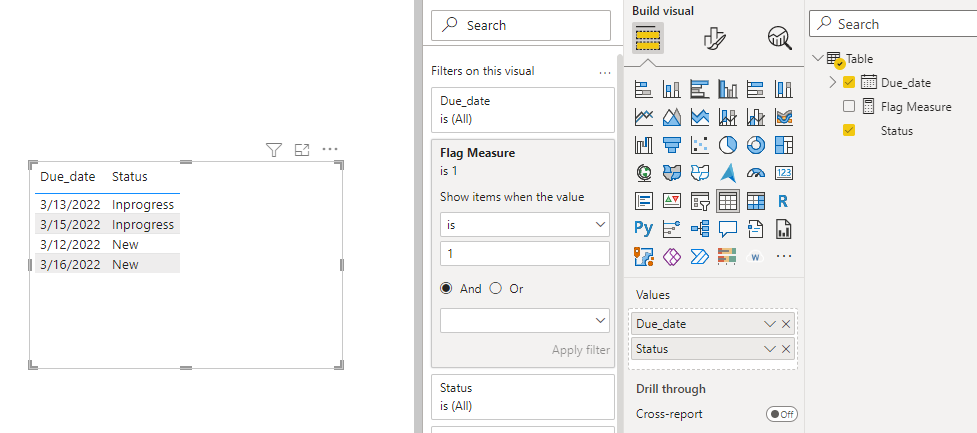
Best Regards,
Eyelyn Qin
If this post helps, then please consider Accept it as the solution to help the other members find it more quickly.
- Mark as New
- Bookmark
- Subscribe
- Mute
- Subscribe to RSS Feed
- Permalink
- Report Inappropriate Content
Hi @Anonymous ,
According to this:
What I want to do is only capture those which are either new or inprogress, after the due date has passed, so in this example it would populate the first 2 and last 2.
It seems that you want to show rows where the date is not blank and the status <> Done, right?
If so, as @amitchandak mentioned, please create a flag measure ,and then apply it to visual-filter pane, set as "is 1":
Flag Measure = IF(MAX('Table'[Due_date])<>BLANK()&&MAX('Table'[Status])<>"Done",1,0)
Best Regards,
Eyelyn Qin
If this post helps, then please consider Accept it as the solution to help the other members find it more quickly.
- Mark as New
- Bookmark
- Subscribe
- Mute
- Subscribe to RSS Feed
- Permalink
- Report Inappropriate Content
@amitchandrak i see that if the due date field is empty, it puts a 1 in the new column, how can i get around that?
- Mark as New
- Bookmark
- Subscribe
- Mute
- Subscribe to RSS Feed
- Permalink
- Report Inappropriate Content


- Mark as New
- Bookmark
- Subscribe
- Mute
- Subscribe to RSS Feed
- Permalink
- Report Inappropriate Content
- Mark as New
- Bookmark
- Subscribe
- Mute
- Subscribe to RSS Feed
- Permalink
- Report Inappropriate Content
Hi Amit,
- Mark as New
- Bookmark
- Subscribe
- Mute
- Subscribe to RSS Feed
- Permalink
- Report Inappropriate Content
- Mark as New
- Bookmark
- Subscribe
- Mute
- Subscribe to RSS Feed
- Permalink
- Report Inappropriate Content
@amitchandrak that was my fault, had it set as a date.
Helpful resources

Power BI Monthly Update - November 2025
Check out the November 2025 Power BI update to learn about new features.

Fabric Data Days
Advance your Data & AI career with 50 days of live learning, contests, hands-on challenges, study groups & certifications and more!

FabCon Atlanta 2026
Join us at FabCon Atlanta, March 16-20, for the ultimate Fabric, Power BI, AI and SQL community-led event. Save $200 with code FABCOMM.


