cancel
Showing results for 
Search instead for 
Did you mean: 

The Power BI Data Visualization World Championships is back! Get ahead of the game and start preparing now! Learn more

Reply
sirineChadly
New Member

@drillthrough wrong filter

Hello,

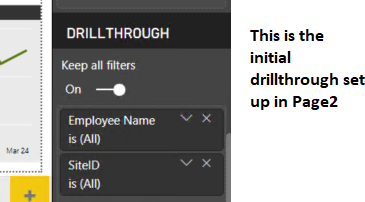
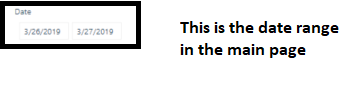
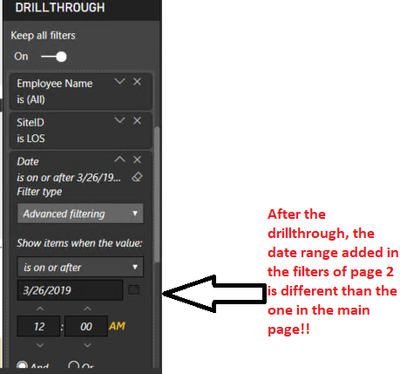
I added drillthrough filters to page 2 for these two columns (SiteID and Employee ID) but when I drill through to it from the main page there's an added wrong date range that doesn't match the date slicer in the main page nor the one in page 2. I can't figure out how to keep this from happening.


Thank yos3.PNG


s4.PNG


s5.PNG


1 REPLY 1
v-lili6-msft
Community Support
Community Support

hi, @sirineChadly 

If there is no date after the date range, eg. 3/27/2019 is the last date for your date data.

It will show as your screenshot

so for 3/26/2019-3/27/2019, after drillthrough page2, It only shows after 3/26/2019.

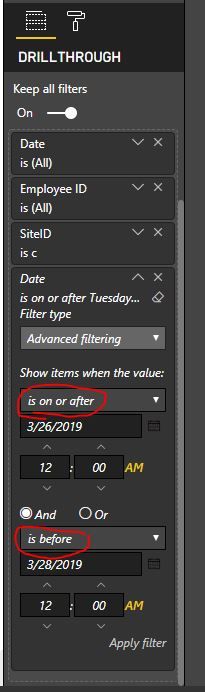
But if there are other date data, It will show 

9.JPG

10.JPG

For slicer couldn't filter Time part of date-time column.


Best Regards,

Lin

Community Support Team _ Lin
If this post helps, then please consider Accept it as the solution to help the other members find it more quickly.

Helpful resources

Announcements
Power BI DataViz World Championships

Power BI Dataviz World Championships

The Power BI Data Visualization World Championships is back! Get ahead of the game and start preparing now!

December 2025 Power BI Update Carousel

Power BI Monthly Update - December 2025

Check out the December 2025 Power BI Holiday Recap!

FabCon Atlanta 2026 carousel

FabCon Atlanta 2026

Join us at FabCon Atlanta, March 16-20, for the ultimate Fabric, Power BI, AI and SQL community-led event. Save $200 with code FABCOMM.