
Join us at FabCon Atlanta from March 16 - 20, 2026, for the ultimate Fabric, Power BI, AI and SQL community-led event. Save $200 with code FABCOMM.
Register now!The Power BI Data Visualization World Championships is back! Get ahead of the game and start preparing now! Learn more
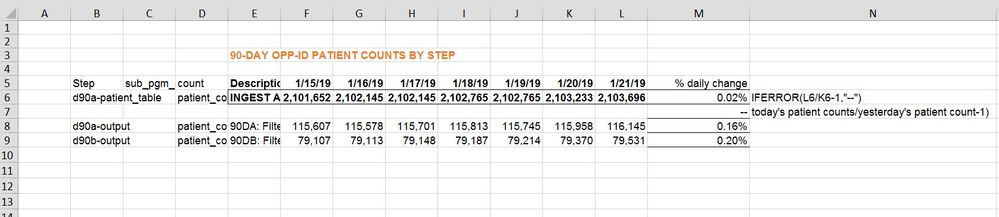
I am replicating an excel report. in PowerBI
columns that I have in my database
step
sub_program_code
count
description
opp_id_date
patient_count
Excel view:-
B= step
C=sub_program_code
D= count
E = Description
F = opp_id date (today-6)
G = opp_id date (today-5)
H = opp_id date (today-4)
I = opp_id date (today-3)
J = opp_id date (today-2)
K = opp_id date (today-1)
L = opp_id date (today)
M= % daily change [opp_id date (today)/opp_id date (today-1)-1]
How can I get value for column M in PowerBI?
Hi @Anonymous,
Please share some sample data so that we can use it to create visual and test to coding formula.
Regards,
Xiaoxin Sheng
hi @Anonymous
I cannot find how I can attach data. There is a link option but I am unable to open dropbox or google drive here sincethey are blocked by our firewalls. If you give me your email I can send it to you.
my data looks like this
step count opp_date
abc 565464 1/22/2019
abc 464646 1/21/2019
abc 9886464 1/20/2019
xyz 2355 1/22/2019
xyz 5646464 1/21/2019
xyz 1254 1/20/2019
For each of these tables abc and xyz, I need to find the daily change. That means for opp_id date 1/22/2019 and table abc, I will perform 565464/(464646-1)
For xyz, I would do for 1/22/2019 --> 2355/5646464-1
Similarly for more tables.
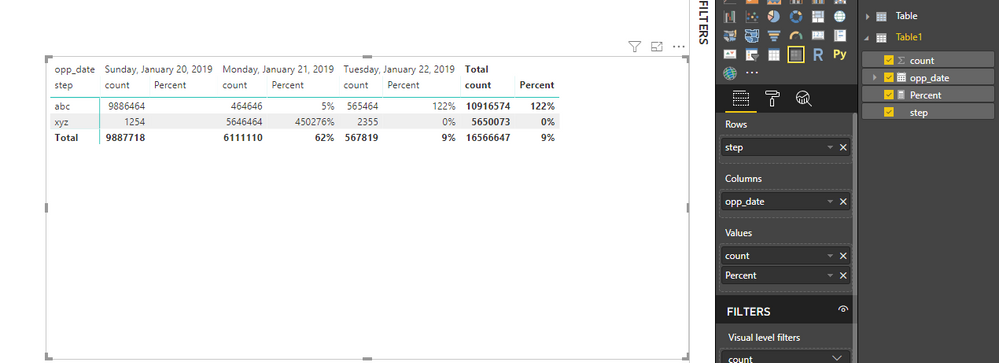
The matric that I have created in powerBI looks like this. How can I subtract value for date 1/22/2019 from date 1/21/2019 for each step?
HI @Anonymous,
You can try to use following measure to calculate diff between current and previous value:
Percent =
VAR currDate =
MAX ( Table1[opp_date] )
VAR prevDate =
CALCULATE (
MAX ( Table1[opp_date] ),
FILTER ( ALLSELECTED ( Table1 ), [opp_date] < currDate )
)
RETURN
DIVIDE (
CALCULATE (
SUM( Table1[count] ),
FILTER ( ALLSELECTED ( Table1 ), [opp_date] = currDate ),
VALUES ( Table1[step] )
),
CALCULATE (
SUM ( Table1[count] ),
FILTER ( ALLSELECTED ( Table1 ), [opp_date] = prevDate ),
VALUES ( Table1[step] )
),
BLANK()
)
Regards,
Xiaoxin Sheng
The Power BI Data Visualization World Championships is back! Get ahead of the game and start preparing now!
| User | Count |
|---|---|
| 67 | |
| 45 | |
| 41 | |
| 36 | |
| 23 |
| User | Count |
|---|---|
| 191 | |
| 127 | |
| 106 | |
| 78 | |
| 53 |