
cancel
Showing results for 
Search instead for 
Did you mean: 

The Power BI Data Visualization World Championships is back! Get ahead of the game and start preparing now! Learn more

Reply
Anonymous
Not applicable

divide two column values in a matrix

I am replicating an excel report. in PowerBI 

columns that I have in my database

step

sub_program_code

count

description

opp_id_date

patient_count


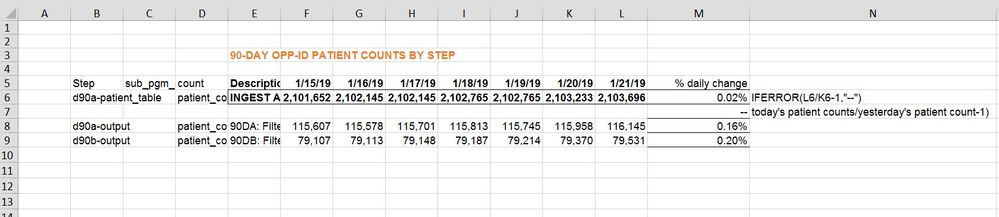
Excel view:-

B= step

C=sub_program_code

D= count

E = Description

F = opp_id date (today-6)

= opp_id date (today-5)

= opp_id date (today-4)

= opp_id date (today-3)

= opp_id date (today-2)

= opp_id date (today-1)

= opp_id date (today)

M= % daily change [opp_id date (today)/opp_id date (today-1)-1]


How can I get value for column M in PowerBI?


daily change.JPG


3 REPLIES 3
Anonymous
Not applicable

Hi @Anonymous,


Please share some sample data so that we can use it to create visual and test to coding formula.


Regards,
Xiaoxin Sheng

Anonymous
Not applicable

hi @Anonymous

I cannot find how I can attach data. There is a link option but I am unable to open dropbox or google drive here sincethey are blocked by our firewalls. If you give me your email I can send it to you.

my data looks like this

step            count                   opp_date

abc             565464                1/22/2019

abc             464646                 1/21/2019

abc             9886464               1/20/2019

xyz              2355                     1/22/2019

xyz              5646464              1/21/2019

xyz               1254                   1/20/2019


For each of these tables abc and xyz, I need to find the daily change. That means for opp_id date 1/22/2019 and table abc, I will perform 565464/(464646-1)

For xyz, I would do for 1/22/2019 -->  2355/5646464-1

Similarly for more tables.

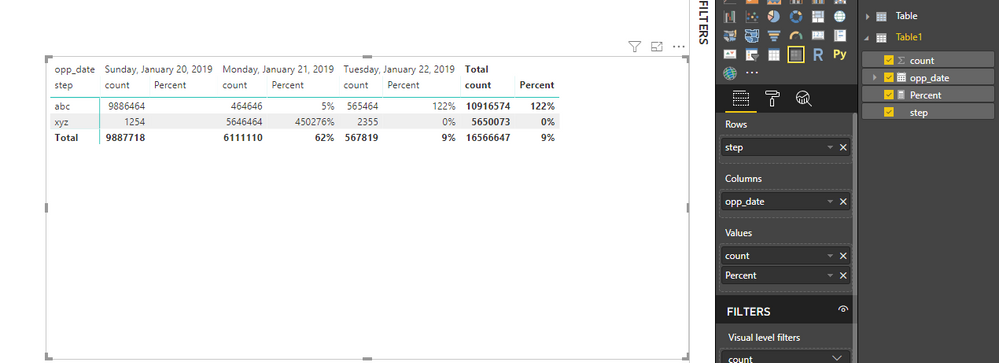
The matric that I have created in powerBI looks like this. How can I subtract value for date 1/22/2019 from date 1/21/2019 for each step?

9ds.JPG


Anonymous
Not applicable

HI @Anonymous,


You can try to use following measure to calculate diff between current and previous value:

Percent = 
VAR currDate =
    MAX ( Table1[opp_date] )
VAR prevDate =
    CALCULATE (
        MAX ( Table1[opp_date] ),
        FILTER ( ALLSELECTED ( Table1 ), [opp_date] < currDate )
    )
RETURN
    DIVIDE (
        CALCULATE (
            SUM( Table1[count] ),
            FILTER ( ALLSELECTED ( Table1 ), [opp_date] = currDate ),
            VALUES ( Table1[step] )
        ),
        CALCULATE (
            SUM ( Table1[count] ),
            FILTER ( ALLSELECTED ( Table1 ), [opp_date] = prevDate ),
            VALUES ( Table1[step] )
        ),
        BLANK()
    )

14.png


Regards,

Xiaoxin Sheng

Helpful resources

Announcements
Power BI DataViz World Championships

Power BI Dataviz World Championships

The Power BI Data Visualization World Championships is back! Get ahead of the game and start preparing now!

December 2025 Power BI Update Carousel

Power BI Monthly Update - December 2025

Check out the December 2025 Power BI Holiday Recap!

FabCon Atlanta 2026 carousel

FabCon Atlanta 2026

Join us at FabCon Atlanta, March 16-20, for the ultimate Fabric, Power BI, AI and SQL community-led event. Save $200 with code FABCOMM.