cancel
Showing results for 
Search instead for 
Did you mean: 

July 7 - July 17 | Round 2 of the Power BI Dataviz World Championships. Don't miss your chance! Learn more

Reply
Fred_el_BI
Regular Visitor

direct queries column column format in SQL

Hello,

I use the SQL Azure to diplay my data (which are a list of salaries) in my PowerBI desktop. 


When using direct queries you cannot change the format of the columns in PowerBI. I would like to change the fomat of a table in SQL so it is shown as a whole number in PowerBI. Because only with whole numbers can we display data such as salaries in a table (otherwise it does a count).


So I need to change the data type in my SQL table. 


What data type should I use? I have tried int, float, money etc. many sql expression for data type. But I cannot display the data as a whole number in PowerBI. If someone out there has a solution I would be very grateful.


Thank you,


Anyone knows how to do that.

1 ACCEPTED SOLUTION
v-ljerr-msft
Microsoft Employee
Microsoft Employee

@Fred_el_BI


When using direct queries you cannot change the format of the columns in PowerBI. I would like to change the fomat of a table in SQL so it is shown as a whole number in PowerBI.


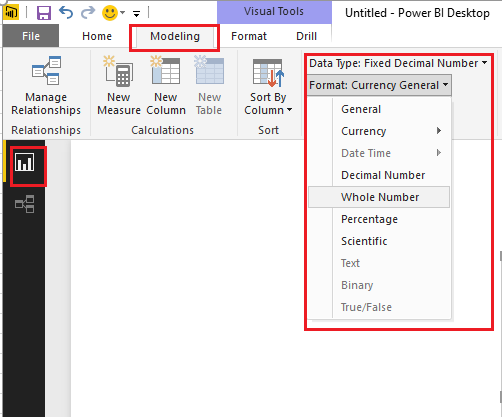
In direct query mode, we should be able to change the format of the columns in Modeling tab in Power BI Desktop. Steps below is for your reference.


1. Select a column you want to change the format in Fields tab.

f2.PNG

2. Select Modeling tab and change the format.

modeling.PNG


Regards

View solution in original post

2 REPLIES 2
v-ljerr-msft
Microsoft Employee
Microsoft Employee

@Fred_el_BI


When using direct queries you cannot change the format of the columns in PowerBI. I would like to change the fomat of a table in SQL so it is shown as a whole number in PowerBI.


In direct query mode, we should be able to change the format of the columns in Modeling tab in Power BI Desktop. Steps below is for your reference.


1. Select a column you want to change the format in Fields tab.

f2.PNG

2. Select Modeling tab and change the format.

modeling.PNG


Regards

Hello Jerry Li,


Arg yes, I see the Modeling, works very well. 


Thanks a lot for taking the time to provide a very well documented and precise answer. Very much appreciated.


Best,


Fred

Helpful resources

Announcements
FabCon and SQLCon Barcelona 2026

FabCon & SQLCon – Barcelona 2026

Join us in Barcelona for FabCon and SQLCon, the Fabric, Power BI, SQL, and AI community event. Save €200 with code FABCMTY200.

60 days of Data Days Carousel

Data Days 2026

Join Fabric Data Days 2026: 60 days of free live/on-demand sessions, challenges, study groups, and certification opportunities.

Power BI DataViz World Championships carousel

Power BI DataViz World Championships - June 2026

A new Power BI DataViz World Championship is coming this June! Don't miss out on submitting your entry.