cancel
Showing results for 
Search instead for 
Did you mean: 

July 28 - August 9 | Final Round of the Power BI Dataviz World Championships. This is your chance. Learn more

Reply
sam021083
Frequent Visitor

desktop

Hello All,


I am facing an issue in creating a custom table using DAX as mentioned below.


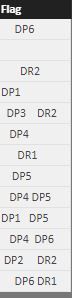
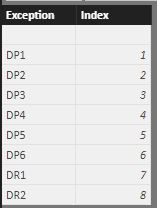
I have two tables with below format

Capture.JPGCapture1.JPG


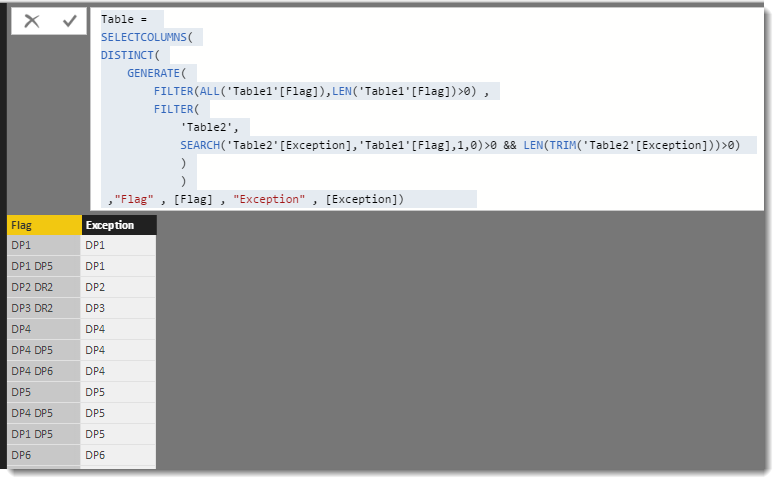
I need a new table in the below format using DAX

Capture2.JPGPlease help.


Thanks,

Sam

1 ACCEPTED SOLUTION
Phil_Seamark
Microsoft Employee
Microsoft Employee

Hi @sam021083


I used the SEARCH function to help match.


Table = 
SELECTCOLUMNS(
DISTINCT(
    GENERATE(
        FILTER(ALL('Table1'[Flag]),LEN('Table1'[Flag])>0) ,
        FILTER(
            'Table2',
            SEARCH('Table2'[Exception],'Table1'[Flag],1,0)>0 && LEN(TRIM('Table2'[Exception]))>0) 
            )
            )
 ,"Flag" , [Flag] , "Exception" , [Exception])           

image.png


To learn more about DAX visit : aka.ms/practicalDAX

Proud to be a Datanaut!

View solution in original post

2 REPLIES 2
Phil_Seamark
Microsoft Employee
Microsoft Employee

Hi @sam021083


I used the SEARCH function to help match.


Table = 
SELECTCOLUMNS(
DISTINCT(
    GENERATE(
        FILTER(ALL('Table1'[Flag]),LEN('Table1'[Flag])>0) ,
        FILTER(
            'Table2',
            SEARCH('Table2'[Exception],'Table1'[Flag],1,0)>0 && LEN(TRIM('Table2'[Exception]))>0) 
            )
            )
 ,"Flag" , [Flag] , "Exception" , [Exception])           

image.png


To learn more about DAX visit : aka.ms/practicalDAX

Proud to be a Datanaut!

Hi @Phil_Seamark


This worked like a miracle. Awesome!

Helpful resources

Announcements
FabCon and SQLCon Barcelona 2026

FabCon & SQLCon – Barcelona 2026

Join us in Barcelona for FabCon and SQLCon, the Fabric, Power BI, SQL, and AI community event. Save €200 with code FABCMTY200.

Fabric Community Sticker Design Challenge Barcelona Carousel

Fabric Community Sticker Challenge - Barcelona 2026

If you love stickers, then you will definitely want to check out our community sticker challenge, Barcelona edition!

July Power BI Update Carousel

Power BI Monthly Update - July 2026

Check out the July 2026 Power BI update to learn about new features.

Power BI DataViz World Championships carousel

Power BI DataViz World Championships - June 2026

A new Power BI DataViz World Championship is coming this June! Don't miss out on submitting your entry.

Top Solution Authors