cancel
Showing results for 
Search instead for 
Did you mean: 

Next up in the FabCon + SQLCon recap series: The roadmap for Microsoft SQL and Maximizing Developer experiences in Fabric. All sessions are available on-demand after the live show. Register now

Reply
Angel
Resolver III
Resolver III

default value for parameters

Hi, everyone


I have a report that connects to ODATA Feed using one parameter for the ODATA URL. For example, for sales the source is defined as: "Url Base ODATA & Sales".


I would like to know if there is one way to assign a default value for the parameter.


Thanks,

1 ACCEPTED SOLUTION

Hi, @Anonymous


Finally, I have solved the issue. I'm trying to explain it.


The key point is that I need to append up to 15 purchase tables in Power BI desktop. Every table comes from a different ODATA Url. Every URL is a parameter. 


The problem was that not all URL ODATA are always used. So, I need to introduce a value in order to create empty queries.


The first thing I tried was typing word 'NOT' in URL not used. So, I can create emtpy queries depending on this condition.  That was the resason because I ask a question. I wanted NOT value by default, and only change ODATA that are going to be used.


However, I couldn't refresh when I try to refresh dataset in Power BI Service using On-premise data gateaway because there was an invalid Data Source.


How did I solve that?. For queries that are not going to used URL Odata, I introduce the same URL ODATA that parameter 1. And works in Power bi desktop and Service... Something like that... If Parameter Url 4 = Parameter URL 1 then CreateEmtpyTable and so on for every query.


It works!!!!!..


Anyway, thanks for your help....


View solution in original post

4 REPLIES 4
Anonymous
Not applicable

@Angel,

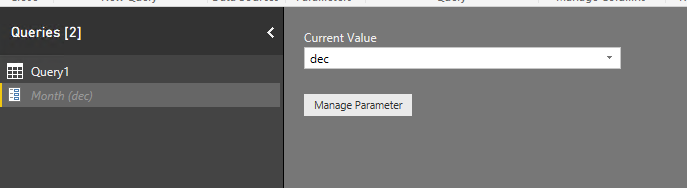
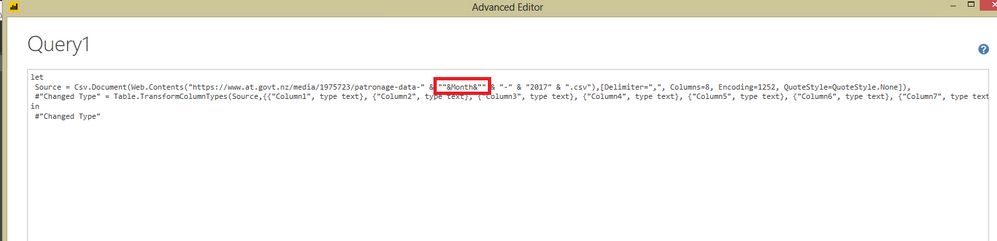
You can create a parameter in Query Editor and set default value. There is an example for your reference.
1.PNG2.PNG3.PNG

Regards,
Lydia

Thanks, @Anonymous


The problem is I can't use a list of values for parameters, because it depends on ODATA Feed URL.


I have a Power BI desktop file with 2 parameters: ODATA Feed for Company 1, ODATA Feed for Company 2.


Sometimes, ODATA Feed Company 2 is not used. So, I want to introduce one defaulte value (i.e. NOTUSED)..


Now, I have two questions:

   - Do you know if I can introduce a default value in the way I have mentioned above?.


   - ¿Do you know If i can have some trouble with refresh in Power BI Service when ODATA 2 is not used?.


Thanks in advance,

Anonymous
Not applicable

@Angel,

I am not very clear about your requirement. If you doesn't have possible values for the parameter, how do you determine the default value?

Regards,
Lydia

Hi, @Anonymous


Finally, I have solved the issue. I'm trying to explain it.


The key point is that I need to append up to 15 purchase tables in Power BI desktop. Every table comes from a different ODATA Url. Every URL is a parameter. 


The problem was that not all URL ODATA are always used. So, I need to introduce a value in order to create empty queries.


The first thing I tried was typing word 'NOT' in URL not used. So, I can create emtpy queries depending on this condition.  That was the resason because I ask a question. I wanted NOT value by default, and only change ODATA that are going to be used.


However, I couldn't refresh when I try to refresh dataset in Power BI Service using On-premise data gateaway because there was an invalid Data Source.


How did I solve that?. For queries that are not going to used URL Odata, I introduce the same URL ODATA that parameter 1. And works in Power bi desktop and Service... Something like that... If Parameter Url 4 = Parameter URL 1 then CreateEmtpyTable and so on for every query.


It works!!!!!..


Anyway, thanks for your help....


Helpful resources

Announcements
New to Fabric survey Carousel

New to Fabric Survey

If you have recently started exploring Fabric, we'd love to hear how it's going. Your feedback can help with product improvements.

Power BI DataViz World Championships carousel

Power BI DataViz World Championships - June 2026

A new Power BI DataViz World Championship is coming this June! Don't miss out on submitting your entry.

Join our Fabric User Panel

Join our Fabric User Panel

Share feedback directly with Fabric product managers, participate in targeted research studies and influence the Fabric roadmap.

March Power BI Update Carousel

Power BI Community Update - March 2026

Check out the March 2026 Power BI update to learn about new features.