Join us at FabCon Atlanta from March 16 - 20, 2026, for the ultimate Fabric, Power BI, AI and SQL community-led event. Save $200 with code FABCOMM.
Register now!The Power BI Data Visualization World Championships is back! Get ahead of the game and start preparing now! Learn more
This should be easy but being new to PowerBI I haven't found out how to do it yet. I have a column in a SQL Server table that I'm importing that contains a DateTime. I need to decompose this into two seperate columns, one that holds the date and another that holds the time.
Solved! Go to Solution.
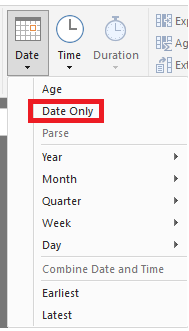
In the query editor, you find Date and Time options at the right hand side of both the "Add Column" tab and the "Transform" tab. These options include extracting date only and time only. They are available only if you first select your date/time column.
So you might add a column with time only and then transform the original column to date only.
In the query editor, you find Date and Time options at the right hand side of both the "Add Column" tab and the "Transform" tab. These options include extracting date only and time only. They are available only if you first select your date/time column.
So you might add a column with time only and then transform the original column to date only.
Thanks!
The Power BI Data Visualization World Championships is back! Get ahead of the game and start preparing now!
| User | Count |
|---|---|
| 39 | |
| 37 | |
| 33 | |
| 32 | |
| 29 |
| User | Count |
|---|---|
| 133 | |
| 88 | |
| 85 | |
| 68 | |
| 64 |