cancel
Showing results for 
Search instead for 
Did you mean: 

View all the Fabric Data Days sessions on demand. View schedule

Reply
Anonymous
Not applicable

dax calculate & max value

Greetings to all, I hope you are well
I am again in the forum with a query, which I suspect can be resolved with a simple dax formula, but I have not yet managed to solve.
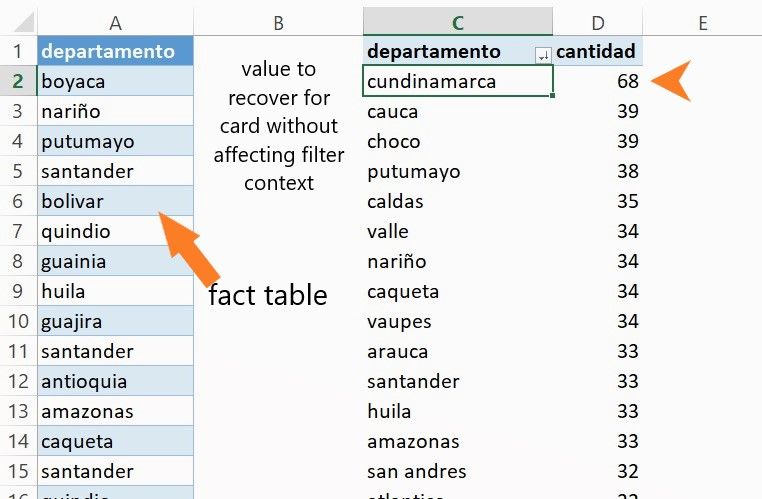
in my facts table I have records that represent a theft event for each department, the measure I used to add it was simply a count of rows with "countrows"
Now I would like to place a card with the department that has the most theft, and that this is not affected by the filter context
try to do it with "calculate" and "max" "max" but I do not know how to combine them to get the result I want.
I hope some of those present can help me. Thanks teachers


example.jpg

1 ACCEPTED SOLUTION
Zubair_Muhammad
Community Champion
Community Champion

@Anonymous 


try this MEASURE


Measure =
CONCATENATEX (
    TOPN ( 1, ALL ( TableName[Departamento] ), [Cantidad], DESC ),
    [Departamento],
    ","
)

View solution in original post

1 REPLY 1
Zubair_Muhammad
Community Champion
Community Champion

@Anonymous 


try this MEASURE


Measure =
CONCATENATEX (
    TOPN ( 1, ALL ( TableName[Departamento] ), [Cantidad], DESC ),
    [Departamento],
    ","
)

Helpful resources

Announcements
November Power BI Update Carousel

Power BI Monthly Update - November 2025

Check out the November 2025 Power BI update to learn about new features.

Fabric Data Days Carousel

Fabric Data Days

Advance your Data & AI career with 50 days of live learning, contests, hands-on challenges, study groups & certifications and more!

FabCon Atlanta 2026 carousel

FabCon Atlanta 2026

Join us at FabCon Atlanta, March 16-20, for the ultimate Fabric, Power BI, AI and SQL community-led event. Save $200 with code FABCOMM.

Top Solution Authors
Top Kudoed Authors