cancel
Showing results for 
Search instead for 
Did you mean: 

The Power BI Data Visualization World Championships is back! Get ahead of the game and start preparing now! Learn more

Reply
RMV
Helper V
Helper V

datesadd(datesmtd) issue

Hi,


I have a calculated column to get the total amount in a month from last year from a transactional table, to be compared with the MTD figure in the current year in a visual.

The formula applied is

Amount MTD Previous Year. = CALCULATE(SUM('Transation'[Amount]),DATEADD(DATESMTD(DateCalendar[Date]),-12,MONTH))


And I have another table consists of calendar dates from several years period.

I use this calendar date table as an X-axis and filtering month and year.

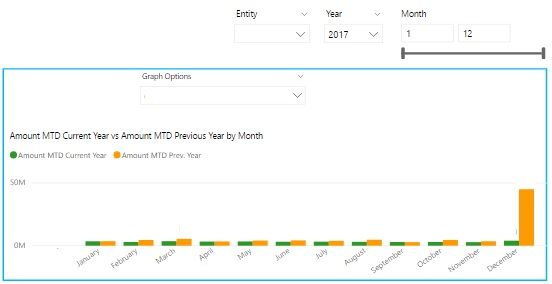
The screen shot below is the visual I mentioned.

The result given from the previous year MTD from Jan-Nov is correct.

However, the Dec figure shows incorrect result. It's showing the total amount of Jan-Nov.


I need help to show me what is wrong with the formula & how to fix this, so I can get the correct figure to show MTD of each month from the previous year of the year that is selected as filter.

Thanks.


pic.jpg


1 ACCEPTED SOLUTION
Ashish_Mathur
Super User
Super User

Hi,


Try this measure (not a calculated column formula)


=CALCULATE(SUM('Transation'[Amount]),SAMEPERIODLASTYEAR(DateCalendar[Date]))


Does this work?


Regards,
Ashish Mathur
http://www.ashishmathur.com
https://www.linkedin.com/in/excelenthusiasts/

View solution in original post

4 REPLIES 4
Ashish_Mathur
Super User
Super User

Hi,


Try this measure (not a calculated column formula)


=CALCULATE(SUM('Transation'[Amount]),SAMEPERIODLASTYEAR(DateCalendar[Date]))


Does this work?


Regards,
Ashish Mathur
http://www.ashishmathur.com
https://www.linkedin.com/in/excelenthusiasts/

Hi @Ashish_Mathur,

I got the problem. It's because of the data.

Sorry to bother you.

Thanks anyway. I will keep in mind your suggestion next time.


@RMV,


To help close this thread, you may accept solution. Your contribution is highly appreciated.

Community Support Team _ Sam Zha
If this post helps, then please consider Accept it as the solution to help the other members find it more quickly.

You are welcome.


Regards,
Ashish Mathur
http://www.ashishmathur.com
https://www.linkedin.com/in/excelenthusiasts/

Helpful resources

Announcements
Power BI DataViz World Championships

Power BI Dataviz World Championships

The Power BI Data Visualization World Championships is back! Get ahead of the game and start preparing now!

December 2025 Power BI Update Carousel

Power BI Monthly Update - December 2025

Check out the December 2025 Power BI Holiday Recap!

FabCon Atlanta 2026 carousel

FabCon Atlanta 2026

Join us at FabCon Atlanta, March 16-20, for the ultimate Fabric, Power BI, AI and SQL community-led event. Save $200 with code FABCOMM.