Get Fabric or SQL Certified for Free.
Get certified for free when you join Fabric Data Days 2026 and dive into Fabric, Power BI, SQL, AI, and other essential data skills.
Join now- Power BI forums
- Get Help with Power BI
- Desktop
- Service
- Report Server
- Power Query
- Mobile Apps
- Developer
- DAX Commands and Tips
- Custom Visuals Development Discussion
- Health and Life Sciences
- Power BI Spanish forums
- Translated Spanish Desktop
- Training and Consulting
- Instructor Led Training
- Dashboard in a Day for Women, by Women
- Galleries
- Data Stories Gallery
- Themes Gallery
- Contests Gallery
- QuickViz Gallery
- Quick Measures Gallery
- Visual Calculations Gallery
- Fabric Apps Gallery
- Notebook Gallery
- Translytical Task Flow Gallery
- TMDL Gallery
- R Script Showcase
- Webinars and Video Gallery
- Ideas
- Custom Visuals Ideas (read-only)
- Issues
- Issues
- Events
- Upcoming Events
July 28 - August 9 | Final Round of the Power BI Dataviz World Championships. This is your chance. Learn more
- Subscribe to RSS Feed
- Mark Topic as New
- Mark Topic as Read
- Float this Topic for Current User
- Bookmark
- Subscribe
- Printer Friendly Page


- Mark as New
- Bookmark
- Subscribe
- Mute
- Subscribe to RSS Feed
- Permalink
- Report Inappropriate Content
date
Hello,
I need to manage some date.
I need to calculate the difference (in terms o number days) among dates.
so, I have for each costumer the date related to each transaction they make and I need to know how many days are in between those days. So i would need to do something like:
4/4/2019 - 7/4/2019 = 3 days
and this calculation has to be done for an entire coloumn.
My table look like something about:
| costumer id | transaction amount | date |
| sr1212 | 1111 | 4/4/2020 |
| st2455 | 1223 | 5/4/2020 |
| sr1212 | 4321 | 7/4/2020 |
so my result should be:
| costumer id | number of transaction | days in between |
| sr1212 | 2 | 3 |
| st2455 | 1 | 0 |
Can you help me?
Thank you so much
Solved! Go to Solution.


- Mark as New
- Bookmark
- Subscribe
- Mute
- Subscribe to RSS Feed
- Permalink
- Report Inappropriate Content
Hi @carol_mar ,
//Measures
number of transaction =
COUNT(Sheet7[transaction amount])

days in between =
VAR x = MAX(Sheet7[date])
VAR y = MIN(Sheet7[date])
RETURN
DATEDIFF(y,x,DAY)
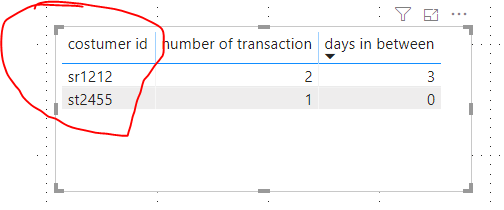
You must add [costumer id] column into the table chart or the matrix chart, doing this is equivalent to using ALLEXCEPT() function.
Best regards,
Lionel Chen
If this post helps, then please consider Accept it as the solution to help the other members find it more quickly.
- Mark as New
- Bookmark
- Subscribe
- Mute
- Subscribe to RSS Feed
- Permalink
- Report Inappropriate Content
Hi @carol_mar ,
//Measures
number of transaction =
COUNT(Sheet7[transaction amount])

days in between =
VAR x = MAX(Sheet7[date])
VAR y = MIN(Sheet7[date])
RETURN
DATEDIFF(y,x,DAY)
You must add [costumer id] column into the table chart or the matrix chart, doing this is equivalent to using ALLEXCEPT() function.
Best regards,
Lionel Chen
If this post helps, then please consider Accept it as the solution to help the other members find it more quickly.


- Mark as New
- Bookmark
- Subscribe
- Mute
- Subscribe to RSS Feed
- Permalink
- Report Inappropriate Content
Try
days diff =
datediff(MIN(Table[date]),MIN(Table[date]), DAY)
or
calculate(days diff =
datediff(MIN(Table[date]),MIN(Table[date]), DAY),values(Table[costumer id]))
number of trasactions = CALCULATE(count(Table[costumer id]))


- Mark as New
- Bookmark
- Subscribe
- Mute
- Subscribe to RSS Feed
- Permalink
- Report Inappropriate Content
Hi @carol_mar
try
days in between =
CALCULATE(MAX(Table[date]), ALLEXCEPT(Table, Table[costumer id])) -
CALCULATE(MIN(Table[date]), ALLEXCEPT(Table, Table[costumer id]))
and
number of transaction =
CALCULATE(Countrows(Table), ALLEXCEPT(Table, Table[costumer id]))
do not hesitate to give a kudo to useful posts and mark solutions as solution
- Mark as New
- Bookmark
- Subscribe
- Mute
- Subscribe to RSS Feed
- Permalink
- Report Inappropriate Content
no, it doesn't work, gives me error
- Mark as New
- Bookmark
- Subscribe
- Mute
- Subscribe to RSS Feed
- Permalink
- Report Inappropriate Content
- Mark as New
- Bookmark
- Subscribe
- Mute
- Subscribe to RSS Feed
- Permalink
- Report Inappropriate Content
😪

this one, why??
- Mark as New
- Bookmark
- Subscribe
- Mute
- Subscribe to RSS Feed
- Permalink
- Report Inappropriate Content
- Mark as New
- Bookmark
- Subscribe
- Mute
- Subscribe to RSS Feed
- Permalink
- Report Inappropriate Content
yes sorry, but still it gives all 0
- Mark as New
- Bookmark
- Subscribe
- Mute
- Subscribe to RSS Feed
- Permalink
- Report Inappropriate Content
- Mark as New
- Bookmark
- Subscribe
- Mute
- Subscribe to RSS Feed
- Permalink
- Report Inappropriate Content
and now.. 30 everywhere😪
- Mark as New
- Bookmark
- Subscribe
- Mute
- Subscribe to RSS Feed
- Permalink
- Report Inappropriate Content
I hope you created it as a measure and using with customer id.
If you want to get that in the table as a column, then you can get a diff from the last date
datediff = datediff(table[date],maxx(filter(table[cust_id]=earlier(table[cust_id]) && table[date]<earlier(table[date])),table[date]),DAY)
- Mark as New
- Bookmark
- Subscribe
- Mute
- Subscribe to RSS Feed
- Permalink
- Report Inappropriate Content
when does the "filter ends?" it says too many arguments passed to the filter function and also.. the first argument of the filter should be a table while in your expression is a column. Am I wrong?
Thank you for helping
- Mark as New
- Bookmark
- Subscribe
- Mute
- Subscribe to RSS Feed
- Permalink
- Report Inappropriate Content
also, trying to modify something it says now "DAX comparison operations do not support comparing values of ytpe Date with values of type Text. Consider using the VALUE or FORMAT function to convert one of the values."
- Mark as New
- Bookmark
- Subscribe
- Mute
- Subscribe to RSS Feed
- Permalink
- Report Inappropriate Content
I formatted it, Table name was missing after filter
datediff(table[date]
		,maxx(filter(table,
					table[cust_id]=earlier(table[cust_id])
					&& table[date]<earlier(table[date])
					)
				,table[date]
			)
			,DAY
)- Mark as New
- Bookmark
- Subscribe
- Mute
- Subscribe to RSS Feed
- Permalink
- Report Inappropriate Content
unfortunatly doesn't give any reasonable result. It goes from 0 to negative numbers...

Helpful resources

Fabric Community Sticker Challenge - Barcelona 2026
If you love stickers, then you will definitely want to check out our community sticker challenge, Barcelona edition!

Power BI Monthly Update - July 2026
Check out the July 2026 Power BI update to learn about new features.

Power BI DataViz World Championships - June 2026
A new Power BI DataViz World Championship is coming this June! Don't miss out on submitting your entry.

| User | Count |
|---|---|
| 28 | |
| 28 | |
| 20 | |
| 19 | |
| 19 |


| User | Count |
|---|---|
| 40 | |
| 31 | |
| 18 | |
| 18 | |
| 15 |


