Join us at FabCon Atlanta from March 16 - 20, 2026, for the ultimate Fabric, Power BI, AI and SQL community-led event. Save $200 with code FABCOMM.
Register now!The Power BI Data Visualization World Championships is back! Get ahead of the game and start preparing now! Learn more
I have an excel file that contains a date column. In the query editor, it is formatted as "date". Then, when I come to use it in a bar graph and select the display as months, I choose modeling>then change it to format as "mm-yyyy". However, it does not show up on the graph as the way i have it selected to display. Am I missing something?? Thanks in advance for any help!
Hi @mollig3,
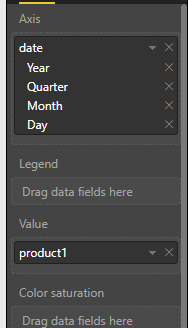
When you added date to X-axis of bar chart, did you change the default date hierarchy to original date format?
Best regards,
Yuliana Gu
Yes, that is how my date appears when I pull it into the X-axis. But I have january and february of 2017 and 2018 and the rest of the months I only have as 2017 so I'm hoping to distinguish between the different years when the month is the same.
The Power BI Data Visualization World Championships is back! Get ahead of the game and start preparing now!
| User | Count |
|---|---|
| 37 | |
| 36 | |
| 33 | |
| 31 | |
| 29 |
| User | Count |
|---|---|
| 132 | |
| 86 | |
| 85 | |
| 68 | |
| 64 |