cancel
Showing results for 
Search instead for 
Did you mean: 

We've captured the moments from FabCon & SQLCon that everyone is talking about, and we are bringing them to the community, live and on-demand. Starts on April 14th. Register now

Reply
nagoor
Helper III
Helper III

data source error while connecting a folder

Hi All,


 I am getting an error while connecting the Data source as a "Folder" to do schedule refresh. I have installed gateway in my computer, but not able to connect the folder to do a scheduled refresh, where I am going to publish this one to my colleagues. 


image.png

1 ACCEPTED SOLUTION
Anonymous
Not applicable

@nagoor,

Do mask sensitive data before uploading screenshot.

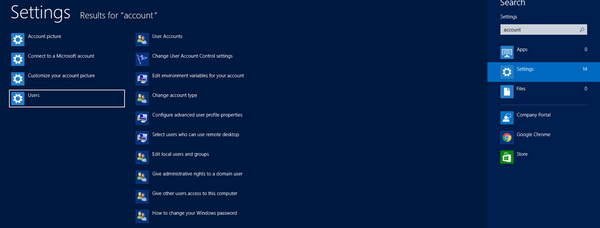
Check your user account in the Settings of your computer,  enter this user account(domain\user in my scenario) as Windows username when adding Folder data source under gateway, and enter relevant password of this account(ensure the password is correct). This way, you should have no issues setting schedule refresh for your dataset using on-premises gateway.
2.png1.JPG


Regards,
Lydia

View solution in original post

4 REPLIES 4
Anonymous
Not applicable

@nagoor,

Do mask sensitive data before uploading screenshot.

Check your user account in the Settings of your computer,  enter this user account(domain\user in my scenario) as Windows username when adding Folder data source under gateway, and enter relevant password of this account(ensure the password is correct). This way, you should have no issues setting schedule refresh for your dataset using on-premises gateway.
2.png1.JPG


Regards,
Lydia

Anonymous
Not applicable

Hi I am also getting same error, but after giving the domain name also the error presisit, can some one help me

anyone know if it is possible to use \\server\share instead of C:\whatever ? 
or does this Gateway software only allow connections to the local server where it is installed?  

I want to find a way to connect to an internal fileserver share and pick up files.    

Unable to connect: We encountered an error while trying to connect.

Details: "We could not register this data source for any gateway instances within this cluster.

Please find more details below about specific errors for each gateway instance.

"Hide details Activity ID: a7cexxxxxxxxxxxxxxxxxxxx

Request ID: 748xxxxxxxxxxxxxxxxxxxxxxxx

Cluster URI: https://wabi-north-europe-redirect.analysis.windows.net

Status code: 400

Error Code: DMTS_PublishDatasourceToClusterErrorCode

Time: Tue Oct 23 2018 10:15:35 GMT+0200 (Central European Summer Time)


Version: 13.0.7055.182


PowerBIGatewayEU: Cannot connect to the mashup data source.

See error details for more information.

Underlying error code: -2147467259 Underlying error message: An IO error occurred while trying to access the file '\\xxxxxxxxxx\xxxx'.

DM_ErrorDetailNameCode_UnderlyingHResult: -2147467259

Microsoft.Data.Mashup.ValueError.Reason: DataSource.Error

Thanks, Lydia. 


It's worked

Helpful resources

Announcements
New to Fabric survey Carousel

New to Fabric Survey

If you have recently started exploring Fabric, we'd love to hear how it's going. Your feedback can help with product improvements.

Power BI DataViz World Championships carousel

Power BI DataViz World Championships - June 2026

A new Power BI DataViz World Championship is coming this June! Don't miss out on submitting your entry.

Join our Fabric User Panel

Join our Fabric User Panel

Share feedback directly with Fabric product managers, participate in targeted research studies and influence the Fabric roadmap.

March Power BI Update Carousel

Power BI Community Update - March 2026

Check out the March 2026 Power BI update to learn about new features.