Learn from the best! Meet the four finalists headed to the FINALS of the Power BI Dataviz World Championships! Register now
Hi , I have the following raw data with me
| Donor Name | Relationship | Donation Amount(S$) | Campaign | Programme |
| Emma Rock | 50,000.00 | ASD Distinguished Lecture Series | ||
| 3D Technology | CEO - Emma Rock | 60,000.00 | ||
| Steve Rock | Parent of Emma Rock | |||
| Rachel Rock | Brother/Sister of Emma Rock | 5,600.00 | ||
| Rachel Rock | Brother/Sister of Emma Rock | 5,800.00 | ||
| Eric Chew | Influencer of Rachel Rock | 18,888.00 | ||
| Eric Chew | Influencer of Rachel Rock | 10,888.00 | Class of 2016 Giving | Class of 2016 Alumus Scholarship |
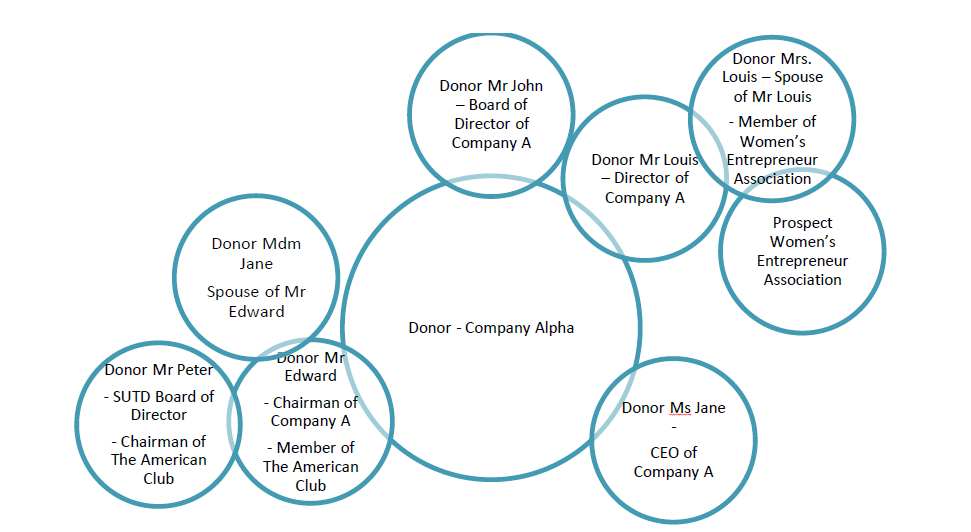
I want to represent it as
Can some one help me which visual should I use in order to representation the data simmilar to how its done in the above image.
@RashmitaR The closest visual i can see that might fit your needs would be the "Cluster Map" custom visual. You can download it from the Custom Visuals Gallery
If you have recently started exploring Fabric, we'd love to hear how it's going. Your feedback can help with product improvements.
A new Power BI DataViz World Championship is coming this June! Don't miss out on submitting your entry.
Share feedback directly with Fabric product managers, participate in targeted research studies and influence the Fabric roadmap.
| User | Count |
|---|---|
| 57 | |
| 34 | |
| 33 | |
| 18 | |
| 16 |
| User | Count |
|---|---|
| 67 | |
| 65 | |
| 44 | |
| 30 | |
| 28 |