Join us at FabCon Atlanta from March 16 - 20, 2026, for the ultimate Fabric, Power BI, AI and SQL community-led event. Save $200 with code FABCOMM.
Register now!Get Fabric Certified for FREE during Fabric Data Days. Don't miss your chance! Request now
Hi all,
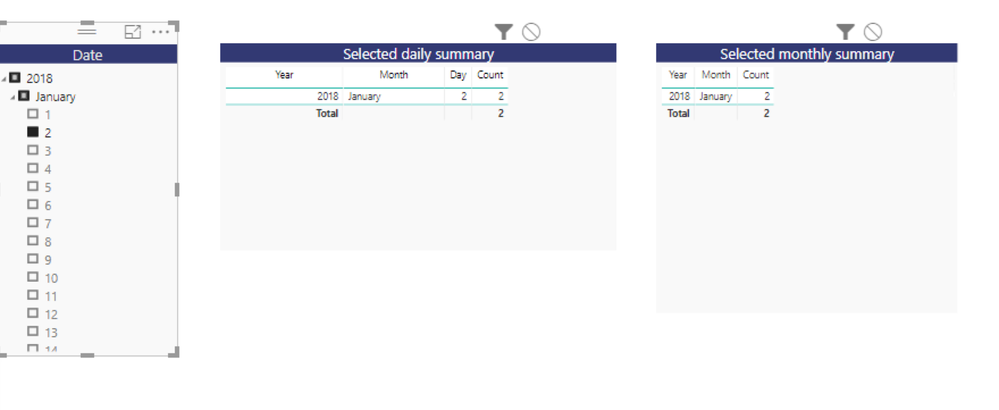
I have a date filter and would like to display one table with days granularity and the other one with a month. For example, If I select jan 2, using hierarchy filter I want the first table to display data based on days and the other table to produce a result based on a monthly basis. Is this possible?
So when I design it appears like this,
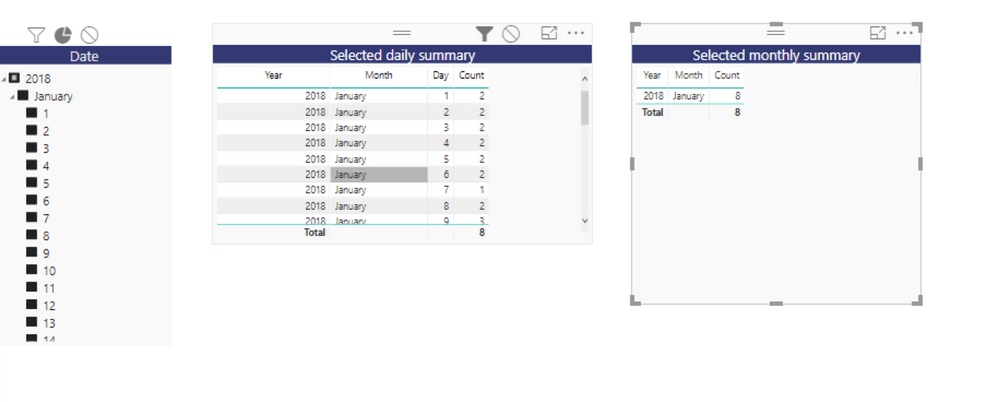
But I want something like this, I.e. the second table to produce aggregated month value even when jan 2 is selected.
When using visual interaction option, it displays the whole month but I wanted to see something specific to that month alone. Is this possible by anyways?
Thanks in advance.
Cheers,
Indhu.
Solved! Go to Solution.
Hi @indhu,
Follow below steps:
1. Create a calculated column Month in your table which has count.
Month = MONTH(Table1[Date])
2. Create a measure which will hold the count for selected month.
MonthlyCount =
VAR SelectedMonth = VALUES(Table1[Month])
RETURN
CALCULATE(SUM(Table1[Count]),
FILTER(ALLEXCEPT(Table1,Table1[Date])
, Table1[Month]= SelectedMonth
)
)
3. Create a Date table which will be used in slicers.
Date =
ADDCOLUMNS (
CALENDAR (
MIN ( Table1[Date] ),
MAX ( Table1[Date] )
),
"Year", YEAR ( [Date] ),
"Monthnumber", FORMAT (
[Date],
"MM"
),
"MonthNameLong", FORMAT (
[Date],
"mmmm"
)
)
4. Create a relationship on Date column between these two tables.
5. User Year > Month > Date heirarchy from this table in your hierarchy slicer and use MonthCount measure as count in your monthly summary table.
You have now got the desired result.
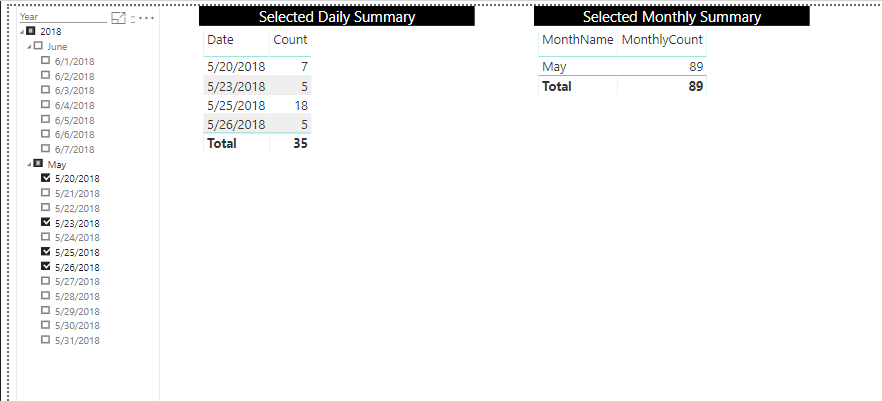
Refer to this pbix where I replicated your scenario and derived the result in case you get stuck.
Prateek Raina
Hi @indhu,
Follow below steps:
1. Create a calculated column Month in your table which has count.
Month = MONTH(Table1[Date])
2. Create a measure which will hold the count for selected month.
MonthlyCount =
VAR SelectedMonth = VALUES(Table1[Month])
RETURN
CALCULATE(SUM(Table1[Count]),
FILTER(ALLEXCEPT(Table1,Table1[Date])
, Table1[Month]= SelectedMonth
)
)
3. Create a Date table which will be used in slicers.
Date =
ADDCOLUMNS (
CALENDAR (
MIN ( Table1[Date] ),
MAX ( Table1[Date] )
),
"Year", YEAR ( [Date] ),
"Monthnumber", FORMAT (
[Date],
"MM"
),
"MonthNameLong", FORMAT (
[Date],
"mmmm"
)
)
4. Create a relationship on Date column between these two tables.
5. User Year > Month > Date heirarchy from this table in your hierarchy slicer and use MonthCount measure as count in your monthly summary table.
You have now got the desired result.
Refer to this pbix where I replicated your scenario and derived the result in case you get stuck.
Prateek Raina
Check out the November 2025 Power BI update to learn about new features.
Advance your Data & AI career with 50 days of live learning, contests, hands-on challenges, study groups & certifications and more!