This is best Fabric, Power BI, SQL and AI community event. How do we know? The last event sold out! Save €200 with code FABCMTY200.
Register nowA new Data Days event is coming soon! This time we’re going bigger than ever. Fabric, Power BI, SQL, AI and more. Don't miss out.
I downloaded the "Enlighten Data Story" custom visual a while back and have been using in in most of my reports. The formatting use to work just fine, but when I opened Power Bi this morning (desktop and server) all the formatting was incorrect and didn't change when I tried to edit it under the format field. So instread of showing 41,9% its showing 0.41934346546 for example.
Under the modeling tab at the top the formatting still shows it so be a percentage but it's not displaying correctly in the custom visual.
There was a fairly signfidicant new version of PowerBI dropped today and if you have the Windows Store version it would have been installed automatically and it may have broken something in the custom visual. You could try installing the visual again form the store and if that does not work i would recommend reaching out to the developer.
I don't think MS tests all (many, or any) custom visuals when they roll out new releases. (This is one of the reasons I tend to avoid custom visuals.)
Hi
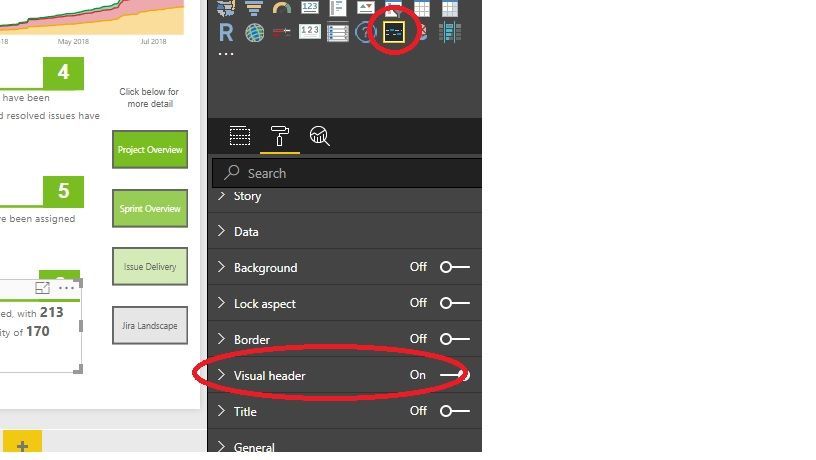
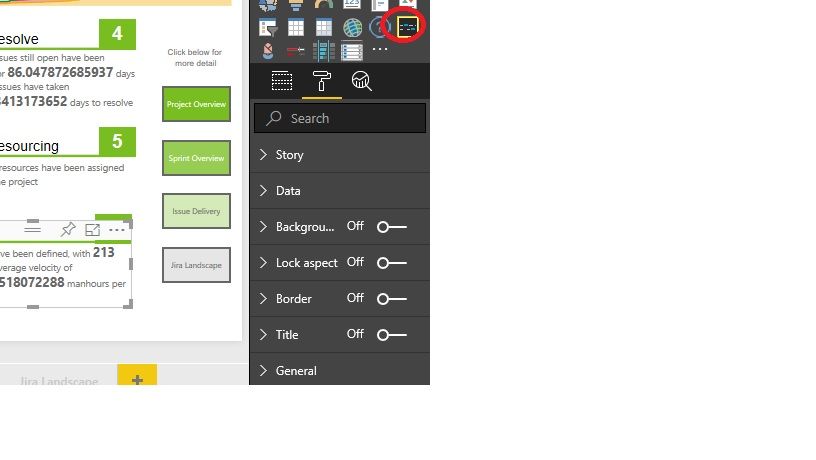
I down loaded the latest version of the visual and it seems to be working 100% on my Desktop, but loses formatting in the Service. I do notice that there is a new? option that appears in the Desktop, that is not visible if I edit the report in the service (Visual Header?)
Desktop
Service
Is the service using the same version? I have mailed Enlighten, but would appreciate any advice as I am reluctant to redevelop the reports unless absolutely necessary
Thanks and Regards
Doug
Check out the May 2026 Power BI update to learn about new features.
Sign up to receive a private message when registration opens and key events begin.
If you have recently started exploring Fabric, we'd love to hear how it's going. Your feedback can help with product improvements.
| User | Count |
|---|---|
| 30 | |
| 28 | |
| 23 | |
| 19 | |
| 17 |
| User | Count |
|---|---|
| 48 | |
| 46 | |
| 41 | |
| 21 | |
| 18 |