Join us at FabCon Atlanta from March 16 - 20, 2026, for the ultimate Fabric, Power BI, AI and SQL community-led event. Save $200 with code FABCOMM.
Register now!The Power BI Data Visualization World Championships is back! Get ahead of the game and start preparing now! Learn more
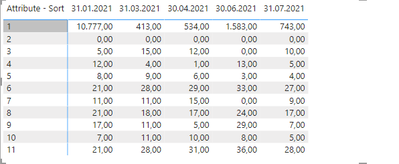
I have a matrix that looks like this:
How can I create another one, in which the value for the current month is equal to the current month - the previous month.
It means, for example for 30.04.2021 we should have 534-413.
I have used a measure like this:
Solved! Go to Solution.
Hi @elimey
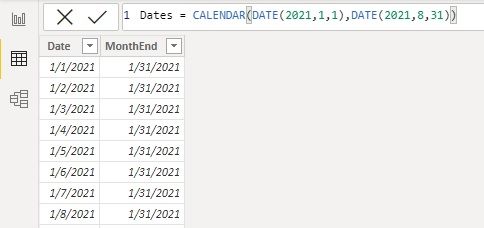
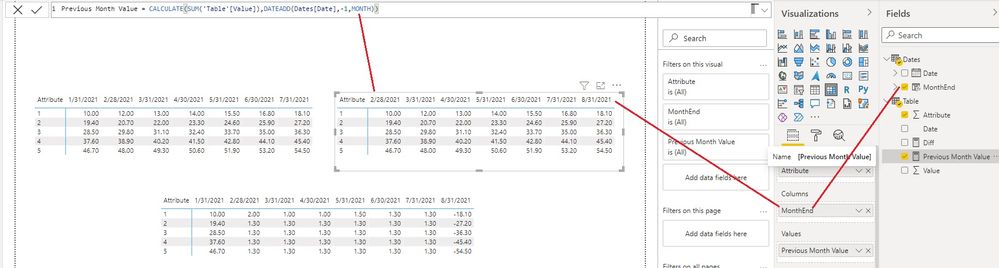
You can add a MonthEnd column to Date table, then use this MonthEnd column in the Matrix as Column field. Then use measures
Previous Month Value = CALCULATE(SUM('Table'[Value]),DATEADD(Dates[Date],-1,MONTH))Diff = SUM('Table'[Value]) - CALCULATE(SUM('Table'[Value]),DATEADD(Dates[Date],-1,MONTH))
Best Regards,
Community Support Team _ Jing
If this post helps, please Accept it as Solution to help other members find it.
Hi @elimey
You can add a MonthEnd column to Date table, then use this MonthEnd column in the Matrix as Column field. Then use measures
Previous Month Value = CALCULATE(SUM('Table'[Value]),DATEADD(Dates[Date],-1,MONTH))Diff = SUM('Table'[Value]) - CALCULATE(SUM('Table'[Value]),DATEADD(Dates[Date],-1,MONTH))
Best Regards,
Community Support Team _ Jing
If this post helps, please Accept it as Solution to help other members find it.
@elimey , You should always use date table, marked as date table , joined with date of you table , month year should be use from date table
VAR __PREV_MONTH =
CALCULATE(
SUM('Table'[Value]),
DATEADD('Date'[Date], -1, MONTH)
)
RETURN
SUM('Table'[Value]) - __PREV_MONTH
Why Time Intelligence Fails - Powerbi 5 Savior Steps for TI : https://youtu.be/OBf0rjpp5Hw
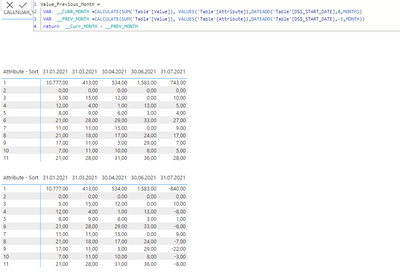
with date table I get the same result:
As you can see in the picture above, it just affects the last column, i.e. 31.07.2021, not the rest of the columns.
The Power BI Data Visualization World Championships is back! Get ahead of the game and start preparing now!
Check out the November 2025 Power BI update to learn about new features.
| User | Count |
|---|---|
| 59 | |
| 43 | |
| 42 | |
| 23 | |
| 17 |
| User | Count |
|---|---|
| 190 | |
| 122 | |
| 96 | |
| 66 | |
| 47 |