Join us at FabCon Atlanta from March 16 - 20, 2026, for the ultimate Fabric, Power BI, AI and SQL community-led event. Save $200 with code FABCOMM.
Register now!The Power BI Data Visualization World Championships is back! It's time to submit your entry. Live now!
Hi All,
I have ID and Name column in two different tables
ID is comma separated value.
| Table 1 |
| ID |
| 1,2,3 |
| 2,4 |
| 5,2 |
| Table 2 | |
| ID | Name |
| 1 | A |
| 2 | B |
| 3 | C |
| 4 | D |
| 5 | E |
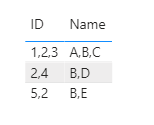
I want to get Name column as comma separated as ID. The output should be :
| Table 3 | |
| ID | Name |
| 1,2,3 | A,B,C |
| 2,4 | B,D |
| 5,2 | E,B |
TIA
Solved! Go to Solution.
Hi @sdobi05 ,
You could create a column using the following formula:
Name =
CONCATENATEX (
CALCULATETABLE (
VALUES ( Table2[Name] ),
FILTER ( Table2, SEARCH ( Table2[ID], Table1[ID], 1, 0 ) > 0 )
),
[Name],
","
)Did I answer your question ? Please mark my reply as solution. Thank you very much.
If not, please upload some insensitive data samples and expected output.
Best Regards,
Eyelyn Qin
Hi @sdobi05 ,
You could create a column using the following formula:
Name =
CONCATENATEX (
CALCULATETABLE (
VALUES ( Table2[Name] ),
FILTER ( Table2, SEARCH ( Table2[ID], Table1[ID], 1, 0 ) > 0 )
),
[Name],
","
)Did I answer your question ? Please mark my reply as solution. Thank you very much.
If not, please upload some insensitive data samples and expected output.
Best Regards,
Eyelyn Qin
@sdobi05 , In table a create a new column ID 1
Split ID1 on , into rows : https://www.tutorialgateway.org/how-to-split-columns-in-power-bi/
Then combine Table 1 and table 2 using ID and ID1 and use concatenatex on Name
Hey Amit.. Thanks for the solution but i want to achieve it withing DAX.
The Power BI Data Visualization World Championships is back! It's time to submit your entry.
Check out the January 2026 Power BI update to learn about new features.
| User | Count |
|---|---|
| 61 | |
| 48 | |
| 35 | |
| 25 | |
| 23 |
| User | Count |
|---|---|
| 134 | |
| 110 | |
| 59 | |
| 39 | |
| 32 |