FabCon is coming to Atlanta
Join us at FabCon Atlanta from March 16 - 20, 2026, for the ultimate Fabric, Power BI, AI and SQL community-led event. Save $200 with code FABCOMM.
Register now!- Power BI forums
- Get Help with Power BI
- Desktop
- Service
- Report Server
- Power Query
- Mobile Apps
- Developer
- DAX Commands and Tips
- Custom Visuals Development Discussion
- Health and Life Sciences
- Power BI Spanish forums
- Translated Spanish Desktop
- Training and Consulting
- Instructor Led Training
- Dashboard in a Day for Women, by Women
- Galleries
- Data Stories Gallery
- Themes Gallery
- Contests Gallery
- QuickViz Gallery
- Quick Measures Gallery
- Visual Calculations Gallery
- Notebook Gallery
- Translytical Task Flow Gallery
- TMDL Gallery
- R Script Showcase
- Webinars and Video Gallery
- Ideas
- Custom Visuals Ideas (read-only)
- Issues
- Issues
- Events
- Upcoming Events
The Power BI Data Visualization World Championships is back! Get ahead of the game and start preparing now! Learn more
- Power BI forums
- Forums
- Get Help with Power BI
- Desktop
- Re: create destination from single departure list
- Subscribe to RSS Feed
- Mark Topic as New
- Mark Topic as Read
- Float this Topic for Current User
- Bookmark
- Subscribe
- Printer Friendly Page

- Mark as New
- Bookmark
- Subscribe
- Mute
- Subscribe to RSS Feed
- Permalink
- Report Inappropriate Content
create destination from single departure list
hello, I need help to model my data in PBI desktop.
below, is my raw data:
| code | date time | description | category |
| 1 | 22/05/2018 08:22:40 | a | c |
| 1 | 22/05/2018 18:11:50 | b | d |
| 2 | 23/05/2018 07:34:42 | aa | dd |
| 2 | 23/05/2018 17:52:02 | bb | ee |
| 2 | 23/05/2018 22:02:12 | cc | ff |
| 3 | 24/05/2018 07:44:36 | aaa | bbb |
| 3 | 25/05/2018 07:46:01 | aaaa | bbbb |
now, this is the data I need:
| code | date time | description | category | date time | description | category |
| 1 | 22/05/2018 08:22:40 | a | c | 22/05/2018 18:11:50 | b | d |
| 2 | 23/05/2018 07:34:42 | aa | dd | 23/05/2018 17:52:02 | bb | ee |
| 2 | 23/05/2018 17:52:02 | bb | ee | 23/05/2018 22:02:12 | cc | ff |
| 3 | 24/05/2018 07:44:36 | aaa | bbb | |||
| 3 | 25/05/2018 07:46:01 | aaaa | bbbb |
Please, see the conceptual rules:
1- for each day, it needs to get the codes and make the second entry become the destination.
2-code number 2, there are 3 entries in the same day, so it became 2 rows. the middle row is doubled, one stays in departure and the other goes one row above as destination.
3-code number 3, there is only one entry for each day, so its new columns will be empty.
How can I achieve this new table?
if I need to separate into 3 tables, because I have 3 rules, no problem. I can merge them later.
Solved! Go to Solution.
- Mark as New
- Bookmark
- Subscribe
- Mute
- Subscribe to RSS Feed
- Permalink
- Report Inappropriate Content
thanks a lot for your help @Phil_Seamark!
I managed to get the final table that I need.
I started with your final table, then I duplicated the full query into another new table.
After that, I made 2 filters, one on each table, and then I appended them together and removed duplicate rows.
One filter is to remove blank dates from one table. The other filter is to remove duplicates from the new column code+date (only date without time).
Bad thing is, I doubled the data to perform the 2 filters. but I got what I wanted!
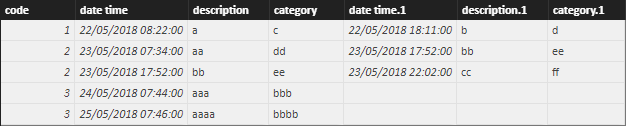
Table1
let
    Source = Table.FromRows(Json.Document(Binary.Decompress(Binary.FromText("bc1LDoAgDATQqxjWJtACQnoV44Lv/Y9gi0ZNZNEupi/TfVegVoWojddoIC6REDlJPEUd6+8OkUCizFMHEI72AYGskwJpqFMBgbxEWTpamxFEMhKVwqv3QawQ9/njrj9pVOXX+K/ZLnMjVscJ", BinaryEncoding.Base64), Compression.Deflate)), let _t = ((type text) meta [Serialized.Text = true]) in type table [code = _t, #"date time" = _t, description = _t, category = _t]),
    #"Changed Type" = Table.TransformColumnTypes(Source,{{"code", Int64.Type}, {"date time", type datetime}, {"description", type text}, {"category", type text}}),
    #"Sorted Rows" = Table.Sort(#"Changed Type",{{"date time", Order.Ascending}}),
    #"Inserted Date" = Table.AddColumn(#"Sorted Rows", "Date", each DateTime.Date([date time]), type date),
    #"Added Index" = Table.AddIndexColumn(#"Inserted Date", "Index", 0, 1),
    #"Added Index1" = Table.AddIndexColumn(#"Added Index", "Index.1", 1, 1),
    #"Merged Queries" = Table.NestedJoin(#"Added Index1",{"Date", "Index.1", "code"},#"Added Index1",{"Date", "Index", "code"},"Added Index1",JoinKind.LeftOuter),
    #"Expanded Added Index1" = Table.ExpandTableColumn(#"Merged Queries", "Added Index1", {"code", "date time", "description", "category", "Date", "Index", "Index.1"}, {"code.1", "date time.1", "description.1", "category.1", "Date.1", "Index.2", "Index.1.1"}),
    #"Removed Other Columns" = Table.SelectColumns(#"Expanded Added Index1",{"code", "date time", "description", "category", "Date", "date time.1", "description.1", "category.1"}),
    #"Rows Filtered" = Table.SelectRows(#"Removed Other Columns", each ([date time.1] <> null)),
    #"Append queries" = Table.Combine({#"Rows Filtered", #"Table1 (2)"}),
    #"Remove column" = Table.RemoveColumns(#"Append queries",{"Date"}),
    #"Remove duplicates" = Table.Distinct(#"Remove column")
in
    #"Remove duplicates"
Table1 (2)
let
    Source = Table.FromRows(Json.Document(Binary.Decompress(Binary.FromText("bc1LDoAgDATQqxjWJtACQnoV44Lv/Y9gi0ZNZNEupi/TfVegVoWojddoIC6REDlJPEUd6+8OkUCizFMHEI72AYGskwJpqFMBgbxEWTpamxFEMhKVwqv3QawQ9/njrj9pVOXX+K/ZLnMjVscJ", BinaryEncoding.Base64), Compression.Deflate)), let _t = ((type text) meta [Serialized.Text = true]) in type table [code = _t, #"date time" = _t, description = _t, category = _t]),
    #"Changed Type" = Table.TransformColumnTypes(Source,{{"code", Int64.Type}, {"date time", type datetime}, {"description", type text}, {"category", type text}}),
    #"Sorted Rows" = Table.Sort(#"Changed Type",{{"date time", Order.Ascending}}),
    #"Inserted Date" = Table.AddColumn(#"Sorted Rows", "Date", each DateTime.Date([date time]), type date),
    #"Added Index" = Table.AddIndexColumn(#"Inserted Date", "Index", 0, 1),
    #"Added Index1" = Table.AddIndexColumn(#"Added Index", "Index.1", 1, 1),
    #"Merged Queries" = Table.NestedJoin(#"Added Index1",{"Date", "Index.1", "code"},#"Added Index1",{"Date", "Index", "code"},"Added Index1",JoinKind.LeftOuter),
    #"Expanded Added Index1" = Table.ExpandTableColumn(#"Merged Queries", "Added Index1", {"code", "date time", "description", "category", "Date", "Index", "Index.1"}, {"code.1", "date time.1", "description.1", "category.1", "Date.1", "Index.2", "Index.1.1"}),
    #"Removed Other Columns" = Table.SelectColumns(#"Expanded Added Index1",{"code", "date time", "description", "category", "Date", "date time.1", "description.1", "category.1"}),
    #"Added column" = Table.AddColumn(#"Removed Other Columns", "New", each Text.Combine({Text.From([code], "pt-BR"), "|", Text.From([Date], "pt-BR")}), type text),
    #"Remove duplicates" = Table.Distinct(#"Added column", {"New"}),
    #"Remove column" = Table.RemoveColumns(#"Remove duplicates",{"New"})
in
    #"Remove column"


- Mark as New
- Bookmark
- Subscribe
- Mute
- Subscribe to RSS Feed
- Permalink
- Report Inappropriate Content
HI @Anonymous
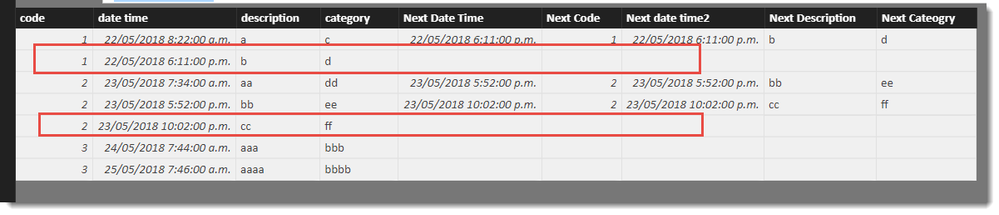
I have this calculated table which gets close
Table =
VAR T1 = ADDCOLUMNS(
            'Table1' ,
            "Next Date Time" ,
            VAR D =
                MINX(
                    FILTER('Table1',
                    'Table1'[Code] = EARLIER('Table1'[code]) &&
                    'Table1'[date time] > EARLIER('Table1'[date time])
                    ),'Table1'[date time])
            RETURN IF(FORMAT(d,"YYYYMMDD") = FORMAT([date time],"YYYYMMDD"),D)
            )


RETURN
    GENERATEALL(
        T1,
        FILTER(
            SELECTCOLUMNS(
                'Table1',
                "Next Code",[code],
                "Next date time2",[Date Time],
                "Next Description",[description] ,
                "Next Cateogry",[category]
                ),
                [Next Date Time] = [Next date time2] &&
                [code]=[Next Code] &&
                FORMAT([date time],"YYYYMMDD") = FORMAT([Next Date Time],"YYYYMMDD")
                )
         )
The question I have, is what is the rule to get rid of the 2nd lines for code 1 and 2 (highlighted), but keep both lines for code 3?
- Mark as New
- Bookmark
- Subscribe
- Mute
- Subscribe to RSS Feed
- Permalink
- Report Inappropriate Content
thanks for your reply.
yes, it is really close to what I need. but it is a calculated table using DAX, and I need a script in M language.
I have extra transformations to perform after this first issue, but i can perform myself on some tests I already did.
maybe you could filter off the empty lines for codes 1 and 2, keeping line for code 3, if you use the comand EARLIER, and then compare the values. code 1 and 2 are repeated, code 3 is not. but once again, this will be a solution in DAX, and I need M language inside the query editor.
- Mark as New
- Bookmark
- Subscribe
- Mute
- Subscribe to RSS Feed
- Permalink
- Report Inappropriate Content
HI @Anonymous
This M gets us to the same place as the DAX. So just need to determine the rule to apply that will remove the lines for codes 1 and 2 but keep the lines for code 3.
let
    Source = Table.FromRows(Json.Document(Binary.Decompress(Binary.FromText("bc1LDoAgDATQqxjWJtACQnoV44Lv/Y9gi0ZNZNEupi/TfVegVoWojddoIC6REDlJPEUd6+8OkUCizFMHEI72AYGskwJpqFMBgbxEWTpamxFEMhKVwqv3QawQ9/njrj9pVOXX+K/ZLnMjVscJ", BinaryEncoding.Base64), Compression.Deflate)), let _t = ((type text) meta [Serialized.Text = true]) in type table [code = _t, #"date time" = _t, description = _t, category = _t]),
    #"Changed Type" = Table.TransformColumnTypes(Source,{{"code", Int64.Type}, {"date time", type datetime}, {"description", type text}, {"category", type text}}),
    #"Sorted Rows" = Table.Sort(#"Changed Type",{{"date time", Order.Ascending}}),
    #"Inserted Date" = Table.AddColumn(#"Sorted Rows", "Date", each DateTime.Date([date time]), type date),
    #"Added Index" = Table.AddIndexColumn(#"Inserted Date", "Index", 0, 1),
    #"Added Index1" = Table.AddIndexColumn(#"Added Index", "Index.1", 1, 1),
    #"Merged Queries" = Table.NestedJoin(#"Added Index1",{"Date", "Index.1", "code"},#"Added Index1",{"Date", "Index", "code"},"Added Index1",JoinKind.LeftOuter),
    #"Expanded Added Index1" = Table.ExpandTableColumn(#"Merged Queries", "Added Index1", {"code", "date time", "description", "category", "Date", "Index", "Index.1"}, {"code.1", "date time.1", "description.1", "category.1", "Date.1", "Index.2", "Index.1.1"}),
    #"Removed Other Columns" = Table.SelectColumns(#"Expanded Added Index1",{"code", "date time", "description", "category", "date time.1", "description.1", "category.1"})
in
    #"Removed Other Columns"
- Mark as New
- Bookmark
- Subscribe
- Mute
- Subscribe to RSS Feed
- Permalink
- Report Inappropriate Content
thanks a lot for your help @Phil_Seamark!
I managed to get the final table that I need.
I started with your final table, then I duplicated the full query into another new table.
After that, I made 2 filters, one on each table, and then I appended them together and removed duplicate rows.
One filter is to remove blank dates from one table. The other filter is to remove duplicates from the new column code+date (only date without time).
Bad thing is, I doubled the data to perform the 2 filters. but I got what I wanted!
Table1
let
    Source = Table.FromRows(Json.Document(Binary.Decompress(Binary.FromText("bc1LDoAgDATQqxjWJtACQnoV44Lv/Y9gi0ZNZNEupi/TfVegVoWojddoIC6REDlJPEUd6+8OkUCizFMHEI72AYGskwJpqFMBgbxEWTpamxFEMhKVwqv3QawQ9/njrj9pVOXX+K/ZLnMjVscJ", BinaryEncoding.Base64), Compression.Deflate)), let _t = ((type text) meta [Serialized.Text = true]) in type table [code = _t, #"date time" = _t, description = _t, category = _t]),
    #"Changed Type" = Table.TransformColumnTypes(Source,{{"code", Int64.Type}, {"date time", type datetime}, {"description", type text}, {"category", type text}}),
    #"Sorted Rows" = Table.Sort(#"Changed Type",{{"date time", Order.Ascending}}),
    #"Inserted Date" = Table.AddColumn(#"Sorted Rows", "Date", each DateTime.Date([date time]), type date),
    #"Added Index" = Table.AddIndexColumn(#"Inserted Date", "Index", 0, 1),
    #"Added Index1" = Table.AddIndexColumn(#"Added Index", "Index.1", 1, 1),
    #"Merged Queries" = Table.NestedJoin(#"Added Index1",{"Date", "Index.1", "code"},#"Added Index1",{"Date", "Index", "code"},"Added Index1",JoinKind.LeftOuter),
    #"Expanded Added Index1" = Table.ExpandTableColumn(#"Merged Queries", "Added Index1", {"code", "date time", "description", "category", "Date", "Index", "Index.1"}, {"code.1", "date time.1", "description.1", "category.1", "Date.1", "Index.2", "Index.1.1"}),
    #"Removed Other Columns" = Table.SelectColumns(#"Expanded Added Index1",{"code", "date time", "description", "category", "Date", "date time.1", "description.1", "category.1"}),
    #"Rows Filtered" = Table.SelectRows(#"Removed Other Columns", each ([date time.1] <> null)),
    #"Append queries" = Table.Combine({#"Rows Filtered", #"Table1 (2)"}),
    #"Remove column" = Table.RemoveColumns(#"Append queries",{"Date"}),
    #"Remove duplicates" = Table.Distinct(#"Remove column")
in
    #"Remove duplicates"
Table1 (2)
let
    Source = Table.FromRows(Json.Document(Binary.Decompress(Binary.FromText("bc1LDoAgDATQqxjWJtACQnoV44Lv/Y9gi0ZNZNEupi/TfVegVoWojddoIC6REDlJPEUd6+8OkUCizFMHEI72AYGskwJpqFMBgbxEWTpamxFEMhKVwqv3QawQ9/njrj9pVOXX+K/ZLnMjVscJ", BinaryEncoding.Base64), Compression.Deflate)), let _t = ((type text) meta [Serialized.Text = true]) in type table [code = _t, #"date time" = _t, description = _t, category = _t]),
    #"Changed Type" = Table.TransformColumnTypes(Source,{{"code", Int64.Type}, {"date time", type datetime}, {"description", type text}, {"category", type text}}),
    #"Sorted Rows" = Table.Sort(#"Changed Type",{{"date time", Order.Ascending}}),
    #"Inserted Date" = Table.AddColumn(#"Sorted Rows", "Date", each DateTime.Date([date time]), type date),
    #"Added Index" = Table.AddIndexColumn(#"Inserted Date", "Index", 0, 1),
    #"Added Index1" = Table.AddIndexColumn(#"Added Index", "Index.1", 1, 1),
    #"Merged Queries" = Table.NestedJoin(#"Added Index1",{"Date", "Index.1", "code"},#"Added Index1",{"Date", "Index", "code"},"Added Index1",JoinKind.LeftOuter),
    #"Expanded Added Index1" = Table.ExpandTableColumn(#"Merged Queries", "Added Index1", {"code", "date time", "description", "category", "Date", "Index", "Index.1"}, {"code.1", "date time.1", "description.1", "category.1", "Date.1", "Index.2", "Index.1.1"}),
    #"Removed Other Columns" = Table.SelectColumns(#"Expanded Added Index1",{"code", "date time", "description", "category", "Date", "date time.1", "description.1", "category.1"}),
    #"Added column" = Table.AddColumn(#"Removed Other Columns", "New", each Text.Combine({Text.From([code], "pt-BR"), "|", Text.From([Date], "pt-BR")}), type text),
    #"Remove duplicates" = Table.Distinct(#"Added column", {"New"}),
    #"Remove column" = Table.RemoveColumns(#"Remove duplicates",{"New"})
in
    #"Remove column"
- Mark as New
- Bookmark
- Subscribe
- Mute
- Subscribe to RSS Feed
- Permalink
- Report Inappropriate Content
how do I attach my pbix file here?
- Mark as New
- Bookmark
- Subscribe
- Mute
- Subscribe to RSS Feed
- Permalink
- Report Inappropriate Content
great! that is something I really can use! I will try to find that missing filter, and if I find I will return the full script here. once again, thanks!
Helpful resources

Power BI Dataviz World Championships
The Power BI Data Visualization World Championships is back! Get ahead of the game and start preparing now!

Power BI Monthly Update - November 2025
Check out the November 2025 Power BI update to learn about new features.

FabCon Atlanta 2026
Join us at FabCon Atlanta, March 16-20, for the ultimate Fabric, Power BI, AI and SQL community-led event. Save $200 with code FABCOMM.

| User | Count |
|---|---|
| 59 | |
| 43 | |
| 42 | |
| 23 | |
| 17 |


| User | Count |
|---|---|
| 190 | |
| 122 | |
| 96 | |
| 66 | |
| 47 |


