cancel
Showing results for 
Search instead for 
Did you mean: 

The Power BI Data Visualization World Championships is back! Get ahead of the game and start preparing now! Learn more

Reply
erihsehc
Helper III
Helper III

create custom table issue

hi there,


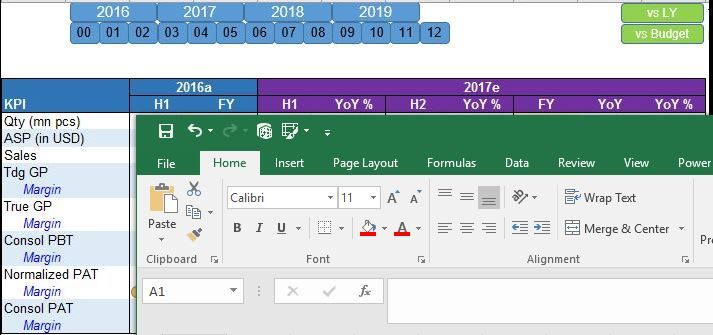
I would like to create a customer table in BI like using Excel, I am thinking to use  {(1,CALCULATE(SUM(Sheet1[amt]),FILTER(ALLSELECTED(Sheet1),Sheet1[item]="1.sales"))),(2,xxx),(3,xxx)}, union function etc. I would like to create the table as screen shot below in Power BI, the row value maybe from measure or directly from data file. I am not sure if it is a good method to create data table by using formula like {1,2,3} dax function. If I created that datatable, it should be connected with slicer. I find a problem that when I create a datatable, the slicer is not working.


I created a dummy data model below, the table on right created manually, however, it is not connected with slicer. how to make a good customized datatable connected with slicer? actually, it is a very basic function in Excel, but seems to be very difficult in Power BI, thanks

data model


table cal2.JPG


Best regards

ER

1 ACCEPTED SOLUTION
v-yulgu-msft
Microsoft Employee
Microsoft Employee

Hi @erihsehc,


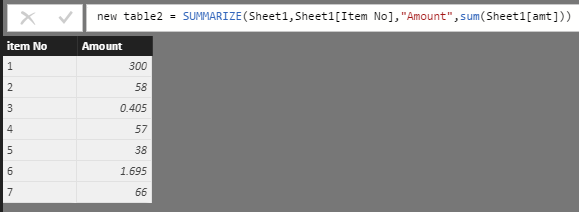
Based on my assumption, you want a calculated table like this, right?

1.PNG


However, even we create a relationship between this calculated table and source table, the [Amount] value won't be changed according to slicer selection. Because [Amount] is initialized once we created the table. In other words, the values are static in a calculated table.


Why do you need to create such a custom table? In your scenario, if you want to display value conditionally depend on slicer, you'd better use measures. For example, add [item] from 'Sheet1' into matrix rows, add measure Sum Amount=SUM(Sheet1[amt]) into matrix values. An easier way is directly add [amt] into matrix Values and choose Sum aggregation for it.


Best regards,

Yuliana Gu

Community Support Team _ Yuliana Gu
If this post helps, then please consider Accept it as the solution to help the other members find it more quickly.

View solution in original post

1 REPLY 1
v-yulgu-msft
Microsoft Employee
Microsoft Employee

Hi @erihsehc,


Based on my assumption, you want a calculated table like this, right?

1.PNG


However, even we create a relationship between this calculated table and source table, the [Amount] value won't be changed according to slicer selection. Because [Amount] is initialized once we created the table. In other words, the values are static in a calculated table.


Why do you need to create such a custom table? In your scenario, if you want to display value conditionally depend on slicer, you'd better use measures. For example, add [item] from 'Sheet1' into matrix rows, add measure Sum Amount=SUM(Sheet1[amt]) into matrix values. An easier way is directly add [amt] into matrix Values and choose Sum aggregation for it.


Best regards,

Yuliana Gu

Community Support Team _ Yuliana Gu
If this post helps, then please consider Accept it as the solution to help the other members find it more quickly.

Helpful resources

Announcements
Power BI DataViz World Championships

Power BI Dataviz World Championships

The Power BI Data Visualization World Championships is back! Get ahead of the game and start preparing now!

December 2025 Power BI Update Carousel

Power BI Monthly Update - December 2025

Check out the December 2025 Power BI Holiday Recap!

FabCon Atlanta 2026 carousel

FabCon Atlanta 2026

Join us at FabCon Atlanta, March 16-20, for the ultimate Fabric, Power BI, AI and SQL community-led event. Save $200 with code FABCOMM.