Join us at FabCon Atlanta from March 16 - 20, 2026, for the ultimate Fabric, Power BI, AI and SQL community-led event. Save $200 with code FABCOMM.
Register now!The Power BI Data Visualization World Championships is back! Get ahead of the game and start preparing now! Learn more
Solved! Go to Solution.
Hi @Bbrown44,
Could you have tried with AND function?
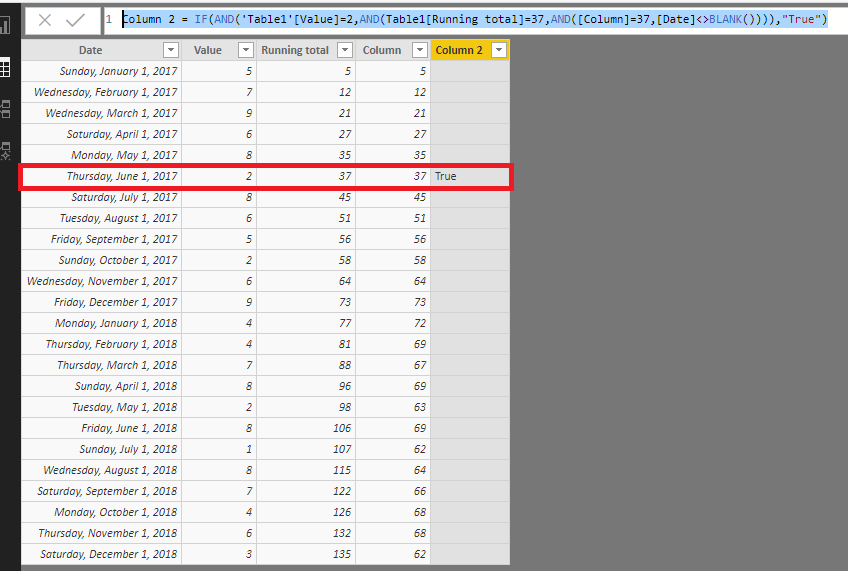
See below picture and code, it could filter the right row:
Column 2 = IF(AND('Table1'[Value]=2,AND(Table1[Running total]=37,AND([Column]=37,[Date]<>BLANK()))),"True")
Regards,
Daniel He
Hi @Bbrown44,
Could you have tried with AND function?
See below picture and code, it could filter the right row:
Column 2 = IF(AND('Table1'[Value]=2,AND(Table1[Running total]=37,AND([Column]=37,[Date]<>BLANK()))),"True")
Regards,
Daniel He
Hi @Bbrown44
You'd have to use &&, which is the AND operator, instead of &, which is the text concatenation operator.
So check that you are comparing numbers with numbers and not mixing types. In any case you will have to use the &&, since I assume you want a logic AND instead of concatenation. The engine won't necessarily complain about that.
The Power BI Data Visualization World Championships is back! Get ahead of the game and start preparing now!
| User | Count |
|---|---|
| 63 | |
| 45 | |
| 41 | |
| 36 | |
| 23 |
| User | Count |
|---|---|
| 189 | |
| 124 | |
| 106 | |
| 78 | |
| 52 |