Learn from the best! Meet the four finalists headed to the FINALS of the Power BI Dataviz World Championships! Register now
I am tyring to calculate montly percentages from a ledger using a date table.
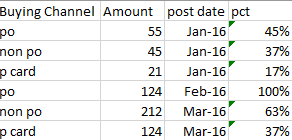
My data looks something like this
So Jan's % = 100, Feb % = 100, Mar % = 100
I can't get it to work in DAX. I've tried
% total = DIVIDE( SUM(Append1[Amount]), CALCULATE( SUM(Append1[Amount]), ALL(Append1[Buying Channel]) ) )
I'm trying to get DAX to ignore the Buying channel context and just use the date context.
Any ideas? Is it messing up because of the date table?
Solved! Go to Solution.
Hi @adgarza,
You can create a measure below:
Measure = CALCULATE(SUM('fact'[Amount]),FILTER(ALL('date'),'date'[Year]=MAX('date'[Year])))
Best Regards,
Qiuyun Yu
I believe the first step is to create a measure that is a sum by month. This can be checked by adding into the visual.
MonthSum =
CALCULATE (
SUM ( 'Table'[Amount] ),
ALLEXCEPT ( 'Table', 'Table'[Month] )
)
If i put it in a table i want it to look like this.
Year is from a date table, buying channel and amount are from a fact table, and total is the new measure. Notice it stays the same for each year.
Year Buying Channel Amount Total 2000 PO 1 6 2000 NONPO 2 6 2001 PCARD 3 6 2001 PO 4 15 2001 NONPO 5 15 2001 PCARD 6 15 2002 PO 1 6 2002 NONPO 2 6 2002 PCARD 3 6
Hi @adgarza,
You can create a measure below:
Measure = CALCULATE(SUM('fact'[Amount]),FILTER(ALL('date'),'date'[Year]=MAX('date'[Year])))
Best Regards,
Qiuyun Yu
A new Power BI DataViz World Championship is coming this June! Don't miss out on submitting your entry.
Share feedback directly with Fabric product managers, participate in targeted research studies and influence the Fabric roadmap.
| User | Count |
|---|---|
| 47 | |
| 35 | |
| 28 | |
| 17 | |
| 16 |
| User | Count |
|---|---|
| 59 | |
| 57 | |
| 40 | |
| 22 | |
| 20 |