Join us at FabCon Vienna from September 15-18, 2025
The ultimate Fabric, Power BI, SQL, and AI community-led learning event. Save €200 with code FABCOMM.
Get registered- Power BI forums
- Get Help with Power BI
- Desktop
- Service
- Report Server
- Power Query
- Mobile Apps
- Developer
- DAX Commands and Tips
- Custom Visuals Development Discussion
- Health and Life Sciences
- Power BI Spanish forums
- Translated Spanish Desktop
- Training and Consulting
- Instructor Led Training
- Dashboard in a Day for Women, by Women
- Galleries
- Data Stories Gallery
- Themes Gallery
- Contests Gallery
- Quick Measures Gallery
- Notebook Gallery
- Translytical Task Flow Gallery
- TMDL Gallery
- R Script Showcase
- Webinars and Video Gallery
- Ideas
- Custom Visuals Ideas (read-only)
- Issues
- Issues
- Events
- Upcoming Events
Enhance your career with this limited time 50% discount on Fabric and Power BI exams. Ends September 15. Request your voucher.
- Power BI forums
- Forums
- Get Help with Power BI
- Desktop
- Re: create Date table on the basis of several tabl...
- Subscribe to RSS Feed
- Mark Topic as New
- Mark Topic as Read
- Float this Topic for Current User
- Bookmark
- Subscribe
- Printer Friendly Page

- Mark as New
- Bookmark
- Subscribe
- Mute
- Subscribe to RSS Feed
- Permalink
- Report Inappropriate Content
create Date table on the basis of several tables
Hi there,
In our data, there is a Date table created on the basis of 1 loaded data:
Solved! Go to Solution.

- Mark as New
- Bookmark
- Subscribe
- Mute
- Subscribe to RSS Feed
- Permalink
- Report Inappropriate Content
yes, this could be possible simply by following these steps.
1. Append all the date columns from all Tables which contains date.
2. Remove the Duplicate dates.
3. This will contain dates which are in all the tables. Lets suppose this table is named as DimDates.
To get all the dates without skipping any date in between. You can create a table.
DimCalendar = calendar(Min(DimDates[Date]),Max(DimDates[Date]))
Thanks and Regards
Shalabh Kushwaha
- Mark as New
- Bookmark
- Subscribe
- Mute
- Subscribe to RSS Feed
- Permalink
- Report Inappropriate Content
You can add a custom column with as "Date" in each table which is just a Column from 'Sales'[PaymentDate], 'Sales'[OrderDate], 'Subscribe'[SubDate], 'Shipment'[ShippingDate], 'Active'[ActiveDate] and then go for Appending and remove all other than Date column from Appended Table.
Thanks and Regards
Shalabh Kushwaha
- Mark as New
- Bookmark
- Subscribe
- Mute
- Subscribe to RSS Feed
- Permalink
- Report Inappropriate Content
Yes, Sure
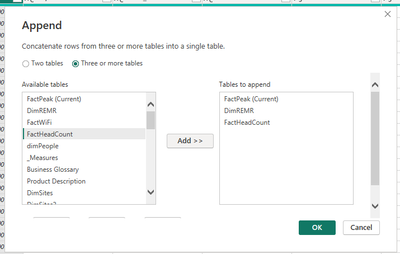
The Way through which we can append the tables.
Step 1: Go to the "Transform Data".

Step 2: Click on "Append Query" in Power Query Editor.

Step 3: Select Tables which you want to Append.
Thanks and Regards
Shalabh Kushwaha
- Mark as New
- Bookmark
- Subscribe
- Mute
- Subscribe to RSS Feed
- Permalink
- Report Inappropriate Content
Hi Shalabh_kushwah,
Thanks for your reply. Yes I understand this is a way to append table, but here my question is, the Date is in different column names in different table, but not all in "Date" Column.
So, after append, there will be more than 1 columns, e.g. 'Sales'[PaymentDate], 'Sales'[OrderDate], 'Subscribe'[SubDate], 'Shipment'[ShippingDate], 'Active'[ActiveDate]
On the other hand, I just noticed there is a column created by using DAX, not in the raw data, so the Append function seems cannot process that column.
I was wondering if there is a way to combine all the Date into 1 column.
Please advise.
Thanks.
- Mark as New
- Bookmark
- Subscribe
- Mute
- Subscribe to RSS Feed
- Permalink
- Report Inappropriate Content
You can add a custom column with as "Date" in each table which is just a Column from 'Sales'[PaymentDate], 'Sales'[OrderDate], 'Subscribe'[SubDate], 'Shipment'[ShippingDate], 'Active'[ActiveDate] and then go for Appending and remove all other than Date column from Appended Table.
Thanks and Regards
Shalabh Kushwaha
- Mark as New
- Bookmark
- Subscribe
- Mute
- Subscribe to RSS Feed
- Permalink
- Report Inappropriate Content
Thanks again Shalabh_Kushwah for the workaround.


- Mark as New
- Bookmark
- Subscribe
- Mute
- Subscribe to RSS Feed
- Permalink
- Report Inappropriate Content
@Anonymous
have you tried to use CALENDARAUTO()
CALENDARAUTO function (DAX) - DAX | Microsoft Learn
Did I answer your question? Mark my post as a solution!
Proud to be a Super User!
- Mark as New
- Bookmark
- Subscribe
- Mute
- Subscribe to RSS Feed
- Permalink
- Report Inappropriate Content
Thanks for reply. Seems this will return a full year calendar? but the actual data earliest date is not 1st of January, it can be any day, e.g. 3-April-2023. (up to what data will be loaded)
- Mark as New
- Bookmark
- Subscribe
- Mute
- Subscribe to RSS Feed
- Permalink
- Report Inappropriate Content
I don't know if we can have better solution for this. If you want the exact earliest and latest date.
maybe you can try to use below formular to get the earliest and latest date. and put them in the calendar function.
min(min(min(date1,date2),date3),date4)
Did I answer your question? Mark my post as a solution!
Proud to be a Super User!
- Mark as New
- Bookmark
- Subscribe
- Mute
- Subscribe to RSS Feed
- Permalink
- Report Inappropriate Content
thanks ryan_mayu for the plan B
- Mark as New
- Bookmark
- Subscribe
- Mute
- Subscribe to RSS Feed
- Permalink
- Report Inappropriate Content
you are welcome
Did I answer your question? Mark my post as a solution!
Proud to be a Super User!
- Mark as New
- Bookmark
- Subscribe
- Mute
- Subscribe to RSS Feed
- Permalink
- Report Inappropriate Content
yes, this could be possible simply by following these steps.
1. Append all the date columns from all Tables which contains date.
2. Remove the Duplicate dates.
3. This will contain dates which are in all the tables. Lets suppose this table is named as DimDates.
To get all the dates without skipping any date in between. You can create a table.
DimCalendar = calendar(Min(DimDates[Date]),Max(DimDates[Date]))
Thanks and Regards
Shalabh Kushwaha
- Mark as New
- Bookmark
- Subscribe
- Mute
- Subscribe to RSS Feed
- Permalink
- Report Inappropriate Content
Thanks for reply, would you please explain a little more about how to appened all date columns in different table into 1 created table?
Helpful resources

Power BI Monthly Update - August 2025
Check out the August 2025 Power BI update to learn about new features.

Fabric Community Update - August 2025
Find out what's new and trending in the Fabric community.

| User | Count |
|---|---|
| 72 | |
| 63 | |
| 61 | |
| 47 | |
| 26 |


