Join us at FabCon Atlanta from March 16 - 20, 2026, for the ultimate Fabric, Power BI, AI and SQL community-led event. Save $200 with code FABCOMM.
Register now!The Power BI Data Visualization World Championships is back! It's time to submit your entry. Live now!
I'm just getting started with Power BI. I wrote a simple sql query and used it in a DirectQuery, thinking l could do a number of different aggregations on the raw dataset in Power BI itself.
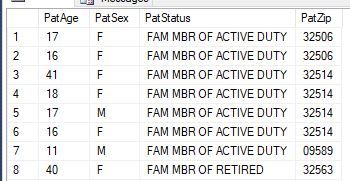
Here's what some of the query results look like:
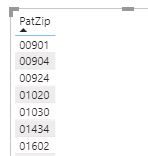
In the Power BI model window I gave the PatZip a Data category of Postal Code and in a table it's grouping and sorting by zip code.
But I can't figure out how to get counts by zip code. I'll want to perform similar counts on the other categories, viz., PatStatus, PatAge, and PatSex.
Thanks for any help.
Christian Bahnsen
Solved! Go to Solution.
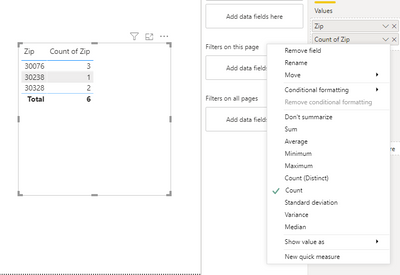
Drag ZIP to the Table a 2nd time, and then under Values, drop down and change it to Count....
Proud to give back to the community!
Thank You!
Drag ZIP to the Table a 2nd time, and then under Values, drop down and change it to Count....
Proud to give back to the community!
Thank You!
@fhill Thanks ... I never would have thought of doing it that way. I was trying to do a calculated column or create a measure or something along those lines
As I'm not aware of the data model so you can try a below Dax :
ZipCode Count = CALCULATE( COUNT(Table[ZipCode Column ]), ALLEXCEPT(Table, AgeColumn))
@CBahnsen , not very clear. You can take a count of column.
Can you share sample data and sample output in table format? Or a sample pbix after removing sensitive data.
@amitchandak I want counts by each zip code (or sex or whatever category I choose), not a count of all the zip codes.
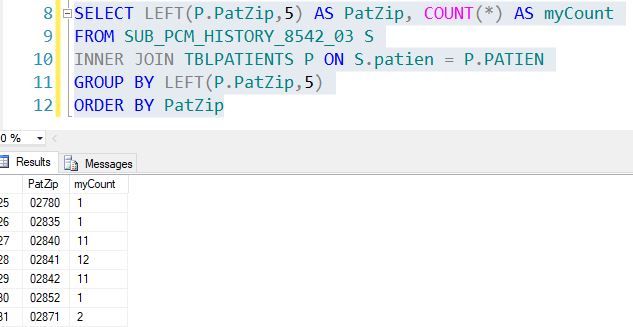
Here's how I'd do it in ssms
| User | Count |
|---|---|
| 49 | |
| 37 | |
| 33 | |
| 22 | |
| 18 |
| User | Count |
|---|---|
| 132 | |
| 99 | |
| 56 | |
| 37 | |
| 37 |