cancel
Showing results for 
Search instead for 
Did you mean: 

Did you hear? There's a new SQL AI Developer certification (DP-800). Start preparing now and be one of the first to get certified. Register now

Reply
milzha
Microsoft Employee
Microsoft Employee

countrow

I have two table as below. One shows who took what classes, and the other one shows who report to whom. I have troublems adding colum "Total employees report to" into the final view. Should be simply and i am using add new column and countrow function, but it's not working. Can someone help me with this?  


Class:

Employee ID      Class
     A                 Cooking
     B                  Math
     C                  English
     D                 Cooking


Report To:

Employee ID     Reoport to
   A                       Joe
   B                      Mary
   C                      Joe
   D                     John


Final view:

Report to               Count of employees take Cooking Class           Total employees report to                Percentage
Joe                                                  1                                                                    2                                        50%
Mary                                               0                                                                    1                                          0%
John                                               1                                                                    1                                        100%

1 ACCEPTED SOLUTION
AlexChen
Microsoft Employee
Microsoft Employee

Hi,


You can create a table using code below to do this.


Table = SUMMARIZE(ReoportTo, ReoportTo[Reoportto],

                              " Count of employees take Cooking Class", if(COUNTAx(FILTER(Class, Class[Class] = "Cooking"), Class[Class]) = BLANK(), 0, COUNTAx(FILTER(Class, Class[Class] = "Cooking"), Class[Class])),

                                " Total employees report to", COUNTA(ReoportTo[EmployeeID]),

                               "percentage", ((if(COUNTAx(FILTER(Class, Class[Class] = "Cooking"), Class[Class]) = BLANK(), 0, COUNTAx(FILTER(Class, Class[Class] = "Cooking"), Class[Class])) / COUNTA(ReoportTo[EmployeeID])) * 100) & "%" )


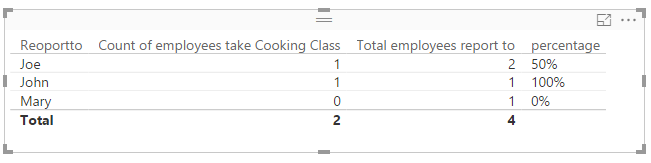
This is the result:

1.png


Best Regards

Alex

View solution in original post

2 REPLIES 2
AlexChen
Microsoft Employee
Microsoft Employee

Hi,


You can create a table using code below to do this.


Table = SUMMARIZE(ReoportTo, ReoportTo[Reoportto],

                              " Count of employees take Cooking Class", if(COUNTAx(FILTER(Class, Class[Class] = "Cooking"), Class[Class]) = BLANK(), 0, COUNTAx(FILTER(Class, Class[Class] = "Cooking"), Class[Class])),

                                " Total employees report to", COUNTA(ReoportTo[EmployeeID]),

                               "percentage", ((if(COUNTAx(FILTER(Class, Class[Class] = "Cooking"), Class[Class]) = BLANK(), 0, COUNTAx(FILTER(Class, Class[Class] = "Cooking"), Class[Class])) / COUNTA(ReoportTo[EmployeeID])) * 100) & "%" )


This is the result:

1.png


Best Regards

Alex

GilesWalker
Skilled Sharer
Skilled Sharer

@milzha Are you able to show an example of the tables and how they are connected.


For this to work I would suggest you use a dax measure not a calculated column. Create the following measures:


Class count = COUNTROWS(Class table)

Report to = COUNTROWS(Report to table)


These will calculate the rows you are requiring. Then it is just a matter of how you want the data displayed.


If this doesnt work let me know.


Giles

Helpful resources

Announcements
April Power BI Update Carousel

Power BI Monthly Update - April 2026

Check out the April 2026 Power BI update to learn about new features.

New to Fabric survey Carousel

New to Fabric Survey

If you have recently started exploring Fabric, we'd love to hear how it's going. Your feedback can help with product improvements.

Power BI DataViz World Championships carousel

Power BI DataViz World Championships - June 2026

A new Power BI DataViz World Championship is coming this June! Don't miss out on submitting your entry.

FabCon and SQLCon Highlights Carousel

FabCon & SQLCon Highlights

Experience the highlights from FabCon & SQLCon, available live and on-demand starting April 14th.