Join us at FabCon Atlanta from March 16 - 20, 2026, for the ultimate Fabric, Power BI, AI and SQL community-led event. Save $200 with code FABCOMM.
Register now!Get Fabric Certified for FREE during Fabric Data Days. Don't miss your chance! Request now
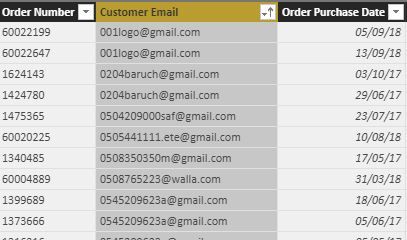
I have data that looks like this:
I am struggling with writing a table that includes a line for each customer (by email), a column that include number of orders for in 2017 and a colum that counts 2018 orders.
Thanks,
Erez
Solved! Go to Solution.
I solved it with:
Orders2017 = CALCULATE(DISTINCTCOUNT('Table'[Order Number]), FILTER('Calendar', 'Calendar'[Year]=2017))
Orders2018 = CALCULATE(DISTINCTCOUNT('Table'[Order Number]), FILTER('Calendar', 'Calendar'[Year]=2018))
SEgggments = SUMMARIZE (
'Table',
'Table'[UpperEmail],
"NumberofOrders2017", [Orders2017],
"NumberofOrders2018", [Orders2018],
"NumberofOrderslast5months", [Orders in last 5 months] )
I solved it with:
Orders2017 = CALCULATE(DISTINCTCOUNT('Table'[Order Number]), FILTER('Calendar', 'Calendar'[Year]=2017))
Orders2018 = CALCULATE(DISTINCTCOUNT('Table'[Order Number]), FILTER('Calendar', 'Calendar'[Year]=2018))
SEgggments = SUMMARIZE (
'Table',
'Table'[UpperEmail],
"NumberofOrders2017", [Orders2017],
"NumberofOrders2018", [Orders2018],
"NumberofOrderslast5months", [Orders in last 5 months] )
If you create two dimensions table one containing the unique list of emails and the other table being a usual calendar table then you just need to create a simple matrix
Did I answer your question correctly? Mark my answer as a solution!
Proud to be a Datanaut!
Thanks but I need it for further calculations so I need it as a table.
that would not stop the analysis capabilities, it would actually enhance it
Did I answer your question correctly? Mark my answer as a solution!
Proud to be a Datanaut!
Check out the November 2025 Power BI update to learn about new features.
Advance your Data & AI career with 50 days of live learning, contests, hands-on challenges, study groups & certifications and more!