Don't miss your chance to take the Fabric Data Engineer (DP-600) exam for FREE! Find out how by attending the DP-600 session on April 23rd (pacific time), live or on-demand.
Learn moreNext up in the FabCon + SQLCon recap series: The roadmap for Microsoft SQL and Maximizing Developer experiences in Fabric. All sessions are available on-demand after the live show. Register now
Hi!
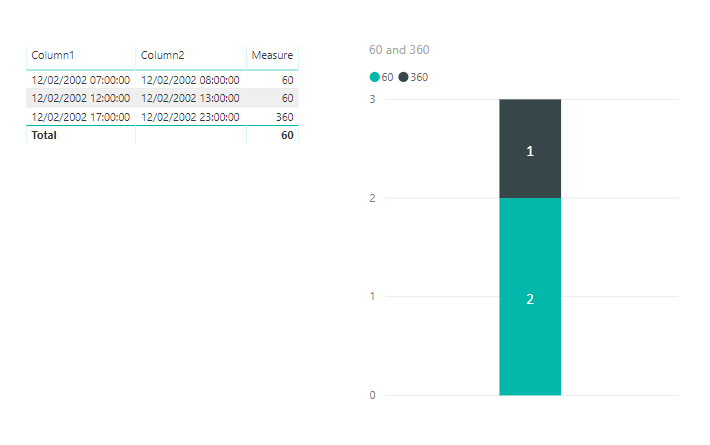
I am totally lost in how to count number of occurences in a measure and display it in a stacked bar chart.
I have a result that looks like this:
Appointment_minutes is based on this measure:
I am new to Power BI, so there might be a pretty simple and straight forward solution that I can't think of..
Hope somebody can help me! 🙂
Kind regards,
S
Solved! Go to Solution.
360 =
COUNTROWS(
FILTER(
SUMMARIZE(
Table1,
Table1[start time],
Table1[end time],
"Value" , [duration measure]
),
[Value] = 360
))Try this and make one for each potential duration.
Are you able to calculate the duration as a calculated column instead of a measure?
/ J
@tex628 sorry, forgot to mention that this is a live connection. So, the solution has to be conducted in a measure 🙂
360 =
COUNTROWS(
FILTER(
SUMMARIZE(
Table1,
Table1[start time],
Table1[end time],
"Value" , [duration measure]
),
[Value] = 360
))Try this and make one for each potential duration.
Thank you @tex628 ! I actually had over 75 distinct appointment durations so i crated a calculated column in the cube where i categorized the columns into 9 values, the 9th being "More than 2 hours". I combined the switch and datediff function.
Then i used your measure in Power BI and it works! 🙂
You will need to create a measure for each potential duration, that counts the amount of occurances for that duration. Then you all of these measures together in the value section of the chart!
If you have recently started exploring Fabric, we'd love to hear how it's going. Your feedback can help with product improvements.
A new Power BI DataViz World Championship is coming this June! Don't miss out on submitting your entry.
Share feedback directly with Fabric product managers, participate in targeted research studies and influence the Fabric roadmap.
| User | Count |
|---|---|
| 48 | |
| 43 | |
| 39 | |
| 19 | |
| 17 |
| User | Count |
|---|---|
| 69 | |
| 63 | |
| 32 | |
| 30 | |
| 23 |