Join us at FabCon Vienna from September 15-18, 2025
The ultimate Fabric, Power BI, SQL, and AI community-led learning event. Save €200 with code FABCOMM.
Get registered- Power BI forums
- Get Help with Power BI
- Desktop
- Service
- Report Server
- Power Query
- Mobile Apps
- Developer
- DAX Commands and Tips
- Custom Visuals Development Discussion
- Health and Life Sciences
- Power BI Spanish forums
- Translated Spanish Desktop
- Training and Consulting
- Instructor Led Training
- Dashboard in a Day for Women, by Women
- Galleries
- Data Stories Gallery
- Themes Gallery
- Contests Gallery
- Quick Measures Gallery
- Notebook Gallery
- Translytical Task Flow Gallery
- TMDL Gallery
- R Script Showcase
- Webinars and Video Gallery
- Ideas
- Custom Visuals Ideas (read-only)
- Issues
- Issues
- Events
- Upcoming Events
Compete to become Power BI Data Viz World Champion! First round ends August 18th. Get started.
- Power BI forums
- Forums
- Get Help with Power BI
- Desktop
- count number of filtered rows
- Subscribe to RSS Feed
- Mark Topic as New
- Mark Topic as Read
- Float this Topic for Current User
- Bookmark
- Subscribe
- Printer Friendly Page

- Mark as New
- Bookmark
- Subscribe
- Mute
- Subscribe to RSS Feed
- Permalink
- Report Inappropriate Content
count number of filtered rows
Hello,
I have a table has 2 columns:
Col1 Col2
A New
A New
B Contacted
C Canceled
C Qualified
I want to summurize these data in new table as follow using dax expression not MATRIX:
Col1 New Contacted Canceled Qualified
A 2 0 0 0
B 0 1 0 0
C 0 0 1 1
what is the expresion will help to do this?
Regards,
Solved! Go to Solution.
- Mark as New
- Bookmark
- Subscribe
- Mute
- Subscribe to RSS Feed
- Permalink
- Report Inappropriate Content
Here is the solution:
I created a new table Table 2 which contain the list of Agents name fetched from Table 1 using the following expression:
Table 2 = DISTINCT(Table1[AgentName])
then I created a relationship betwen Table 1 and Table 2 (Many to One *:1) and Cross filter direction (Both)
then, I started creating new columns with folowing expression:
ColumnName1 = CALCULATE ( COUNTROWS (Table 1), Table 1[fieldName] = "Value")
Now I am able to summarize the data as required.
- Mark as New
- Bookmark
- Subscribe
- Mute
- Subscribe to RSS Feed
- Permalink
- Report Inappropriate Content
Here is the solution:
I created a new table Table 2 which contain the list of Agents name fetched from Table 1 using the following expression:
Table 2 = DISTINCT(Table1[AgentName])
then I created a relationship betwen Table 1 and Table 2 (Many to One *:1) and Cross filter direction (Both)
then, I started creating new columns with folowing expression:
ColumnName1 = CALCULATE ( COUNTROWS (Table 1), Table 1[fieldName] = "Value")
Now I am able to summarize the data as required.


- Mark as New
- Bookmark
- Subscribe
- Mute
- Subscribe to RSS Feed
- Permalink
- Report Inappropriate Content
You do need any expression to create this.
Use matrix visual to create the expected result. See the attached screenshot.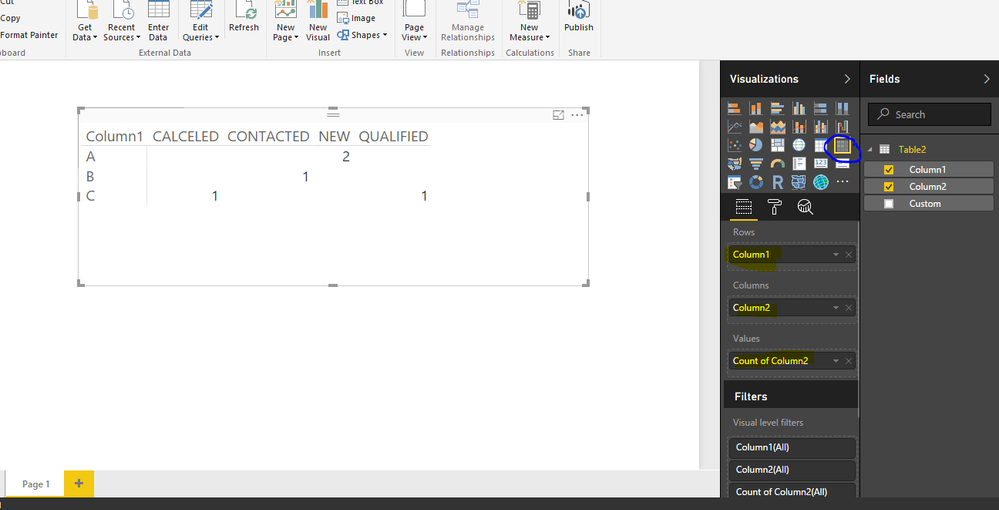
Bhavesh
Love the Self Service BI.
Please use the 'Mark as answer' link to mark a post that answers your question. If you find a reply helpful, please remember to give Kudos.
- Mark as New
- Bookmark
- Subscribe
- Mute
- Subscribe to RSS Feed
- Permalink
- Report Inappropriate Content
Thanks, @BhaveshPatel this helped to view the data but cannot interact with them, the reason wanted to use expression because I need to use these values in some equasions .
- Mark as New
- Bookmark
- Subscribe
- Mute
- Subscribe to RSS Feed
- Permalink
- Report Inappropriate Content
Can you please post the full question including what other equations you will use these values with.
Bhavesh
Love the Self Service BI.
Please use the 'Mark as answer' link to mark a post that answers your question. If you find a reply helpful, please remember to give Kudos.
- Mark as New
- Bookmark
- Subscribe
- Mute
- Subscribe to RSS Feed
- Permalink
- Report Inappropriate Content
my question is simple, regardless about the equasions because its not the issue. simply I need the expresion which could help me to achive the requested.
I need to count the number of filtered rows. example: I have table have 50 rows, and I filtered the rows which contain value "Contacted" . I need to get the number of the filtered rows
- Mark as New
- Bookmark
- Subscribe
- Mute
- Subscribe to RSS Feed
- Permalink
- Report Inappropriate Content
filteredRows:=CALCULATE(COUNTA(Table[Col2],ALLSELECTED(Table[col2]))
Use col2 values as slicers.
Bhavesh
Love the Self Service BI.
Please use the 'Mark as answer' link to mark a post that answers your question. If you find a reply helpful, please remember to give Kudos.

Helpful resources

Fabric Community Update - July 2025
Find out what's new and trending in the Fabric community.

Power BI Monthly Update - July 2025
Check out the July 2025 Power BI update to learn about new features.

| User | Count |
|---|---|
| 86 | |
| 84 | |
| 36 | |
| 34 | |
| 34 |


| User | Count |
|---|---|
| 94 | |
| 79 | |
| 65 | |
| 55 | |
| 52 |


