Get Fabric certified for FREE!
Don't miss your chance to take the Fabric Data Engineer (DP-700) exam on us!
Learn more- Power BI forums
- Get Help with Power BI
- Desktop
- Service
- Report Server
- Power Query
- Mobile Apps
- Developer
- DAX Commands and Tips
- Custom Visuals Development Discussion
- Health and Life Sciences
- Power BI Spanish forums
- Translated Spanish Desktop
- Training and Consulting
- Instructor Led Training
- Dashboard in a Day for Women, by Women
- Galleries
- Data Stories Gallery
- Themes Gallery
- Contests Gallery
- QuickViz Gallery
- Quick Measures Gallery
- Visual Calculations Gallery
- Notebook Gallery
- Translytical Task Flow Gallery
- TMDL Gallery
- R Script Showcase
- Webinars and Video Gallery
- Ideas
- Custom Visuals Ideas (read-only)
- Issues
- Issues
- Events
- Upcoming Events
The FabCon + SQLCon recap series starts April 14th at 8am Pacific. If you’re tracking where AI is going inside Fabric, this first session is a can't miss. Register now
- Power BI forums
- Forums
- Get Help with Power BI
- Desktop
- Re: count multiple from multiple columns into one
- Subscribe to RSS Feed
- Mark Topic as New
- Mark Topic as Read
- Float this Topic for Current User
- Bookmark
- Subscribe
- Printer Friendly Page

- Mark as New
- Bookmark
- Subscribe
- Mute
- Subscribe to RSS Feed
- Permalink
- Report Inappropriate Content
count multiple from multiple columns into one
Hi,
I am trying to count multilple column values into one column.
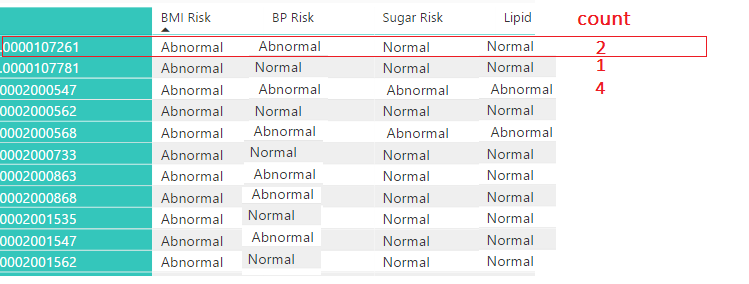
I have 4 column values BMI,BP,sugar,Lipid respective values normal and abnormal below screen shot for ref.
Kindly sugguest me how to get the count number(Dax Formula) where ever Abnormal exists in 4 columns.
Expectation highlighted in color in below screen shot.
Thanks...
Solved! Go to Solution.


- Mark as New
- Bookmark
- Subscribe
- Mute
- Subscribe to RSS Feed
- Permalink
- Report Inappropriate Content
Hey,
I'm not sure if this is exactly what you are looking for, the result of the measure looks promising
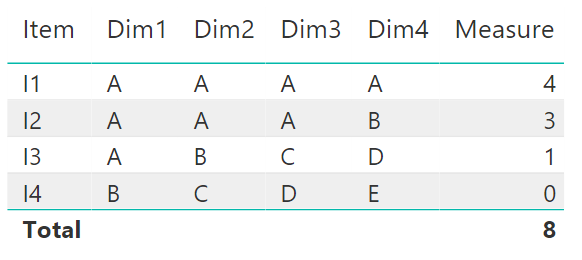
Here is the measure
Measure =
SUMX(
UNION(
	SELECTCOLUMNS('Table1',"ContainsA", 'Table1'[Dim1]),
	SELECTCOLUMNS('Table1',"ContainsA", 'Table1'[Dim2]),
	SELECTCOLUMNS('Table1',"ContainsA", 'Table1'[Dim3]),
	SELECTCOLUMNS('Table1',"ContainsA", 'Table1'[Dim4])
)
,IF([ContainsA] = "A", 1, 0))
Basically this measure creates a table for each row (maybe you have to put CALCULATE() to its magically use if your table and model much more complex than my simple model.
Than SUMX iterates over the 4 ROWS and sums the result.
I created a measure but this should also be usable by creating a calculated column.
Cheers
[note to myself: Compare Multiple Columns]
Did I answer your question? Mark my post as a solution, this will help others!
Proud to be a Super User!
I accept Kudos 😉
Hamburg, Germany
- Mark as New
- Bookmark
- Subscribe
- Mute
- Subscribe to RSS Feed
- Permalink
- Report Inappropriate Content
Hey,
I got other measure formula
Here is the measure
Measure2 =
            IF(Table1[DIM1]="A",1,0)+
            IF(Table1[DIM2]="A",1,0)+
            IF(Table1[DIM3]="A",1,0)+
            IF(Table1[DIM4]="A",1,0)
Thanks for you help.

- Mark as New
- Bookmark
- Subscribe
- Mute
- Subscribe to RSS Feed
- Permalink
- Report Inappropriate Content
Is this possible to do with creating a new column instead of measure ??
- Mark as New
- Bookmark
- Subscribe
- Mute
- Subscribe to RSS Feed
- Permalink
- Report Inappropriate Content
Hey,
I'm not sure if this is exactly what you are looking for, the result of the measure looks promising
Here is the measure
Measure =
SUMX(
UNION(
	SELECTCOLUMNS('Table1',"ContainsA", 'Table1'[Dim1]),
	SELECTCOLUMNS('Table1',"ContainsA", 'Table1'[Dim2]),
	SELECTCOLUMNS('Table1',"ContainsA", 'Table1'[Dim3]),
	SELECTCOLUMNS('Table1',"ContainsA", 'Table1'[Dim4])
)
,IF([ContainsA] = "A", 1, 0))
Basically this measure creates a table for each row (maybe you have to put CALCULATE() to its magically use if your table and model much more complex than my simple model.
Than SUMX iterates over the 4 ROWS and sums the result.
I created a measure but this should also be usable by creating a calculated column.
Cheers
[note to myself: Compare Multiple Columns]
Did I answer your question? Mark my post as a solution, this will help others!
Proud to be a Super User!
I accept Kudos 😉
Hamburg, Germany
- Mark as New
- Bookmark
- Subscribe
- Mute
- Subscribe to RSS Feed
- Permalink
- Report Inappropriate Content
Hey,
I got other measure formula
Here is the measure
Measure2 =
            IF(Table1[DIM1]="A",1,0)+
            IF(Table1[DIM2]="A",1,0)+
            IF(Table1[DIM3]="A",1,0)+
            IF(Table1[DIM4]="A",1,0)
Thanks for you help.
- Mark as New
- Bookmark
- Subscribe
- Mute
- Subscribe to RSS Feed
- Permalink
- Report Inappropriate Content
Hello Mr.Tom,
Thanks for query and its works for few records and rest of records shows more then having columns.
For example the formula applied for 7 columns where as the result shows the value more than 7.
Kindly provide any another solution.
- Mark as New
- Bookmark
- Subscribe
- Mute
- Subscribe to RSS Feed
- Permalink
- Report Inappropriate Content
Hey,
to be of further help you have to provide sampledata, that help to reproduce the wrong beings of my solution.
Prepare Excel Data or PBIX using Enter Data and make the file available from onedrive or dropbox.
Cheers
Did I answer your question? Mark my post as a solution, this will help others!
Proud to be a Super User!
I accept Kudos 😉
Hamburg, Germany
- Mark as New
- Bookmark
- Subscribe
- Mute
- Subscribe to RSS Feed
- Permalink
- Report Inappropriate Content
thanks
- Mark as New
- Bookmark
- Subscribe
- Mute
- Subscribe to RSS Feed
- Permalink
- Report Inappropriate Content
Hey,
it will help others if you flag my answer as solution and if you like my answer do not hesitate to provide a kudo.
Cheers
Did I answer your question? Mark my post as a solution, this will help others!
Proud to be a Super User!
I accept Kudos 😉
Hamburg, Germany
Helpful resources

New to Fabric Survey
If you have recently started exploring Fabric, we'd love to hear how it's going. Your feedback can help with product improvements.

Power BI DataViz World Championships - June 2026
A new Power BI DataViz World Championship is coming this June! Don't miss out on submitting your entry.

Join our Fabric User Panel
Share feedback directly with Fabric product managers, participate in targeted research studies and influence the Fabric roadmap.

Power BI Community Update - March 2026
Check out the March 2026 Power BI update to learn about new features.

| User | Count |
|---|---|
| 53 | |
| 40 | |
| 38 | |
| 19 | |
| 18 |


| User | Count |
|---|---|
| 69 | |
| 68 | |
| 34 | |
| 33 | |
| 30 |


