cancel
Showing results for 
Search instead for 
Did you mean: 

The Power BI Data Visualization World Championships is back! Get ahead of the game and start preparing now! Learn more

Reply
Aida_Ken
New Member

count common value for columns and rows

Hi everyone, 


After hours of arguing with ChatGpt, sudden blurry vision and probably acute OCD due to errors showing up with my formula, Im finaly here. 


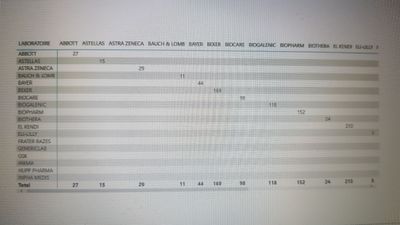
All I want is to display the count of products with the same DCI for each combination of labs, even if the labs are different ( all what I managed to do is to display it only when the lab is the same, if my boss sees it ... 😏)


Well that's it, Im counting on any charitable soul here, thanks in advance 🙏🏻


PS: the actual formula:

CommonProducts =
CALCULATE(
COUNTROWS(db),
ALLEXCEPT(db, db[Lab], db[DCI])
)


20230604_194715.jpg

1 ACCEPTED SOLUTION
Anonymous
Not applicable

Hi  @Aida_Ken ,

I created some data:

vyangliumsft_0-1686027548415.png

Here are the steps you can follow:

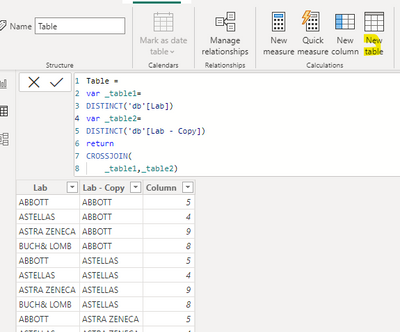
1. Create calculated table.

Table =
var _table1=
DISTINCT('db'[Lab])
var _table2=
DISTINCT('db'[Lab - Copy])
return
CROSSJOIN(
    _table1,_table2)

2. Create calculated column.

Column =
COUNTX(
    FILTER(ALL('db'),
    'db'[Lab]=EARLIER('Table'[Lab])),[the actual formula:CommonProducts])

vyangliumsft_1-1686027548417.png

3. Result:

vyangliumsft_2-1686027587733.png


Best Regards,

Liu Yang

If this post helps, then please consider Accept it as the solution to help the other members find it more quickly

View solution in original post

1 REPLY 1
Anonymous
Not applicable

Hi  @Aida_Ken ,

I created some data:

vyangliumsft_0-1686027548415.png

Here are the steps you can follow:

1. Create calculated table.

Table =
var _table1=
DISTINCT('db'[Lab])
var _table2=
DISTINCT('db'[Lab - Copy])
return
CROSSJOIN(
    _table1,_table2)

2. Create calculated column.

Column =
COUNTX(
    FILTER(ALL('db'),
    'db'[Lab]=EARLIER('Table'[Lab])),[the actual formula:CommonProducts])

vyangliumsft_1-1686027548417.png

3. Result:

vyangliumsft_2-1686027587733.png


Best Regards,

Liu Yang

If this post helps, then please consider Accept it as the solution to help the other members find it more quickly

Helpful resources

Announcements
November Power BI Update Carousel

Power BI Monthly Update - November 2025

Check out the November 2025 Power BI update to learn about new features.

Fabric Data Days Carousel

Fabric Data Days

Advance your Data & AI career with 50 days of live learning, contests, hands-on challenges, study groups & certifications and more!

FabCon Atlanta 2026 carousel

FabCon Atlanta 2026

Join us at FabCon Atlanta, March 16-20, for the ultimate Fabric, Power BI, AI and SQL community-led event. Save $200 with code FABCOMM.

Top Solution Authors
Top Kudoed Authors